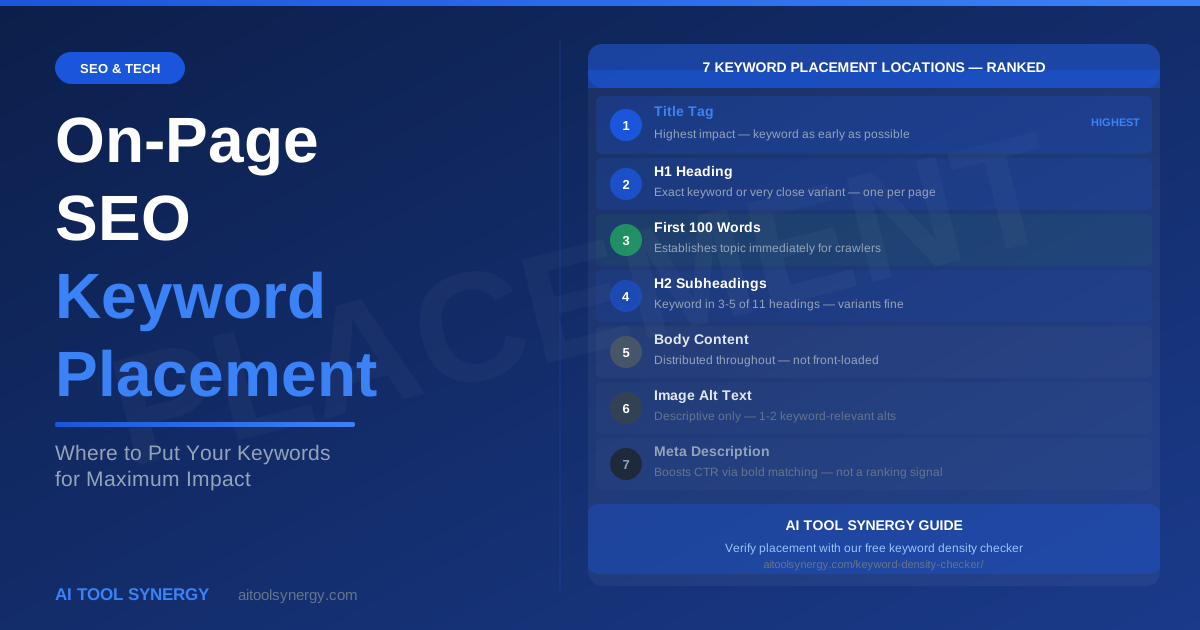
On-Page SEO Keyword Placement — Where to Put Your Keywords for Maximum Impact
Knowing the right keyword density is only half the on-page SEO equation. The other half is keyword placement — where exactly on a page your target keyword appears. A keyword that shows up only in the body text paragraphs sends a much weaker SEO signal than the same keyword appearing in the title tag, H1 heading, first paragraph, and subheadings. Google reads different page locations with different levels of weight, and understanding that hierarchy is what separates well-optimised pages from pages that never reach page one despite having good content.
This guide covers the seven most important keyword placement locations on any page, exactly what to put in each location, common placement mistakes that dilute your SEO signal, and how to verify your keyword placement is complete using a free density checker. On-page keyword placement is one of the most controllable ranking factors available — and one of the most commonly done wrong.
Why Keyword Placement Matters as Much as Keyword Density
Google does not treat all text on a page as equally important. A keyword in your title tag carries significantly more weight than the same keyword buried in a paragraph at the bottom of the page. This is because different page elements have different structural significance — the title tag tells Google what the page is about at the highest level, while body text paragraphs provide supporting detail.
Understanding keyword placement means understanding this hierarchy. You can have perfectly calibrated keyword density — say 1.5% — but if all of those occurrences are scattered through mid-body paragraphs with no keyword in the title, H1, or first paragraph, your page will underperform compared to a competitor with the same density but proper placement across all seven key locations.
As Google’s SEO Starter Guide notes, accurate and descriptive titles and headings help Google understand page content — placing your keyword in these structural elements is one of the most direct on-page signals you can send.
Keyword placement and keyword density work together, not separately. Placement tells Google where the keyword sits in the page hierarchy. Density tells Google how much of the content relates to that keyword. Both signals are needed for strong on-page SEO. After completing your keyword placement, use our free keyword density checker to confirm the density is in the optimal 1-3% range across the full page.
The 7 Keyword Placement Locations — Complete Guide
These are the seven locations where keyword placement has a measurable impact on how Google reads and ranks your page. Work through each one systematically before publishing any new page or post.
The title tag is the single most important keyword placement location on any page. It appears as the blue clickable link in Google search results and tells both users and search engines exactly what the page covers. Your primary keyword must appear in the title tag — ideally near the beginning.
Rule: Place the primary keyword in the first 60 characters of the title tag. Titles are truncated at approximately 60 characters in search results, so a keyword at position 70 may not even be visible. Keep the title natural — “How to Calculate Keyword Density — Step-by-Step Guide” is better than “Keyword Density: Keyword Density Calculator Keyword Density Guide.”
Example: Targeting “on-page SEO keyword placement” → Title: “On-Page SEO Keyword Placement — Where to Put Your Keywords for Maximum Impact”
The H1 is the main visible heading of your page — the large text readers see first when they land. There should be exactly one H1 per page, and it should contain your primary keyword or a very close variant. The H1 does not need to be identical to the title tag — minor variations are fine and actually signal natural writing.
Rule: Include the primary keyword in the H1. It does not need to be at the very start — “The Complete Guide to On-Page SEO Keyword Placement” is perfectly effective. What matters is presence, not position within the heading.
Common mistake: Using a creative or brand-focused H1 that omits the keyword entirely — “Start Ranking Better Today” for a page about keyword placement is an SEO miss.
The opening paragraph of your page is the third most important keyword placement location. Google’s crawlers prioritize the beginning of content as an indicator of topical focus — placing your primary keyword within the first 100 words confirms immediately what the page is about.
Rule: Include your primary keyword naturally within the first two or three sentences of the opening paragraph. Do not delay it until paragraph three or four. If your introduction takes 200 words before mentioning the topic keyword, Google has already read significant content without a clear topical signal.
Natural example: “On-page SEO keyword placement — knowing where to put your keywords on a page — is one of the most controllable ranking factors available to any content creator.” The keyword appears in the first sentence without feeling forced.
The meta description does not directly influence keyword rankings — Google confirmed it is not a ranking signal. However, keyword placement in the meta description serves a different purpose: when your target keyword appears in the meta description and matches what a user searched for, Google bolds the matching words in the search result. This bold text increases click-through rate (CTR), which is a ranking signal.
Rule: Include the primary keyword naturally in the meta description within 155 characters total. Write the description to encourage clicks — not to list keywords. The keyword should appear once, not be repeated.
Example: “Learn on-page SEO keyword placement — the 7 locations where keywords have the most impact on Google rankings, with examples and a free verification tool.”
H2 headings break your content into sections and carry more SEO weight than body text. Including your keyword in 2-3 of your H2 subheadings — not all of them — reinforces topical relevance without heading overload. Use the exact keyword in some subheadings and close variants or related phrases in others.
Rule: Aim for the primary keyword in 2-3 H2s out of your total heading count. For a post with 11 H2s, targeting 7-9 H2s containing the keyword or a variant is optimal. This signals consistent topical coverage without triggering heading-level keyword stuffing.
Variants that work: If your keyword is “keyword placement”, acceptable H2 variants include “where to place keywords”, “keyword location in SEO”, “placing your keyword in headings” — all clearly related without exact repetition.
Image alt text serves two purposes: it describes images for visually impaired users and screen readers (its primary purpose), and it provides an additional keyword signal for Google’s image indexing. Keyword placement in alt text should always be accurate description first, SEO second.
Rule: Include the keyword in alt text for one or two images per page — specifically for images where the keyword genuinely describes the image content. A diagram illustrating keyword placement locations is a natural fit: alt=”on-page SEO keyword placement — 7 key locations diagram”. An unrelated stock photo of a laptop should not receive keyword-stuffed alt text.
What to avoid: Using identical keyword-heavy alt text on every image on the page. This is a form of keyword stuffing that Google Panda specifically targets.
The URL slug is one of the most permanent keyword placement decisions you make — changing it after publishing risks losing backlinks and search rankings. Include your primary keyword in the URL slug, keep it short, and use hyphens to separate words.
Rule: Target keyword goes in the slug, stripped of stop words. “On-Page SEO Keyword Placement — Where to Put Your Keywords for Maximum Impact” becomes the slug: /on-page-seo-keyword-placement/. Remove articles (a, an, the), prepositions (for, of, in), and filler words. Keep only the core keyword phrase in the slug.
Length: Aim for 3-5 words in the slug. Shorter is better. /on-page-seo-keyword-placement/ is ideal. /on-page-seo-keyword-placement-where-to-put-your-keywords-for-maximum-impact-guide/ is too long and dilutes the keyword signal.
On-Page SEO Keyword Placement — Video Walkthrough
This Ahrefs tutorial walks through how to optimize a page for a keyword across all key on-page locations — an excellent visual companion to the placement guide above:
Keyword Placement Priority — Which Locations Matter Most
Not all seven keyword placement locations carry equal weight. If you are updating an existing page and have limited time, prioritize in this order:
| Priority | Location | SEO Weight | Minimum Requirement |
|---|---|---|---|
| 1 | Title Tag | Highest | Exact keyword, within first 60 characters |
| 2 | H1 Heading | Very High | Keyword or close variant — one occurrence |
| 3 | First 100 Words | High | Keyword within first two sentences |
| 4 | H2 Subheadings | Medium-High | Keyword in 2-3 of your total H2s |
| 5 | URL Slug | Medium | Core keyword phrase, no stop words |
| 6 | Image Alt Text | Low-Medium | Keyword in one descriptive alt text |
| 7 | Meta Description | CTR only | Keyword once, naturally written |
On-Page Keyword Placement for Blog Posts vs Other Content Types
The seven placement locations apply to every page type, but the emphasis shifts depending on what you are publishing:
Blog posts and long-form guides
Focus heavily on H2 placement since long-form content has many subheadings. The keyword should appear in 7-9 of your 11 H2s or their close variants. The first 100 words rule is especially critical for blog posts — readers and crawlers both decide within seconds whether the content matches their query. After writing, use our free keyword density tool to confirm the overall density sits at 1-1.5% — the natural range for comprehensive long-form content.
Product pages
Title tag and H1 placement are the dominant signals on short product pages. URL slug matters because product URLs are often shared and linked. Image alt text is more important here because product images are the primary visual content — accurate, keyword-containing alt text for product images is both SEO and accessibility best practice.
Landing pages
The title tag, H1, and first 100 words carry disproportionate weight on landing pages because they are typically shorter with fewer headings. Meta description keyword placement has higher impact here because landing pages depend on paid and organic clicks — a compelling, keyword-containing meta description directly supports CTR from both channels.
On-Page Keyword Placement When Updating Existing Pages
New pages let you build keyword placement in from the start. Existing pages require a targeted audit. Here is how to approach on-page SEO keyword placement for content that is already live:
- Start with the title tag. It is the most impactful single edit you can make to an existing page. If the keyword is missing or buried past the 60-character mark, update it first. This edit alone can shift rankings within days of Google re-crawling.
- Check the first paragraph. Open the page in edit mode and search (Ctrl+F) for the keyword. If the first result is beyond paragraph three, move a natural mention into the opening two sentences.
- Audit H2s without rewriting the page. Review your existing subheadings. Add the keyword or a close variant to any H2 that describes a section it naturally belongs in — do not force it. Two to three keyword-containing H2s is the target.
- Update image alt text in the media library. In WordPress, go to Media, find the primary image, and update the alt text to include the keyword descriptively. No page rewrite needed.
- Run the density check after edits. Paste the updated content into our free keyword density checker to confirm the combined effect of your placement edits sits at 1-3%.
The most common mistake when updating existing pages is rewriting content unnecessarily. Targeted placement fixes — title, first paragraph, one or two H2s — are often all that is needed to move a page from position 15 to the top 10. According to Ahrefs’ content audit research, updating and optimising existing pages consistently produces faster ranking gains than publishing new content from scratch.
Semantic SEO and LSI Keywords — Going Beyond Exact Match
Modern on-page SEO keyword placement goes beyond repeating one exact phrase. Search engines now understand semantic relationships between words — meaning your content should include the primary keyword and related terms that confirm topical authority.
Latent Semantic Indexing (LSI) keywords are conceptually related terms that Google expects to see on a page about your topic. For a page targeting “on-page SEO keyword placement,” Google also expects to see terms like: title tag optimisation, H1 heading, meta description, URL slug, search intent, content relevance, and page rank signals.
Practical application for keyword placement:
- Use the exact keyword in the highest-priority locations (title, H1, first 100 words, one H2)
- Use natural variants in secondary H2s — “keyword location strategy,” “where to place your keyword,” “SEO placement best practices”
- Use LSI terms throughout the body to build topical depth without over-repeating the primary phrase
- After writing, check keyword density to ensure the primary term sits at 1-3% and semantic variants appear naturally across sections
As Moz’s on-page SEO research makes clear, topical comprehensiveness — demonstrated through strategic keyword placement and semantic coverage — is a stronger ranking signal than raw keyword repetition alone.
Common On-Page Mistakes That Hurt Rankings
These are the most common keyword placement errors seen on under-performing pages, and how to fix each one. According to Search Engine Journal’s on-page optimisation research, placement errors in the title tag and first paragraph are responsible for the majority of keyword-related ranking underperformance:
Keyword in body but missing from title
A page with the keyword appearing 15 times in body text but absent from the title tag is sending mixed signals. Google sees a page with high body text keyword density but no structural confirmation of the topic. Fix: always check the title tag first in any placement audit.
H1 and title are identical
Having the exact same text in the title tag and H1 is a wasted opportunity. The title is your search result headline — it can be slightly more descriptive or click-oriented. The H1 is your on-page headline — it can be more conversational. Vary them slightly while keeping the keyword in both.
Keyword only in conclusion
Some writers save the keyword for the conclusion as a “summary mention.” This is the lowest-value placement on the page. Move the keyword into the first paragraph and distribute it naturally throughout — not just at the end.
Generic URL slug
Auto-generated slugs like /post-1234/ or /p=456/ waste the URL keyword placement opportunity entirely. Always set a custom keyword-containing slug before publishing. For existing pages with generic slugs, the SEO benefit of fixing the URL (plus 301 redirect) usually outweighs the risk if the page has not built significant link equity yet.
Never change the URL slug on a page that is already receiving significant organic traffic without first setting up a 301 redirect from the old URL to the new one. Changing a slug without a redirect causes the old URL to return a 404 error, destroying any accumulated ranking and link equity.
On-Page SEO Keyword Placement for E-Commerce Pages
E-commerce pages have a different structure from blog posts and landing pages — keyword placement rules shift to match. Here is how to apply on-page SEO keyword placement to product listings and category pages:
- Product title (H1): Include the primary keyword plus the model name or variant. E.g., “Blue Running Shoes — Men’s Lightweight Trail Shoe” rather than just the brand name alone.
- Product description first paragraph: Place the keyword within the first 30 words of the product description. Most product pages bury keywords in bullet points — the description opening is a high-value, often under-used placement location.
- Category page H1 and meta: Category pages compete for broad, high-volume head terms. The H1 should contain the exact category keyword — “Men’s Running Shoes” not “Our Running Collection.”
- Image alt text: Product images are often the majority of visual content on an e-commerce page. Keyword-containing, descriptive alt text (e.g., “blue men’s trail running shoes lightweight”) serves both crawlers and screen readers.
- URL structure: E-commerce platforms often auto-generate long, parameter-filled URLs. Where possible, enforce clean, keyword-containing URL slugs: /mens-running-shoes/blue-trail/ rather than /products?id=4521&cat=3.
After setting up keyword placement on a product or category page, run the page content through our free keyword density checker to confirm the overall density. Product pages typically perform best at 1-2% — higher than a blog post in relative terms because the total word count is lower.
How to Verify On-Page SEO Keyword Placement Is Complete — Checklist
Before publishing any new page, run through this keyword placement verification checklist. Each item takes under 30 seconds to check:
Check with browser tab or RankMath preview
Ctrl+F the page for the H1 content
Count to sentence 2-3 and check
Check in RankMath or Yoast preview
Review heading list before writing body
Check image attributes in WP media
Set before first publish — permanent
The final density check is the quality control step that confirms your keyword placement strategy is working as intended. After placing the keyword across all seven locations, the combined density should naturally sit in the 1-3% optimal range. If it is below 1%, some placements are missing. If it is above 3%, a location has been over-used. The free keyword density analyzer gives you both the percentage and the specific phrase counts to pinpoint exactly where the imbalance is.
On-Page Keyword Placement — Key Takeaways
Keyword placement is where on-page SEO becomes a concrete, checkable discipline. Here is what to apply to every page you publish:
- Place the primary keyword in all seven locations: title tag, H1, first 100 words, meta description, 2-3 H2s, one image alt text, and the URL slug
- Title tag is the highest-priority placement — keyword must appear here, within the first 60 characters
- First 100 words is the most commonly missed placement — move the keyword into the opening paragraph, not paragraph three or four
- Do not repeat the keyword in every H2 — 2-3 subheadings is optimal, with variants used in others
- Meta description keyword placement drives CTR, not rankings — write it to encourage clicks, not to repeat the keyword
- Set the URL slug before publishing and never change it on a high-traffic page without a 301 redirect
- After completing all seven placements, verify overall density is 1-3% using the free keyword density checker
Frequently Asked Questions — On-Page SEO Keyword Placement
The seven most important keyword placement locations for on-page SEO are: the title tag (highest priority), the H1 heading, the first 100 words of body text, the meta description, 2-3 H2 subheadings, one relevant image alt text, and the URL slug. Placing your primary keyword across all seven locations sends a clear, consistent topical signal to Google from multiple structural elements of the page — not just the body text.
Ideally within the first two sentences, but anywhere within the first 100 words is acceptable. The first paragraph is more important than the first sentence specifically. What matters is that Google’s crawler encounters the keyword early in the content — before reading three or four paragraphs of introduction that do not mention the topic keyword. Natural writing that introduces the topic immediately will almost always satisfy this requirement without forced keyword insertion.
For a post with 11 H2 subheadings, aim for the keyword or a close variant in 7-9 of them. For shorter posts with 5-6 H2s, 2-3 H2s containing the keyword is appropriate. The key is variation — do not use the exact same keyword phrase in every single H2, as this is heading-level keyword stuffing. Alternate between the exact keyword, close variants, related phrases, and descriptive headings that imply the topic without stating it explicitly.
Yes — the URL slug is a keyword placement signal, though a relatively minor one compared to title tag and H1. The main SEO value of a keyword-containing slug is clarity — both Google and users can infer the page topic from the URL before clicking. Keep the slug short (3-5 words), hyphenated, and containing the core keyword phrase without stop words. Set it before publishing and avoid changing it later unless you are prepared to implement a 301 redirect from the old URL.
Meta description keyword placement does not directly affect keyword rankings — Google confirmed it is not a direct ranking signal. However, it indirectly affects rankings through CTR. When your meta description contains the search term a user typed, Google bolds the matching words in search results. Bolded keywords in a compelling meta description increase click-through rate, which is a user engagement signal that can influence rankings over time.
Use an 8-point pre-publish checklist: confirm the keyword is in your title tag within 60 characters, in your H1, in the first 100 words, in your meta description under 155 characters, in 2-3 subheadings, in one relevant image alt text, and in the URL slug. Then paste the full page content into a free keyword density checker to confirm the overall density sits between 1-3%. The density check is your final quality control — if density is below 1%, a placement is missing; if above 3%, a location has been over-used.
Technically you can, but it is heading-level keyword stuffing and will hurt more than it helps. Google’s quality systems treat headings with the same exact keyword phrase in every single one as a sign of over-optimisation rather than topical depth. Vary your H2s — use the exact keyword in 2-3 headings, close variants in 2-3 more, and descriptive headings without the keyword in the rest. This signals comprehensive topic coverage rather than mechanical repetition.
Keyword placement refers to where on a page the keyword appears — title tag, H1, first paragraph, subheadings, alt text, URL. Keyword density refers to how often the keyword appears across the whole page expressed as a percentage of total word count. Both are needed for strong on-page SEO. Placement without density means the keyword is in the right locations but not repeated enough throughout the body text. Density without placement means the keyword appears frequently in body paragraphs but is absent from the critical structural locations that carry the most SEO weight.
Yes — including the keyword naturally in your conclusion is a good practice. It reinforces topical relevance at the end of the content and helps the density percentage across a long article. However, the conclusion is the lowest-priority placement location — it should not be the only place you have keyword presence. Priority order is always: title tag, H1, first 100 words first. The conclusion keyword is a supporting signal, not a substitute for structural placement in the highest-weight locations.