


How to Calculate Keyword Density — Step-by-Step Formula and Examples
Knowing how to calculate keyword density is one of the most practical on-page SEO skills you can have. Whether you are writing a new article from scratch, auditing an existing page, or reviewing a freelancer’s draft, the ability to quickly calculate keyword density tells you whether your content is sending a clear enough signal about its topic — or whether it is over-repeating a phrase to the point of looking unnatural to Google.
This guide covers the keyword density formula in full, walks through five real worked examples across different content types and word counts, shows you how to calculate keyword density manually step by step, and explains when to use the formula directly versus letting a free tool handle the maths for you. By the end, you will be able to calculate keyword density for any piece of content in under a minute — with or without a tool.
The Keyword Density Formula — How to Calculate Keyword Density
The formula to calculate keyword density has stayed the same since search engines first started measuring it. It is a simple percentage calculation that any content writer or SEO can run manually in seconds:
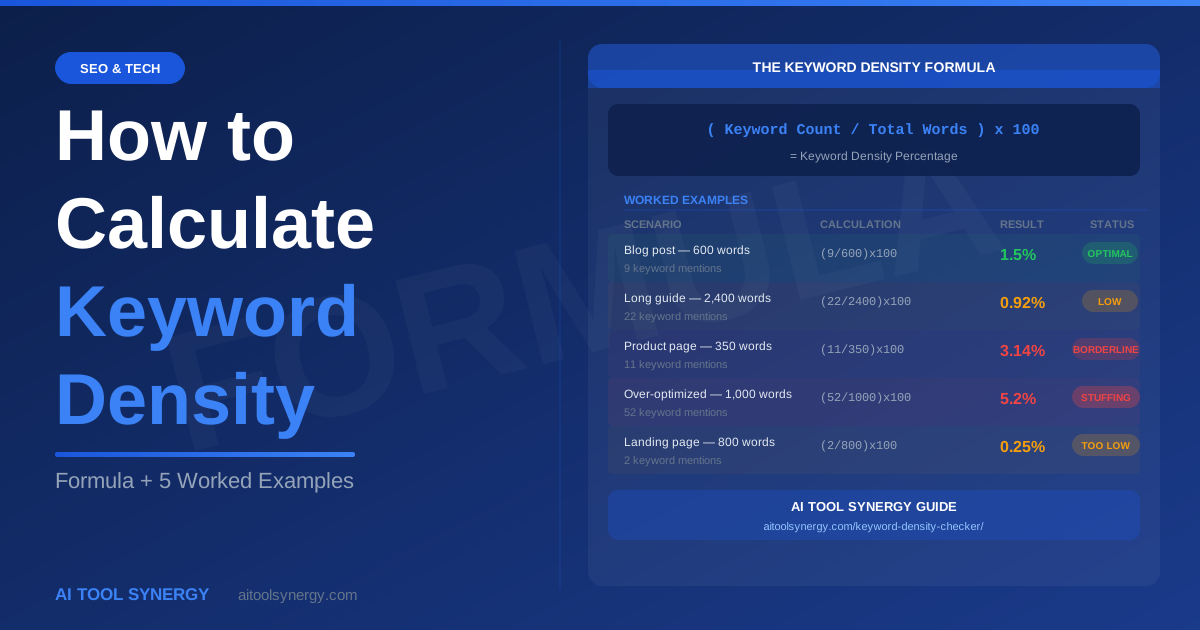
( Number of Times Keyword Appears ÷ Total Word Count ) × 100
To calculate keyword density manually, you need two numbers: how many times your target keyword or phrase appears in the content, and the total number of words in the content. Divide the first by the second, multiply by 100, and you have your keyword density percentage.
That is the complete formula. Everything else — the interpretation, the benchmarks, the decision about whether to add or remove keyword mentions — comes after you have this number. The calculation itself takes less than ten seconds once you know your two inputs.
When you calculate keyword density for a phrase rather than a single word — for example “calculate keyword density” — count each complete occurrence of the full phrase as one instance. Do not count the individual words separately. “Calculate keyword density appears 8 times in 800 words” means the three-word phrase appeared as a unit 8 times — giving 1.0% density.
How to Calculate Keyword Density Step by Step — Manual Method
Here is exactly how to calculate keyword density manually without any tools, using only the content itself and a word processor or browser.
Count the total word count of your content
In Microsoft Word or Google Docs, the word count is shown in the bottom status bar. In a browser, paste the content into a blank Google Doc and check. Most blog posts run 800-3,000 words. Make a note of this number — it is your denominator in the keyword density formula.
Count how many times your keyword appears
Use the Find function (Ctrl+F or Cmd+F) and type your target keyword or phrase. The browser or word processor will show a count of all matches. For example, searching “calculate keyword density” in a 1,200-word article might return 14 matches. That is your numerator.
Apply the keyword density formula
Divide the keyword count by the total word count, then multiply by 100. If your keyword appears 14 times in a 1,200-word article: (14 ÷ 1200) × 100 = 1.17%. This result tells you that 1.17% of your content is your target keyword — sitting comfortably in the optimal 1-3% range.
Interpret the result against the healthy range
Compare your calculated keyword density percentage against the standard benchmarks. Below 0.5% — the keyword barely signals the topic. Between 1% and 3% — optimal for most content types. Above 3-5% — repetitive and potentially over-optimized. Above 5% — clear keyword stuffing risk that may trigger search engine filters. Google’s spam policies explicitly list keyword stuffing as a violation that can suppress rankings.
Adjust if necessary and recalculate
If the density is too low, add natural keyword mentions in headings, the introduction, and conclusion sections. If too high, replace some exact-match occurrences with synonyms or related phrases. After editing, recalculate keyword density using the same formula to confirm the new percentage sits within range before publishing. Search Engine Journal’s keyword optimization guide recommends this recalculation step as standard pre-publish practice.
Keyword Density Calculation — 5 Worked Examples
The fastest way to understand how to calculate keyword density is to see it applied to real content scenarios. Here are five worked examples covering different content types and word counts — the kind you will actually encounter in day-to-day SEO and content work.
Scenario: A 600-word introductory blog post targeting the keyword “keyword density”.
Keyword count: The phrase “keyword density” appears 9 times in the article.
Keyword density calculation: (9 ÷ 600) × 100 = 1.5%
Interpretation: 1.5% sits in the optimal range. This is a well-calibrated short post — the keyword appears frequently enough to establish topical relevance without feeling forced.
Scenario: A comprehensive 2,400-word guide targeting the phrase “calculate keyword density”.
Keyword count: The phrase “calculate keyword density” appears 22 times throughout.
Keyword density calculation: (22 ÷ 2400) × 100 = 0.92%
Interpretation: 0.92% is slightly low but acceptable. In a long-form guide covering many subtopics, the primary keyword naturally gets diluted by supporting content. Adding 3-4 natural mentions in subheadings or the introduction would bring it closer to 1.1-1.2% — a stronger signal without forced repetition.
Scenario: A 350-word e-commerce product page targeting “keyword density checker tool”.
Keyword count: The phrase appears 11 times across headings, bullet points, and description text.
Keyword density calculation: (11 ÷ 350) × 100 = 3.14%
Interpretation: 3.14% is borderline. On a short product page, repetition builds up fast because there are fewer total words to dilute the count. Replacing 2-3 exact-match uses with “this keyword analysis tool” or “our density checker” would drop it to approximately 2.3% — safer and more natural-sounding.
Scenario: A 1,000-word article where the writer repeated “keyword density” in every paragraph.
Keyword count: “keyword density” appears 52 times.
Keyword density calculation: (52 ÷ 1000) × 100 = 5.2%
Interpretation: 5.2% is clear keyword stuffing. At this density, the content reads unnaturally and Google’s spam detection systems are likely to suppress it. The fix requires removing approximately 37 occurrences — replacing them with “density percentage”, “keyword percentage”, “on-page optimization”, and similar natural variations — to bring the calculation result down to a healthy 1.5%.
Scenario: An 800-word landing page where the primary keyword “free keyword density checker” appears only twice.
Keyword density calculation: (2 ÷ 800) × 100 = 0.25%
Interpretation: 0.25% is far too low. Google has almost no signal from this page that it is specifically about a free keyword density checker. Adding the phrase naturally in the H1, the first paragraph, at least two subheadings, and the conclusion — approximately 8-10 total mentions — would bring the calculated density to 1.0-1.25%, dramatically strengthening the on-page topical signal.
How to Calculate Keyword Density for a Phrase vs a Single Word
The keyword density calculation works slightly differently depending on whether your target keyword is a single word or a multi-word phrase. This distinction matters because the denominator — total word count — stays the same regardless, but the numerator changes based on how you define a “match.”
Single-word keyword density calculation
Straightforward. If your target keyword is “SEO” and it appears 16 times in a 1,000-word article, the density is (16 ÷ 1000) × 100 = 1.6%. Every occurrence of the word “SEO” anywhere in the content counts as one instance.
Two-word phrase density calculation
Count only complete, consecutive occurrences of the full phrase. If your target is “keyword density” and it appears 14 times in 900 words, the density is (14 ÷ 900) × 100 = 1.56%. The words “keyword” and “density” appearing separately in different parts of a sentence do not count as one phrase occurrence.
Three-word phrase density calculation
The same rule applies. “Calculate keyword density” as a three-word phrase counts only when all three words appear consecutively in that order. In a 1,500-word article where “calculate keyword density” appears 12 times: (12 ÷ 1500) × 100 = 0.8%. This is why long-tail keyword density tends to run lower than single-word density — it is harder for a specific three-word phrase to appear as frequently as a single term.
= 1.6% — Each solo word occurrence counts
= 1.56% — Full phrase must appear consecutively
= 0.8% — All three words, in order, as a unit
Calculate Keyword Density — Video Explainer
If you prefer to see the keyword density calculation explained visually, this short video walks through the formula and shows real examples of healthy vs over-optimized content:
After watching, use our free keyword density calculator to instantly calculate keyword density for your own content — the tool applies the same formula automatically across every phrase in your text, saving you the manual counting step entirely.
Manual Calculation vs Using a Keyword Density Calculator — When to Use Each
Knowing how to calculate keyword density manually is valuable — but it has clear limits. Here is when each approach makes sense:
| Situation | Manual Calculation | Free Density Calculator |
|---|---|---|
| Checking one specific keyword in a short draft | Fast and sufficient — Ctrl+F gives the count in seconds | Optional — tool gives more data but not essential |
| Checking 10+ keywords and phrases at once | Impractical — too many Ctrl+F searches to manage | Essential — tool calculates all phrases simultaneously |
| Auditing a competitor’s page | Very slow — need to copy text and count manually | Ideal — paste competitor text and get full analysis instantly |
| Checking 2-gram and 3-gram phrase density | Difficult — hard to isolate multi-word phrase counts | Automatic — tool separates 1-gram, 2-gram, 3-gram tabs |
| Understanding the formula for the first time | Best — manual calculation builds intuition | Use after understanding the formula |
| Pre-publish content check on every article | Too slow for routine use | 30-second habit — paste, check, publish |
Our free keyword density calculator applies the formula above to every word and phrase in your content simultaneously — giving you a complete density map in under 30 seconds that would take 20-30 minutes to replicate manually.
How to Calculate Keyword Density in Excel or Google Sheets
For content teams managing large volumes of articles or running site-wide keyword density audits, calculating keyword density in a spreadsheet is a useful intermediate option between fully manual counting and a dedicated tool.
Here is the Excel or Google Sheets formula to calculate keyword density for a cell containing article text:
This formula works by comparing the length of the text with and without the keyword to count occurrences, then divides by the approximate word count. It is useful for batch processing many articles at once, but it has limitations: it cannot easily handle multi-word phrase density, and it does not account for stopword removal. For phrase-level keyword density calculation, a dedicated keyword density checker tool is faster and more accurate.
Common Errors That Skew Your Density Results
The keyword density formula is simple, but there are several calculation errors and interpretation mistakes that consistently produce misleading results. Avoid these:
Including navigation, headers, and footer text in the word count
If you copy the entire page including menus, sidebars, and footers, your total word count is inflated by text that is not part of the article content. This artificially lowers the calculated keyword density percentage. Always count only the main body text when you calculate keyword density — from the first paragraph to the last, excluding page furniture.
Counting partial keyword matches
If your target keyword is “density checker” and you count every occurrence of the word “density” separately, you are measuring the wrong thing. The keyword density calculation for a phrase must count only complete, consecutive phrase occurrences — not individual words within the phrase that happen to appear elsewhere in the content.
Ignoring stopwords in the word count
When you calculate keyword density manually using a raw word count, words like “the”, “a”, “is”, “and” inflate your total. This makes your density percentage appear lower than it really is in terms of meaningful content. Professional keyword density tools remove stopwords before calculating — which is why a tool’s result may show a slightly higher density than your manual calculation using the raw word count.
Treating density as the only optimization metric
Keyword density calculation gives you one on-page signal. Pages can rank with a wide range of density percentages depending on topical authority, backlink profile, content depth, and user engagement signals. Use the calculated density as a quality check — not as a target number to hit regardless of how the content reads. As Moz’s on-page SEO research confirms, content quality and topical relevance consistently outperform mechanical keyword repetition as ranking signals.
Do not try to hit exactly 2.0% keyword density by mechanical repetition. If your calculated density comes out at 1.3%, that is not a problem to fix — it is a perfectly healthy result. The 1-3% range is a zone, not a single target. Content that reads naturally and covers the topic comprehensively will reach a healthy density without you counting every sentence.
Target Density Ranges by Content Type
When you calculate keyword density, the result you are aiming for depends on the type of content you are writing. Different content types have different structural characteristics that affect how keyword density naturally falls:
| Content Type | Typical Word Count | Target Keyword Density | Why |
|---|---|---|---|
| Blog post / guide | 1,000–3,500 words | 1.0%–1.5% | Long content covers many subtopics — primary keyword naturally dilutes across sections |
| Product page | 200–600 words | 1.5%–2.5% | Short focused copy — keyword must appear clearly in a limited word count |
| Landing page | 500–1,200 words | 1.5%–2.0% | Conversion-focused — keyword signals in headlines and CTAs increase count quickly |
| Category page | 300–800 words | 1.5%–2.5% | Navigational content with repeated product/topic mentions |
| News article | 400–900 words | 0.8%–1.5% | Journalistic style avoids repetition — lower density is natural and expected |
Start with in-depth keyword research to identify your primary target keyword before calculating density. Ahrefs’ keyword research guide is a strong starting point for finding the right terms to optimize for — then use the density formula to keep those terms calibrated throughout your content., you can be confident the on-page keyword signal is calibrated appropriately. If it falls outside the range, use your judgment — a slightly low density on a long guide is far less of an issue than a 5% density on a 400-word product page.
How to Calculate Keyword Density Using Our Free Tool — Faster Than Any Manual Method
While the manual keyword density formula is useful to understand, calculating keyword density for a full article by hand — especially for multi-word phrases and secondary keywords — is time-consuming. Our free keyword density checker applies the formula to every word and phrase in your content simultaneously, in under 30 seconds.
Here is what the tool calculates automatically that would take significant manual effort otherwise:
- 1-gram density — density percentage for every individual word in your content (after stopword removal)
- 2-gram density — density calculation for every two-word phrase combination — this is where most focus keywords live
- 3-gram density — density for every three-word phrase — reveals long-tail keyword coverage
- Health status — color-coded green/amber/red against the 1-3% optimal range
- Raw frequency count — the numerator in the keyword density formula, shown alongside the percentage
- Total word count — the denominator, shown at the top of the results
How to Calculate Keyword Density — Key Takeaways
The keyword density formula is: (keyword count ÷ total word count) × 100 = keyword density percentage. That is everything you need to calculate keyword density for any piece of content.
- To calculate keyword density manually: count keyword occurrences with Ctrl+F, get total word count from your editor, divide and multiply by 100
- Optimal keyword density for most content sits between 1% and 3%
- For multi-word phrases, count only complete, consecutive phrase occurrences — not individual words
- Different content types have different target density ranges — blog posts run lower (1-1.5%), short product pages can run higher (1.5-2.5%)
- Manual keyword density calculation is useful for understanding — but for full articles and competitor audits, a free tool is dramatically faster
- After calculating keyword density, the result is a diagnostic — use it to guide natural edits, not to hit a mechanical target
Frequently Asked Questions — Keyword Density Calculation
The keyword density formula is: (Number of times keyword appears ÷ Total word count) × 100 = Keyword Density %. For example, if your keyword appears 12 times in an 800-word article, the keyword density calculation gives you (12 ÷ 800) × 100 = 1.5%. This is a straightforward percentage calculation that you can run manually using Ctrl+F to count occurrences and your word processor’s word count feature for the total.
To calculate keyword density manually: step 1, open your content in a word processor and note the total word count. Step 2, use Ctrl+F (or Cmd+F on Mac) to search for your target keyword and note how many times it appears. Step 3, divide the keyword count by the total word count and multiply by 100. The result is your keyword density percentage. For example: keyword appears 9 times, total words 600 — (9 ÷ 600) × 100 = 1.5% keyword density.
When you calculate keyword density, a result between 1% and 3% is considered optimal for most content types. This means your primary keyword should appear approximately once or twice per 100 words. Below 0.5% suggests the keyword is underrepresented and the topical signal is weak. Above 3-5% suggests over-repetition that may feel unnatural to readers and trigger keyword stuffing detection. The exact ideal percentage varies slightly by content type — blog posts typically fall at 1-1.5%, while short product pages can support 1.5-2.5% naturally.
To calculate keyword density for a two-word phrase, count only complete consecutive occurrences of the full phrase — not the individual words separately. Use Ctrl+F and search for the complete phrase (for example, “keyword density”) to get an accurate count. Then divide by the total word count and multiply by 100. The individual words appearing separately elsewhere in the content do not count as phrase occurrences. Our free keyword density checker handles this automatically in the 2-gram tab, showing density for every two-word phrase combination in your content.
To calculate keyword density for a 1,000-word article and hit the 1-2% optimal range, your keyword should appear approximately 10 to 20 times. At 10 occurrences: (10 ÷ 1000) × 100 = 1.0% density. At 20 occurrences: (20 ÷ 1000) × 100 = 2.0% density. For a primary focus keyword in a standard blog post, targeting 12-15 occurrences in 1,000 words (1.2-1.5% density) is a practical and natural range that signals topical relevance without feeling repetitive.
Most keyword density calculation tools — including ours — count all visible text in the content you paste in, which includes headings (H1, H2, H3) and any introductory text. Meta descriptions are not part of the page body content and are not included in keyword density calculations. Including headings in the calculation is standard practice and reflects how search engines scan page content. Keyword appearances in H2 and H3 headings are particularly valuable SEO signals, so having your keyword in several subheadings naturally contributes positively to both density and on-page relevance.
To calculate keyword density in Excel or Google Sheets, use this formula in a cell where A1 contains your article text and “keyword” is your target term: =( LEN(A1) – LEN( SUBSTITUTE(A1,”keyword”,””) ) ) / LEN(“keyword”) / ( LEN(A1) – LEN( SUBSTITUTE(A1,” “,””) ) + 1 ) * 100. This formula counts keyword occurrences by measuring the difference in string length with and without the keyword, then divides by the approximate word count. Replace “keyword” with your actual target term. Note that this method is best for single keywords — for multi-word phrase density, use a dedicated keyword density checker tool for accuracy.
Different keyword density tools may give slightly different results for the same content because of three main variables: whether stopwords are included or excluded from the total word count, whether the count is case-sensitive, and how the tool handles punctuation and special characters. Our tool uses stopword removal by default (excludable), which gives a more accurate picture of meaningful content density by filtering out words like “the”, “a”, and “is” from both the keyword count and the total word count. Manual calculation using raw word count will typically show a lower density percentage than a stopword-filtered tool result.
For a single keyword in one article, you can calculate keyword density manually in under one minute using Ctrl+F for the count and your word processor’s built-in word count. For multiple keywords or phrases, manual calculation becomes slow quickly — checking 10 different keywords in a 2,000-word article manually could take 10-15 minutes. Our free keyword density checker calculates density for every single word and phrase in your content simultaneously in under 30 seconds, making the tool approach dramatically faster for any content beyond a quick single-keyword check.








2 Responses
[…] Guide SEO & Tech Keyword Frequency vs Keyword Density — What Is the Difference in SEO? SEO & Tech How to Calculate Keyword Density — Step-by-Step Formula and Examples SEO & Tech Keyword Stuffing Checker — How to Detect and Fix Over-Optimisation SEO & […]
[…] & Tech Keyword Frequency vs Keyword Density — What Is the Difference in SEO? SEO & Tech How to Calculate Keyword Density — Step-by-Step Formula and Examples SEO & Tech What Is a Good Keyword Density for SEO? Benchmarks and Data SEO & Tech How to […]