


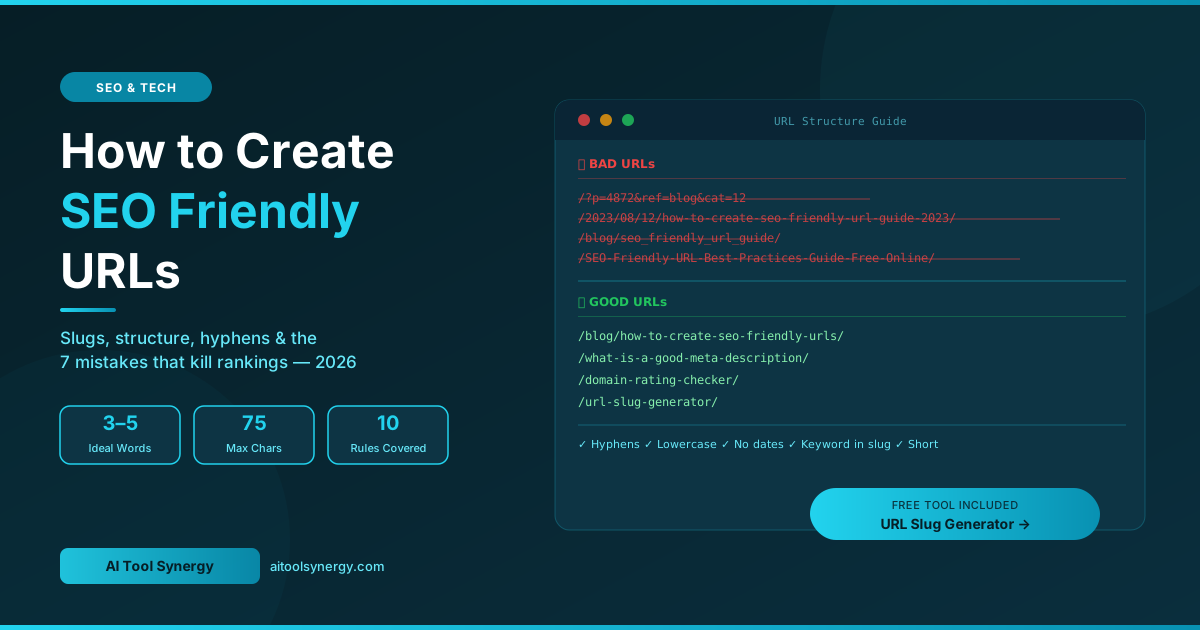
Knowing how to create SEO friendly URLs is one of the simplest and most overlooked wins in on-page SEO. A well-structured URL slug tells Google exactly what your page is about, builds user trust before the click, and signals topical relevance across every search result, social share, and backlink. This complete guide covers every rule for SEO URL structure, how to write the perfect slug for any blog post or page, and the seven mistakes that quietly destroy rankings.
What Is an SEO Friendly URL?
An SEO friendly URL is a web address written in plain, readable language that immediately communicates the topic of a page to both humans and search engines. It is the opposite of auto-generated URLs filled with random numbers, session IDs, or cryptic parameters that tell nobody anything about the content behind the link.
Consider these two URLs for the same page:
❌ Not SEO Friendly
aitoolsynergy.com/?p=4872&ref=blog&cat=12Random parameter — tells Google and users nothing about the content
✅ SEO Friendly
aitoolsynergy.com/how-to-create-seo-friendly-urls/Keyword-rich, descriptive, readable — clear to both Google and users
The second URL communicates the exact topic instantly. When someone sees it in a Google search result, a Slack message, or a social media post, they know what the page covers before clicking. That trust translates directly into higher click-through rates, better crawl efficiency, and stronger keyword relevance signals.
Google’s official URL structure guidance states that URLs should use “simple, descriptive words in a manner that is most intelligible to humans.” This is not optional advice — it is the technical standard for any well-optimised website in 2026.
Why SEO Friendly URLs Matter for Rankings
Google confirms that URL structure is a ranking factor — though a relatively light one compared to content quality and backlinks. The real SEO power of a clean URL comes from three indirect but compounding effects:
1. Keyword Relevance Signal
When your URL slug contains your primary keyword, it reinforces the topical relevance of your page. Google uses the URL path as one of many signals when categorising what a page is about. A URL like /how-to-create-seo-friendly-urls/ sends a clear, consistent signal that aligns with the page title, H1, and body content — creating a coherent relevance cluster that supports rankings.
2. Click-Through Rate Impact
In Google search results, the URL appears as the green breadcrumb line below your title. Users scan it before clicking to verify the page is what they are looking for. A SEO friendly URL that clearly describes the content builds confidence and increases CTR. A messy URL filled with dates, numbers, or category folders raises doubt and reduces clicks — which indirectly signals to Google that your result is less relevant.
3. AI and Generative Search Visibility
In 2026, AI-powered search engines including Google AI Overviews, Perplexity, and ChatGPT Search use URL paths as primary semantic hints when categorising content for citations. A descriptive SEO URL structure makes it easier for AI systems to identify your page as an authoritative source for a specific query — increasing the frequency with which your content is cited in AI-generated answers.
The Anatomy of a Perfect SEO Friendly URL
Every SEO friendly URL has three components you control — protocol, domain, and slug. The slug is the part you set on a per-page basis and the most important part to optimise correctly every single time you publish.
10 Rules for Creating SEO Friendly URLs
Use Your Primary Keyword in the Slug
Your URL slug must contain your page’s primary keyword — placed as naturally as possible. If you are writing about SEO friendly URLs, your slug should be /how-to-create-seo-friendly-urls/ or /seo-friendly-urls/. Include the keyword once. Do not repeat it, vary it, or stack multiple keyword variations — that is URL keyword stuffing and Google treats it as a spam signal.
Always Use Hyphens — Never Underscores
Google treats hyphens as word separators and underscores as word joiners. This means /seo-friendly-urls/ is read as three separate, meaningful words. But /seo_friendly_urls/ is read as a single, unseparated string — effectively one unrecognised word. Google’s John Mueller has confirmed hyphens as the correct separator in every public statement on URL best practices. This rule is non-negotiable.
Keep Slugs Short — 3 to 5 Words Maximum
The ideal SEO URL slug is 3 to 5 words long. Google displays roughly 60 to 70 characters of a URL in search results before truncating with “…” — anything critical after that point is invisible to users. Short slugs are also easier to share in social posts, easier to copy into emails, and easier to remember. If your blog post title is “10 of the Best Ways to Save Money on Car Insurance in 2026”, your slug should be /save-money-car-insurance/ — not the full title.
Remove Stop Words
Stop words are short filler words that add length without adding keyword value: “a”, “an”, “the”, “and”, “or”, “in”, “of”, “for”, “to”, “how”, “with”. Remove them from slugs unless their removal changes the meaning of the URL or makes it unreadable. The title “How to Create an SEO Friendly URL for a Blog Post” becomes the slug /create-seo-friendly-urls/ or /how-to-create-seo-friendly-urls/ depending on whether the “how to” adds search intent clarity — which in this case it does, so it stays.
Use Lowercase Letters Only
URLs are case-sensitive on Linux-based servers — which most web hosts use. This means /SEO-Friendly-URLs/ and /seo-friendly-urls/ can be treated as two completely different pages, creating duplicate content issues that split ranking authority. Always use lowercase throughout. This is one of the most common technical SEO errors on sites that have been built quickly without a URL style guide.
Never Include Dates in Blog Post URLs
Date-stamped URLs like /2023/04/15/seo-url-guide/ are one of the most damaging permalink structures for evergreen content. The date makes the content appear outdated even after you update it — a reader in 2026 seeing “2023” in the URL is less likely to click, regardless of how fresh the content is. Use clean post-name permalinks with no dates. If your WordPress site is currently using date-based permalinks, change the permalink structure immediately and set up 301 redirects.
Use HTTPS — Not HTTP
HTTPS has been a confirmed Google ranking signal since 2014 and is non-negotiable in 2026. Browsers including Chrome flag HTTP sites as “Not Secure” before the user even reads a word of your content, destroying trust and CTR instantly. Every page on your site must serve over HTTPS. Check that your SSL certificate is valid, that HTTP requests redirect to HTTPS, and that all internal links use the HTTPS version to avoid mixed-content warnings.
Keep Subfolder Depth to Maximum Two Levels
URL depth refers to how many folders separate your content from the root domain. A flat structure like /seo-friendly-urls/ is zero levels deep — clean and efficient. /blog/category/subcategory/2026/seo-friendly-urls/ is four levels deep — harder to crawl, harder to share, and signals lower page importance. For most blogs and tool sites, keeping content flat off the root is ideal. Limit depth to two levels maximum for any content.
Be Consistent with Trailing Slashes
Mixing /seo-friendly-urls and /seo-friendly-urls/ across your site creates duplicate content — both versions can be indexed as separate pages if not handled with redirects or canonical tags. Pick one format — with trailing slash or without — and apply it consistently across every URL on your site. Configure your server or CMS to redirect the non-preferred version automatically.
Make URLs Stable — Change Them Only When Necessary
A URL that earns backlinks, ranks well, and accumulates traffic has real SEO equity built into it. Changing that URL without a 301 redirect permanently destroys that equity. Every link pointing to the old URL becomes a dead link. Every share, bookmark, and citation breaks. Only change published URLs when absolutely necessary, and always implement a permanent 301 redirect from old to new. Use our free URL Slug Generator to get the slug right before publishing — prevention is far cheaper than fixing.
Good vs Bad URL Examples — Side by Side
The best way to internalise SEO URL best practices is to see the contrast between optimised and unoptimised slugs for real content. Every example below is based on a real pattern seen on live websites.
| Page Topic | ❌ Bad URL | ✅ Good URL | Issue Fixed |
|---|---|---|---|
| Meta description guide | /2024/08/12/what-is-a-good-meta-description-for-seo-in-2024/ | /what-is-a-good-meta-description/ | Removed date, shortened slug |
| Domain rating post | /?p=4421 | /what-is-a-good-domain-rating-for-a-new-website/ | Replaced parameter with keyword slug |
| SEO tools list | /blog/category/seo/best-free-seo-tools-for-beginners-2026-updated/ | /free-keyword-research-tools/ | Removed category, shortened, removed year |
| BMI calculator | /health/tools/bmi-calculator-free-online-tool-2026/ | /bmi-calculator/ | Flat structure, removed filler words |
| AI content detector | /ai_content_detector_tool/ | /ai-content-detector/ | Replaced underscores with hyphens |
How to Write the Perfect URL Slug — Step by Step
Here is the exact process to follow every single time you publish a new blog post or page. Following this process before hitting publish takes under 60 seconds and saves hours of redirect management later.
- Start with your post title. Write the full title first — “How to Create SEO Friendly URLs for a Blog Post in 2026”
- Strip the year. Remove any dates or years → “How to Create SEO Friendly URLs for a Blog Post”
- Remove stop words. Remove filler words where possible without losing meaning → “Create SEO Friendly URLs Blog Post” — but in this case “how to” signals intent, so keep it → “How to Create SEO Friendly URLs”
- Lowercase everything. → “how to create seo friendly urls”
- Replace spaces with hyphens. → “how-to-create-seo-friendly-urls”
- Check the length. 33 characters ✅ — well within the 75-character limit
- Verify the keyword is present. “seo friendly urls” ✅ — primary keyword included naturally
Hyphens vs Underscores — The Definitive Answer
This question comes up constantly and the answer is settled — always use hyphens. Here is exactly why:
❌ Underscores — Never Use
/seo_friendly_url_guide/- Google joins words: reads as “seofrienlyurlguide”
- Reduces keyword signal strength
- Harder to read at a glance
- Underlined text hides underscores visually
✅ Hyphens — Always Use
/seo-friendly-url-guide/- Google separates words: “seo” “friendly” “url” “guide”
- Full keyword signal for each word
- Easier to read, copy and share
- Clearly visible in all contexts
URL Structure for WordPress — Permalink Settings
WordPress by default generates URLs that look like /?p=123 — one of the worst possible URL structures for SEO. The first thing you should do on any new WordPress site is change the permalink structure. Here is exactly how:
- Go to WordPress Dashboard → Settings → Permalinks
- Select Post name — this gives you
/your-post-slug/clean URLs - Click Save Changes
- Never select “Day and name” or “Month and name” — these add dates to every URL
Once post-name permalinks are set, WordPress will use whatever you type in the slug field in the post editor. Always manually edit the auto-generated slug before publishing — WordPress defaults to the full post title including stop words and sometimes special characters.
URL Slugs and Category Structure — What to Use
A common question for blog owners is whether to include a category in the URL path — for example /seo/how-to-create-seo-friendly-urls/ versus a flat /how-to-create-seo-friendly-urls/.
| Structure | Example | Best For | Recommendation |
|---|---|---|---|
| Flat — no category | /seo-friendly-urls/ | Small blogs, tool sites, simple sites | Recommended |
| One category level | /seo/seo-friendly-urls/ | Large blogs with many niches | Acceptable |
| Multiple category levels | /seo/technical/2026/seo-friendly-urls/ | Nobody — this is always wrong | Avoid |
| Date-based | /2024/06/seo-friendly-urls/ | News sites only | Avoid for blogs |
For a site like AI Tool Synergy — a tool site with a blog — the flat structure /post-slug/ is perfect. It keeps URLs short, keeps the content close to the root domain, and makes the site architecture clean and easy to crawl.
7 URL Mistakes That Silently Kill Rankings
How to Change a URL Safely After Publishing
If you have existing posts with poor URL slugs — dates baked in, auto-generated titles, underscores, or no keyword — here is the safe process for fixing them without losing rankings:
- Audit first. Use Google Search Console to check which pages are currently ranking and receiving impressions. Pages with no impressions are low risk to change. Pages with existing traffic carry higher risk.
- Install a redirect plugin. In WordPress, install the free Redirection plugin before making any slug changes.
- Change the slug. Edit the post and update the slug field to your new clean version.
- Verify the 301 redirect. Test that the old URL automatically redirects to the new one. Use a browser or a redirect checker tool to confirm.
- Update internal links. Search your site for any pages linking to the old URL and update them to the new one — internal links to the old URL will work via the redirect but direct links to the new URL are cleaner.
- Request re-indexing. In Google Search Console, use the URL Inspection tool to request re-indexing of the new URL.
🔗 Generate a Perfect URL Slug in Seconds
Paste your full blog post title into our free URL Slug Generator and get a clean, optimised slug with stop word removal, hyphen formatting, and 5 variations to choose from. No signup required.
Try Free URL Slug Generator →SEO Friendly URLs and AI Search in 2026
The importance of clean URL structure has grown significantly with the rise of AI-powered search. When Google AI Overviews, Perplexity, or ChatGPT Search cite a page in a generated answer, they display the URL alongside the citation. A descriptive, keyword-rich URL reinforces the topical authority of the source and makes the citation look credible to users reading the AI response.
AI search systems also use the URL path as one of the first signals when categorising content for their knowledge graphs. A URL like /how-to-create-seo-friendly-urls/ sends an immediate, unambiguous signal about the page’s topic before the AI has even read the content. A URL like /?p=4872 provides no signal at all, making the content harder to categorise and less likely to be cited.
In this environment, URL slug optimization is no longer just an on-page SEO task — it is part of a broader generative engine optimisation (GEO) strategy that determines how visible your content is across both traditional and AI-powered search surfaces.
Frequently Asked Questions
Final Thoughts
Learning how to create SEO friendly URLs takes five minutes and pays dividends for the entire life of every page you publish. A clean URL slug — keyword-rich, hyphenated, lowercase, short, and free of dates — sends consistent relevance signals to Google, builds user trust in search results, and future-proofs your content against URL changes that break backlinks and rankings.
The rules are simple: use your primary keyword once, use hyphens not underscores, keep it under 75 characters, remove stop words, use lowercase only, avoid dates, and never change a published URL without a 301 redirect. Get the slug right before you hit publish — it is far easier than fixing it later.
Use our free slug generator below to create a perfect URL from any post title in seconds — it handles stop word removal, hyphen formatting, and lowercase conversion automatically.
✅ Generate Clean URL Slugs Free — No Signup
Paste any blog post title and get an optimised, SEO friendly URL slug instantly. Stop word removal, hyphens, lowercase — all handled automatically. Free forever.
Open Free URL Slug Generator →





3 Responses
[…] of your site’s content hierarchy. Also see our guides on how to write meta tags for SEO and how to create SEO-friendly URLs — these three files and tags work together as the technical SEO foundation every site depends […]
[…] our guides on what every meta tag type actually does, what makes a meta description perform well, how to write SEO-friendly URLs, and ideal keyword density for body […]
[…] SEO & Tech What Is a Good Domain Rating for a New Website? 2026 Benchmarks SEO & Tech How to Check Ahrefs Domain Rating for Free — Complete 2026 Guide SEO & Tech 7 Best Free Keyword Research Tools in 2026 — Tested and Ranked SEO & Tech How to Create SEO Friendly URLs for a Blog Post […]