


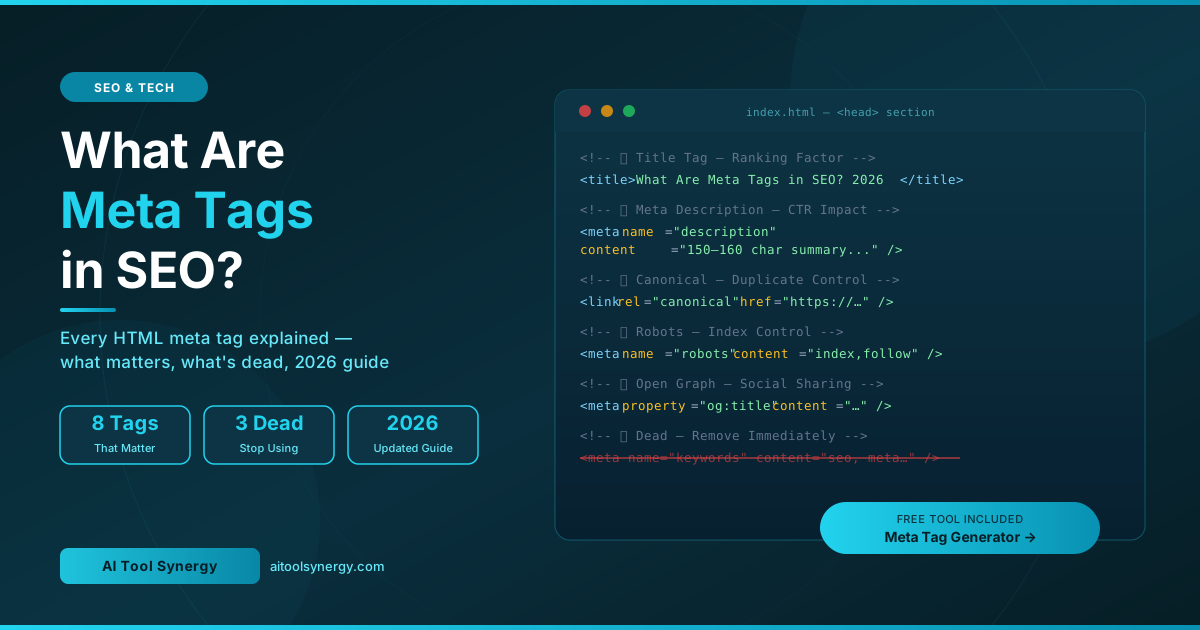
Meta tags in SEO are HTML elements placed inside the <head> section of your webpage that communicate critical information to search engines, social platforms, and browsers. They are invisible to visitors but enormously powerful — the right HTML meta tags control how your page appears in Google, how it ranks, whether it gets indexed, and how it looks when shared on social media. This complete guide explains every type of meta tag, which ones actually matter in 2026, and exactly how to write each one correctly.
What Are Meta Tags in SEO?
Meta tags are snippets of HTML code that live inside the <head> section of a webpage — above the visible content. They are never displayed directly on the page itself. Instead, search engine crawlers, social media platforms, and web browsers read them to understand what the page is about, how to index it, how to display it in search results, and what preview to show when the URL is shared.
Think of meta tags for a website as the information panel on the back of a book. The reader never sees it while reading, but it tells the librarian what shelf to put it on, what summary to print in the catalogue, and what image to use on the cover. Without this information, the librarian guesses — and usually guesses wrong.
In the early days of search engines, SEO head tags like meta keywords were central to ranking. Webmasters stuffed them with keywords and gamed results easily. Search engines evolved quickly, and by 2009 Google officially stopped using meta keywords altogether. Today, meta tag optimization is no longer about volume — it’s about precision, intent matching, and technical accuracy.
How Meta Tags Work: The Technical Foundation
Every HTML meta tag follows the same basic structure. It is a self-closing element placed between the opening and closing <head> tags. It uses attributes to define what type of tag it is and what value it carries. Here is how a standard meta tag block looks in code:
<head>
  <!-- Required technical tags -->
  <meta charset="UTF-8" />
  <meta name="viewport" content="width=device-width, initial-scale=1.0" />

  <!-- SEO critical tags -->
  <title>What Are Meta Tags in SEO? Complete Guide 2026</title>
  <meta name="description" content="Learn what meta tags are in SEO, which ones
  matter in 2026, and how to write each one correctly." />
  <meta name="robots" content="index, follow" />
  <link rel="canonical" href="https://yoursite.com/page-url/" />

  <!-- Social sharing tags -->
  <meta property="og:title" content="Your Page Title" />
  <meta property="og:description" content="Your page description." />
  <meta property="og:image" content="https://yoursite.com/image.jpg" />
  <meta property="og:url" content="https://yoursite.com/page-url/" />
</head>
Search engine crawlers — including Googlebot, Bingbot, and AI crawlers like GPTBot, ClaudeBot, and PerplexityBot — read this <head> block on every page visit. The information they find here directly influences indexing decisions, snippet generation, and ranking signals. This is why on-page SEO meta tags must be in the initial HTML — not loaded by JavaScript — to be reliably read by all crawlers.
Types of Meta Tags — Complete Breakdown
There are many types of meta tags in SEO, but they fall into four clear categories: ranking-critical tags, technical control tags, social sharing tags, and dead or obsolete tags. Understanding which category each tag belongs to helps you prioritise correctly.
| Meta Tag | Category | Ranking Factor? | Still Matters? |
|---|---|---|---|
| Title Tag | Ranking critical | Direct | Yes |
| Meta Description | Ranking critical | Indirect (CTR) | Yes |
| Canonical Tag | Technical control | Indirect | Yes |
| Meta Robots | Technical control | Indirect | Yes |
| Viewport Tag | Technical control | Indirect | Yes |
| Charset Tag | Technical control | No | Yes (required) |
| Open Graph Tags | Social sharing | No | Yes |
| Twitter Card Tags | Social sharing | No | Yes |
| Meta Keywords | Obsolete | No | Dead since 2009 |
| Meta Refresh | Obsolete | No | Avoid |
The Title Tag — The Most Important Meta Tag in SEO
The meta title tag is the single most important on-page SEO element and the only meta tag confirmed as a direct Google ranking factor. It appears as the clickable blue headline in search engine results pages (SERPs), in the browser tab, and as the default title when the page is bookmarked or shared. Every other HTML meta tag can be imperfect and you can still rank — but a weak, duplicate, or keyword-stuffed title tag directly undermines your search visibility.
Title Tag — Best Practices
- Length: 50–60 characters (Google truncates after approximately 600 pixels)
- Keyword placement: Primary keyword in the first 30 characters — Google and users read left to right
- Format: Primary Keyword — Secondary Modifier | Brand Name
- Uniqueness: Every page must have a completely unique title — 54% of sites fail this
- No keyword stuffing: “SEO Meta Tags SEO Guide SEO 2026” is a penalty risk, not an optimization
- Match intent: Informational pages use “What is / How to”, commercial pages use “Best / Free / Top”
The Meta Description Tag — Your Organic Ad Copy
The meta description tag is a 150–160 character summary that appears beneath your title in Google search results. It is not a direct ranking factor — Google’s official documentation confirms this clearly. However, it is one of the highest-leverage elements in your entire SEO strategy because it controls click-through rate (CTR) — the percentage of people who see your result and actually click.
A 32% CTR improvement was recorded by one digital marketing agency after rewriting meta descriptions on just 50 blog pages. Think about that: no new backlinks, no content changes, no technical work — just better descriptions, more clicks, more traffic.
Meta Description Tag — Best Practices
- Length: 150–160 characters for desktop; keep core message within 120 for mobile
- Include the focus keyword: Google bolds matching words, making your result visually pop
- State a clear benefit: What does the reader gain from clicking? Be specific
- End with a soft CTA: “Learn more”, “Try free today”, “See examples”, “Discover now”
- Match search intent: Informational query = promise an answer; commercial query = promise a comparison
- Unique per page: Duplicate descriptions are flagged by Google Search Console and get rewritten
For a deep dive on writing descriptions that consistently outperform auto-generated snippets, read our full guide on what is a good meta description — including real before/after examples and character-count benchmarks.
The Meta Robots Tag — Controlling What Google Indexes
The meta robots tag is a powerful technical directive that tells search engine crawlers exactly what to do with a page. It controls two independent actions: whether the page should appear in search results (indexing) and whether the links on the page should pass authority to other pages (following). Misusing this tag — even accidentally — can cause entire sections of your site to disappear from Google overnight.
<!-- Allow indexing and link following (default if tag is absent) -->
<meta name="robots" content="index, follow" />

<!-- Prevent indexing but still follow links -->
<meta name="robots" content="noindex, follow" />

<!-- Index the page but don't follow its links -->
<meta name="robots" content="index, nofollow" />

<!-- Block everything — used for private/thank-you pages -->
<meta name="robots" content="noindex, nofollow" />

<!-- Allow full snippet length in search results -->
<meta name="robots" content="max-snippet:-1, max-image-preview:large" />Meta Robots Tag — When to Use Each Directive
| Directive | Use Case |
|---|---|
index, follow | All public blog posts, landing pages, tool pages |
noindex, follow | Thank-you pages, admin pages, search results pages, staging content |
noindex, nofollow | Login pages, private pages, pages with no SEO value |
max-snippet:-1 | Any page where you want full snippet visibility in AI Overviews and SERPs |
max-image-preview:large | Image-heavy pages where you want Google to show a large image preview |
noindex tag and a robots.txt Disallow rule do completely different things. A robots.txt Disallow prevents crawling — Google never sees the page. A noindex meta tag allows crawling but prevents indexing. To remove a page from search results, always use noindex. Use our free Robots.txt Generator to handle crawl directives separately.The Canonical Tag — Preventing Duplicate Content Issues
The canonical tag (technically a link tag, not a meta tag, but universally grouped with SEO head tags) solves one of the most common and damaging technical SEO problems: duplicate content. It tells search engines which version of a page is the “official” one that should appear in search results.
Duplicate content happens more often than most site owners realise. The same page can be accessible via multiple URLs — http:// vs https://, www. vs non-www., trailing slash vs no slash, URL parameters from analytics tracking, and paginated versions of the same content. Without canonical tags, Google may split your ranking power across all these versions, causing each one to rank weakly instead of concentrating authority on the page you actually want to rank.
<!-- Self-referencing canonical — every indexable page should have this -->
<link rel="canonical" href="https://aitoolsynergy.com/blog/what-are-meta-tags-in-seo/" />

<!-- Pointing to the preferred version when duplicate exists -->
<link rel="canonical" href="https://aitoolsynergy.com/meta-tag-generator/" />The Viewport Meta Tag — Essential for Mobile SEO
The viewport meta tag controls how a webpage is displayed on mobile devices. It tells the browser how to scale and size the page relative to the screen width. Without it, mobile browsers render your page at desktop width and then scale it down — producing tiny, unreadable text and forcing users to pinch and zoom.
<!-- Standard viewport tag — required on every page -->
<meta name="viewport" content="width=device-width, initial-scale=1.0" />
Google uses mobile-first indexing — meaning it crawls and evaluates the mobile version of your site to determine rankings. A missing or broken viewport tag is a technical SEO failure that affects your entire domain’s search performance, not just individual pages. With over 60% of all Google searches now happening on mobile, this tag is non-negotiable.
Open Graph Tags — How Your Pages Look on Social Media
Open Graph tags were created by Facebook and are now used by virtually every major social platform — Facebook, LinkedIn, Slack, Discord, iMessage, and WhatsApp — to generate rich link previews when a URL is shared. Without OG tags, social platforms attempt to auto-generate previews by pulling random page content, which usually results in a broken image, incorrect title, or missing description.
In 2026, Open Graph tags have expanded in importance beyond social sharing. Google’s AI Overviews and citation cards increasingly use og:title and og:description as signals for how to display cited sources. Well-written OG tags are now part of GEO (Generative Engine Optimisation) strategy — not just social media management.
<meta property="og:type"        content="article" />
<meta property="og:title"       content="What Are Meta Tags in SEO? Complete Guide 2026" />
<meta property="og:description" content="Learn which HTML meta tags actually
affect rankings in 2026 and how to write each one correctly." />
<meta property="og:url"         content="https://aitoolsynergy.com/blog/what-are-meta-tags-in-seo/" />
<meta property="og:image"       content="https://aitoolsynergy.com/image.jpg" />
<meta property="og:image:width"  content="1200" />
<meta property="og:image:height" content="630" />
<meta property="og:site_name" content="AI Tool Synergy" />Open Graph Tags — Key Rules
- og:image is the most important OG tag — posts with images get significantly more engagement than text-only previews
- Image size: 1200×630px minimum — this is the standard for all major platforms
- og:title can differ from your title tag — write it for social share appeal, not just keyword ranking
- og:type should be
articlefor blog posts andwebsitefor homepages and tool pages - og:url should always be the canonical URL — not the URL with tracking parameters
Twitter Card Meta Tags — Rich Previews on X
Twitter Card meta tags control how your page appears when shared on X (formerly Twitter). While X falls back to Open Graph tags when Twitter Cards are absent, keeping both sets of tags gives you full control over the exact preview that appears — including whether it displays as a small thumbnail or a large image card.
<meta name="twitter:card"        content="summary_large_image" />
<meta name="twitter:title"       content="What Are Meta Tags in SEO? Complete Guide 2026" />
<meta name="twitter:description" content="Which HTML meta tags still matter in 2026?
Title, description, robots, canonical — all explained." />
<meta name="twitter:image" content="https://aitoolsynergy.com/image.jpg" />Twitter Card Types — Which to Use
| Card Type | Appearance | Best For |
|---|---|---|
summary_large_image | Large image above title and description | Blog posts, guides, articles |
summary | Small thumbnail left of title | Tool pages, homepages |
player | Embedded video/audio player | Video or podcast content |
The Charset and Lang Tags — Required Technical Foundations
The meta charset tag and the lang attribute on the HTML element are technical requirements that have nothing to do with ranking directly but are required foundations for every other tag to work correctly. The charset tag declares the character encoding used in the document. Without it, special characters, accented letters, and symbols may display as garbled text in some browsers.
<!-- Always the very first tag inside <head> -->
<meta charset="UTF-8" />

<!-- Language declared on the html element -->
<html lang="en">
UTF-8 is the universal standard encoding and should be used on every page. The lang attribute helps screen readers pronounce content correctly and helps Google serve your pages to the right language audience in international search results.
Dead Meta Tags You Should Stop Using Immediately
A significant amount of outdated advice still circulates online telling website owners to use meta tags that have been irrelevant for years. Using these tags wastes development time, clutters your HTML, and in some cases can trigger spam filters.
Meta Keywords Tag
Google stopped using <meta name="keywords"> as a ranking signal in 2009. Bing ignores it and flags excessive keywords as a potential spam indicator. There is zero SEO benefit and a measurable downside risk. Remove it from all pages.
Meta Refresh Tag
The meta refresh tag was once used to automatically redirect users to another page after a set number of seconds. Search engines now treat it as poor practice. Use proper 301 server-side redirects instead — they pass full link authority and are processed correctly by all crawlers.
Meta Author, Meta Copyright, Meta Generator
These tags provide no ranking or indexing benefit. They are informational only and reveal potentially useful information about your CMS to bad actors. Meta Generator tags in particular can expose your WordPress version to vulnerability scanners — most security plugins suppress them automatically.
Meta Tags and AI Overviews — What Changed in 2026
The rise of Google AI Overviews and AI-powered search engines like Perplexity and ChatGPT Search has added a new dimension to meta tag optimization. Your HTML meta tags are now read not just by traditional search crawlers but by AI crawlers including GPTBot, ClaudeBot, PerplexityBot, and OAI-SearchBot — all of which index your content for use in AI-generated answers.
- Title and description tags are frequently pulled directly into AI Overview citation cards — the snippets shown alongside AI-generated answers. A precise, self-contained description increases citation frequency.
- Open Graph tags are used by AI systems to understand page context and generate accurate citations when your content is referenced in a response.
- Robots meta tags control AI crawler access. If you want to appear in AI-generated answers, ensure your robots tag does not block these new crawlers — and check your robots.txt file separately.
- Max-snippet directives — adding
max-snippet:-1to your robots meta tag allows AI systems and Google to display unlimited snippet length, increasing your visibility in AI-generated summaries.
Complete Meta Tag Checklist for Every Page
Use this checklist for every page you publish. These are the on-page SEO meta tags that every indexable page must have as a baseline, plus the optional but recommended tags that improve social sharing and AI visibility.
Baseline Meta Tags
- ✅
<meta charset="UTF-8">— first inside head - ✅
<meta name="viewport" content="width=device-width, initial-scale=1.0"> - ✅
<title>— unique, 50–60 chars, keyword first - ✅
<meta name="description">— unique, 150–160 chars, keyword + CTA - ✅
<meta name="robots" content="index, follow"> - ✅
<link rel="canonical">— self-referencing on all indexable pages
Social + AI Visibility Tags
- ✅
og:title,og:description,og:image(1200×630px),og:url,og:type - ✅
twitter:card,twitter:title,twitter:description,twitter:image - ✅
max-snippet:-1, max-image-preview:largeadded to robots content - ✅ Article schema JSON-LD for blog posts
- ✅ FAQPage schema JSON-LD for pages with FAQ sections
Obsolete Tags — Remove If Present
- ❌
<meta name="keywords">— ignored by Google, spam risk on Bing - ❌
<meta http-equiv="refresh">— use 301 redirects instead - ❌
<meta name="author">,<meta name="generator">— no SEO value
🚀 Generate All Your Meta Tags in One Click
Stop writing meta tags manually. Our free Meta Tag Generator creates a complete, SEO-optimised title, description, Open Graph block, and Twitter Card block for any page — no signup, no cost, forever.
Try Free Meta Tag Generator →How to Check Meta Tags on Any Website
Knowing how to audit meta tags for a website is a core skill for anyone managing SEO. There are three reliable methods:
Method 1 — View Page Source
Right-click any webpage and select View Page Source (or press Ctrl+U on Windows / Cmd+U on Mac). Press Ctrl+F and search for <title> or <meta to jump directly to the tags. This shows exactly what the server is returning — no interpretation.
Method 2 — Google Search Console
Google Search Console flags duplicate title tags, duplicate meta descriptions, missing descriptions, and titles that are too long or too short under the Search Appearance → HTML Improvements section. This is the most actionable audit tool because it shows you which specific pages have problems at scale.
Method 3 — Browser Extensions
Free browser extensions like Detailed SEO Extension (Chrome) or META SEO Inspector show a clean overlay of all meta tags on any page without needing to read source code. Useful for quick competitive research — check what title and description your competitors are using for any keyword you’re targeting.
Frequently Asked Questions
Final Thoughts
Meta tags in SEO are the foundation of how search engines, AI systems, and social platforms understand and display your content. They require minimal code — a few lines per page — but the cumulative impact of getting them right across your entire site is enormous. A well-optimised title tag boosts rankings. A compelling description boosts CTR. A correct canonical tag prevents authority dilution. A proper robots tag ensures your best content gets indexed and your thin content stays out of search results.
The key shift in 2026 is understanding that meta tag optimization now serves three audiences simultaneously: Google’s traditional ranking algorithm, AI crawlers feeding generative search engines, and human users scanning search results for the result worth clicking. Write every tag with all three in mind and you will have a measurable edge over the majority of sites that still treat meta tags as an afterthought.
Use our free tool below to generate a complete, correctly formatted meta tag block for any page in seconds — no SEO knowledge required.
✅ Generate Complete Meta Tags — Free, No Signup
Title tag, meta description, Open Graph block, and Twitter Card — all generated and formatted correctly in one click. 100% free forever.
Open Meta Tag Generator →




9 Responses
[…] What Are Meta Tags in SEO? Complete Guide to Every Tag That Matters in 2026 […]
[…] What Are Meta Tags in SEO? Complete Guide to Every Tag That Matters […]
[…] What Are Meta Tags in SEO? Complete Guide to Every Tag That Matters […]
[…] What Are Meta Tags in SEO? Complete Guide to Every Tag That Matters […]
[…] What Are Meta Tags in SEO? Complete Guide to Every Tag That Matters […]
[…] the full mechanics of each of these elements, see our guides on what meta tags actually do in SEO, what makes a good meta description, and how to structure an SEO-friendly […]
[…] more on the SEO elements that work alongside your meta tags, see our guides on what every meta tag type actually does, what makes a meta description perform well, how to write SEO-friendly URLs, and ideal keyword […]
[…] a correct robots.txt with well-written meta tags including noindex directives gives crawlers the clearest possible picture of your site’s content hierarchy. Also see our […]
[…] & Tech How to Check Ahrefs Domain Rating for Free — Complete 2026 Guide SEO & Tech What Are Meta Tags in SEO? Complete Guide to Every Tag SEO & Tech 7 Best Free Keyword Research Tools in 2026 — Tested and Ranked SEO & Tech […]