


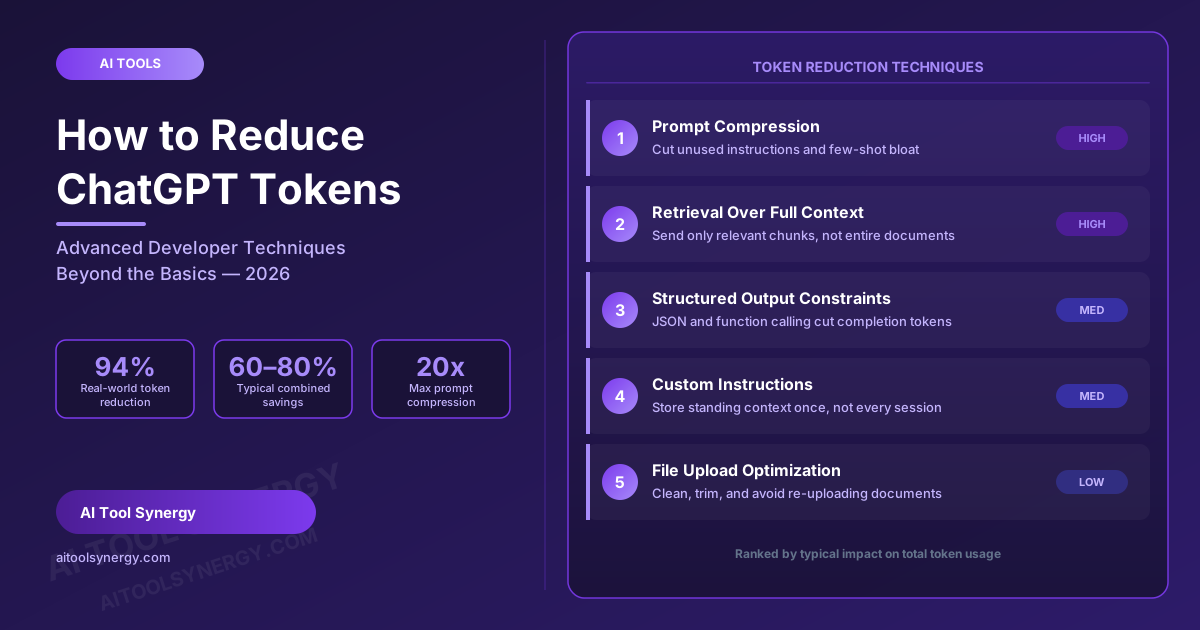
How to Reduce ChatGPT Tokens: Advanced Techniques for Developers (2026)
If you’ve already tried the basic advice on how to reduce ChatGPT tokens — shorter prompts, fewer examples, simpler wording — and you’re still burning through your budget faster than expected, you’re not doing anything wrong. Those tips genuinely help, and our ChatGPT Token Counter tool page covers the six fundamentals well. But for developers building real products, the basic advice only gets you partway there, because it targets the wrong part of the problem.
One developer who instrumented token usage across a production AI agent found that the prompt itself accounted for only a small fraction of total tokens sent to the model. The real driver was what surrounds the prompt: system instructions, tool definitions, conversation history, retrieved documents, and logs, all stacking on top of each other with every request. This is the part of learning how to reduce ChatGPT tokens that most beginner guides skip entirely — and it’s what this guide is built around.
Before you optimize anything, you need a baseline. Run your current prompt through our free ChatGPT Token Counter to see exactly where your tokens are going before you start cutting. And if you haven’t yet nailed down the difference between a token limit and an output cap, our ChatGPT token limit guide is worth reading first, since several of the techniques below exist specifically to keep you under both ceilings.
Measure Before You Optimize
You can’t reduce what you haven’t measured. Paste your current prompt into our free ChatGPT Token Counter to see your exact starting token count across every major model.
Check Your Token Count →Why the Basic ChatGPT Token-Saving Tips Aren’t Enough for Developers
Most consumer-facing advice on how to reduce ChatGPT tokens focuses on the visible prompt: write shorter sentences, remove filler words, ask one question at a time. That advice isn’t wrong, but it addresses maybe 10-20% of the real problem in any non-trivial application. The larger, hidden driver is context accumulation — the system prompt, tool schemas, chat history, and any retrieved documents that get silently reattached to every single request, whether or not they’re still relevant to what the user just asked.
This is why two teams building what looks like the same chatbot can have wildly different token bills: one keeps re-sending an ever-growing conversation history and a bloated system prompt on every turn, while the other actively prunes, compresses, and filters what gets sent. Learning how to reduce ChatGPT tokens at a developer level means treating context as a budget you actively manage, not a pile that grows by default.
How to Reduce ChatGPT Tokens with Prompt Compression
Prompt compression is the most direct way to reduce ChatGPT tokens on the input side without changing what the model actually needs to know. Start by auditing your system prompt line by line and asking whether each instruction has ever measurably changed the model’s output — instructions that exist “just in case” are pure token waste. According to OpenAI’s own prompt engineering documentation, the recommended approach is to start with the smallest prompt that passes your evaluation tests and add instructions only when they fix a measured failure — not preemptively.
Few-shot examples are one of the biggest silent token costs. It’s tempting to include five or six examples to “make sure the model gets it,” but one to three well-chosen examples is almost always enough, and each additional example adds tokens to every single request forever. Specialized compression algorithms can go further still — independent testing has found some compression techniques capable of cutting prompt token counts by as much as 20x while preserving the information the model actually needs to complete the task, according to LaunchDarkly’s prompt engineering research.
How to Reduce ChatGPT Tokens by Restructuring Long Documents
Pasting an entire document into a prompt is one of the most common ways developers accidentally blow through both their token limit and their budget. The fix is to restructure long content into smaller, purpose-built chunks before it ever reaches the model, rather than relying on the model to find the relevant three paragraphs inside forty pages. Semantic chunking — splitting text at natural topic boundaries rather than at a fixed character count — consistently produces better results than arbitrary splitting, because each chunk stays coherent on its own.
Only the chunks relevant to the current question get sent — not the entire document
Once a document is chunked, you have two ways to reduce ChatGPT tokens further: summarize each chunk hierarchically so the model works from condensed versions first and only pulls the full text when needed, or retrieve just the top few chunks that are actually relevant to the current question — which we cover in detail in the retrieval section below.
How to Reduce ChatGPT Tokens Using Custom Instructions
If you find yourself re-pasting the same background information, tone guidelines, or project context into every new conversation, you’re paying the full token cost for that content every single time. ChatGPT’s custom instructions feature lets you store standing context once, rather than retyping or re-pasting it at the start of every session. This is a different mechanism from the prompt caching we cover in our OpenAI API cost calculator guide — caching discounts a repeated prefix within the API, while custom instructions eliminate the need to send that content at all inside the ChatGPT app.
For API-based applications, the equivalent move is to keep a single, versioned system prompt that stays completely stable across requests rather than dynamically rebuilding it per user or per session — which also happens to be a prerequisite for prompt caching to kick in at all.
How to Reduce ChatGPT Tokens with Retrieval Instead of Full-Context Pasting
Retrieval-augmented generation, or RAG, is the single highest-leverage technique for developers who want to reduce ChatGPT tokens on any application backed by a large knowledge base, document set, or codebase. Instead of pasting your entire knowledge base into every prompt, a retrieval step searches for and returns only the handful of chunks most relevant to the current query — typically the top three to five — and only those get sent to the model.
Teams that move from “paste everything” to a proper retrieval step routinely report token reductions in the 60-80% range once compression, retrieval, and smart routing are combined, and in one documented engineering case study, a developer measured a 94% reduction in tokens per request after restructuring an agent’s context pipeline this way. The lesson holds regardless of your stack: a model performs best when it sees the right information, not the most information.
How to Reduce ChatGPT Tokens When Working with Code
Code-heavy workflows have their own version of the token bloat problem. Pasting an entire file when only one function changed, including unrelated files “for context,” or re-sending a whole codebase on every follow-up question all inflate token usage far beyond what the task requires. To reduce ChatGPT tokens in coding workflows, send diffs instead of full files wherever possible, reference specific file paths and function names rather than pasting entire modules, and scope requests narrowly — “review only the authentication middleware” rather than “review the codebase.”
This kind of targeted, location-specific prompting has been shown to cut token consumption dramatically in agentic coding workflows — one analysis found requests dropping from over 8,000 tokens to roughly 2,100 tokens per query once instructions specified exact file locations instead of asking the model to re-scan an entire codebase.
Check Your Code Prompt’s Token Count
Before pasting a large file or diff into ChatGPT, run it through our free counter to see exactly how many tokens it will consume against your model’s limit.
Try the Free Token Counter →How to Reduce ChatGPT Tokens on the Output Side
Everything covered so far reduces input tokens, but output tokens are typically priced two to five times higher than input tokens, which makes the output side just as important if you want to meaningfully reduce ChatGPT tokens overall. The simplest lever is a hard output cap — setting an explicit maximum token limit on the response so the model can’t generate more than the task requires. Stop sequences work similarly, cutting generation short the moment a defined marker appears.
Structured output formats consistently use fewer completion tokens than free-form natural language for the same information, a pattern confirmed across multiple independent token optimization benchmarks. In one documented comparison generating an identical structured order object from GPT-4o, a JSON-message approach used 370 completion tokens, while constraining the same task through function calling brought that down to 213 tokens — roughly a 42% reduction for functionally identical output. Asking explicitly for bullet points, a fixed schema, or a specific format instead of open-ended prose is one of the easiest ways to reduce ChatGPT tokens on every response without losing any information the user actually needs.
| Output approach | Completion tokens (example task) | Relative savings |
|---|---|---|
| Free-form prose | ~450+ tokens | Baseline |
| JSON message format | 370 tokens | ~18% fewer |
| Function calling / schema-constrained | 213 tokens | ~53% fewer |
How to Reduce ChatGPT Tokens During File Uploads
Uploaded files are tokenized just like typed text, and raw file uploads are one of the most overlooked ways developers blow past their token budget. A PDF exported directly from a design tool or scanned document often carries a large amount of formatting noise, embedded metadata, and layout artifacts that consume tokens without adding meaning. Converting a file to clean plain text before uploading, and trimming it to only the pages or sections relevant to your question, can meaningfully reduce ChatGPT tokens spent on file-based tasks.
It also helps to avoid re-uploading the same file multiple times across a single conversation — once a document’s content has been established, referencing it by name in follow-up questions is far cheaper than re-attaching it, since re-uploads count against your token limit every single time.
A Complete Token Reduction Workflow for Developers
Applied together rather than individually, this workflow is where developers consistently reach that 60-80% reduction range mentioned earlier — no single technique gets you there alone, but the combination compounds.
Common Mistakes That Undo Your Token Reduction Efforts
Even well-optimized systems drift back toward token bloat over time if nobody is actively watching. The most common regression is re-adding removed context “just in case” after a single edge-case failure, without re-measuring whether it was actually necessary. Few-shot examples tend to grow back over months as different team members add their own preferred example. Output caps get forgotten on new endpoints. And system prompts that get dynamically modified per request silently break prompt caching eligibility, which — as we cover in our OpenAI API cost guide — can quietly double your effective cost even if your raw token count to reduce ChatGPT tokens hasn’t changed at all. Treat token reduction as an ongoing discipline, not a one-time cleanup — recheck your prompts against our free token counter periodically as your product evolves.
Keep Your Token Usage in Check
Make checking your token count part of your regular workflow. Our free tool shows exact counts across every major model, instantly.
Check Your Tokens Now →FAQ: How to Reduce ChatGPT Tokens
What’s the fastest way to reduce ChatGPT tokens?
Auditing and compressing your system prompt and few-shot examples gives the quickest win, but the largest sustained reductions come from adding retrieval so you stop pasting entire documents or knowledge bases into every request.
Does reducing ChatGPT tokens hurt response quality?
Not when done correctly. Removing genuinely unused context and replacing verbose prose with structured output formats typically maintains or improves quality, since the model isn’t sifting through irrelevant information.
How much can developers realistically reduce ChatGPT tokens by?
Combining prompt compression, retrieval, structured output, and model routing commonly achieves 60-80% overall reduction, with some documented case studies reporting reductions above 90% after restructuring context pipelines.
Is retrieval (RAG) necessary to reduce ChatGPT tokens, or just prompt compression?
For applications backed by any sizable knowledge base or document set, retrieval is usually more impactful than prompt compression alone, since it prevents entire documents from being sent when only a few paragraphs are relevant.
Why do output tokens matter as much as input tokens?
Output tokens are typically priced two to five times higher than input tokens, so an unconstrained, verbose response can cost more than a much larger input prompt.
How do custom instructions help reduce ChatGPT tokens?
Custom instructions let you store standing background information once instead of re-pasting it into every new conversation, eliminating that repeated token cost entirely inside the ChatGPT app.
Do structured outputs really reduce ChatGPT tokens compared to plain text answers?
Yes. Documented testing has shown schema-constrained or function-calling outputs using roughly half the completion tokens of an equivalent free-form written answer.
Should I compress files before uploading them to ChatGPT?
Yes — converting files to clean plain text and trimming them to only the relevant sections before upload avoids paying token cost for formatting noise and irrelevant pages.
Why does my token usage creep back up after I’ve optimized it?
Context tends to regrow over time as team members re-add examples or instructions without re-measuring necessity — treating token reduction as an ongoing process rather than a one-time fix prevents this drift.








3 Responses
Hmm is anyone else experiencing problems with the images on this
blog loading? I’m trying to find out if its a problem on my end or if it’s the blog.
Any responses would be greatly appreciated.
Hi, Thanks for the reading, Blog is loading properly, I hope you got the information you wanted to
Regards:
Admin AI Tool Synergy
Good info. Lucky me I discovered your website by accident
(stumbleupon). I have saved it for later!