
If you’ve ever wondered what is a token in ChatGPT for beginners need to know, here’s the simple answer: a token is just a small chunk of text — a whole word, part of a word, or a punctuation mark — that ChatGPT uses to read and write instead of reading full sentences the way you do. This guide explains what is a token in ChatGPT for beginners with zero technical jargon, shows you exactly how text gets broken into tokens, and gives you a free tool to count your own tokens instantly.
What Is a Token in ChatGPT for Beginners? The Simple Answer
When you type a message to ChatGPT, the AI does not actually read your words the way a human brain does. Before anything else happens, your text gets broken into tokens — and that is exactly what is a token in ChatGPT for beginners really needs to understand first. A token can be:
- A whole common word — “hello”, “love”, “AI”
- Part of a longer word — “un”, “believ”, “able” for “unbelievable”
- A single character or symbol — punctuation, emoji, or special characters
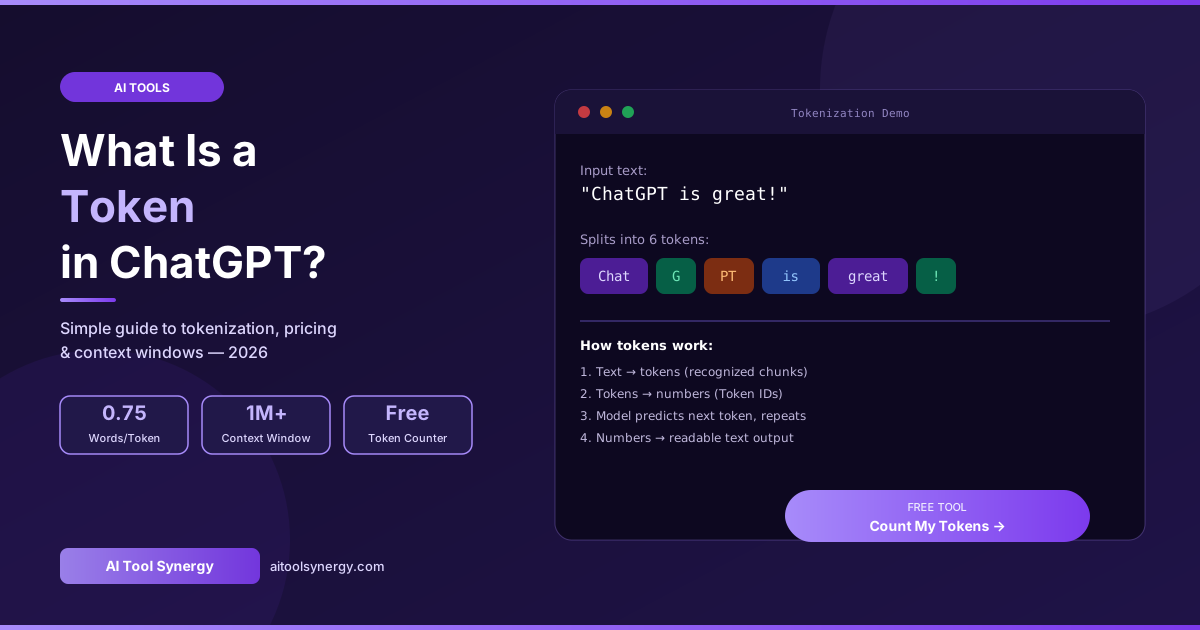
Here is exactly how the sentence “ChatGPT is great!” gets broken into tokens — a perfect visual answer to what is a token in ChatGPT for beginners trying to picture this for the first time:
Notice “ChatGPT” itself splits into three separate tokens — Chat, G, PT — because it is not a single recognized word in the model’s vocabulary. This single example answers most of what is a token in ChatGPT for beginners get confused about: tokens rarely match up neatly with the words you see on screen.
What Is a Token in ChatGPT for Beginners? Why It Matters at All
You might be wondering why this even matters if you just want to chat with ChatGPT normally. Here’s what is a token in ChatGPT for beginners should actually care about in practice:
- It explains the “memory limit” — ChatGPT can only “remember” a certain number of tokens in one conversation. Once you go over that limit, the oldest parts of your conversation get forgotten.
- It explains API pricing — if you ever use ChatGPT through a developer tool or app built on OpenAI’s API, you are billed per token, not per word or per message.
- It explains weird text behavior — sometimes ChatGPT mishandles a word, miscounts letters, or struggles with a specific phrase. This often traces back to how that text was tokenized.
According to a beginner-focused breakdown of ChatGPT tokens, understanding token limits and memory constraints becomes especially important once you start using ChatGPT for longer documents or extended conversations — exactly the point where most beginners first encounter the term.
What Is a Token in ChatGPT for Beginners? How the Process Actually Works
Here is the full pipeline, broken into beginner-friendly steps — answering what is a token in ChatGPT for beginners need to know about what happens behind the scenes every time they hit send:
Your text is split into tokens
The moment you send a message, ChatGPT’s tokenizer breaks it into chunks based on a fixed vocabulary built from training data.
Each token becomes a number
Every token in the model’s vocabulary maps to a specific Token ID. For example, the token “love” might correspond to the number 8923. The model never actually “sees” text — only numbers.
The model predicts the next token
The AI looks at the sequence of numbers so far and calculates which token should come next — repeating this one token at a time to build the full response.
Numbers convert back into readable text
The output token numbers get converted back into text fragments and assembled into the response you actually read on screen.
What Is a Token in ChatGPT for Beginners? How Many Words Is One Token?
The simplest rule beginners should remember: one token equals approximately 0.75 words in English, or roughly 4 characters. This lets you estimate quickly without any tool:
| Word Count | Approximate Tokens | Example |
|---|---|---|
| 75 words | ~100 tokens | A short paragraph |
| 750 words | ~1,000 tokens | A blog post intro |
| 3,750 words | ~5,000 tokens | A long-form article |
| 900,000 words | ~1,200,000 tokens | Shakespeare’s complete works |
This ratio is not the same in every language — a tool from OpenAI itself lets you paste text and see the exact token breakdown, confirming that English is one of the most token-efficient languages since most AI models are trained predominantly on English text.
What Is a Token in ChatGPT for Beginners? Do You Get Charged Per Token?
This is one of the most common beginner questions, and the answer depends entirely on how you use ChatGPT:
| How You Use ChatGPT | Do You Pay Per Token? |
|---|---|
| ChatGPT website/app, Free plan | No — $0 flat, with usage limits instead |
| ChatGPT website/app, Plus/Pro plan | No — flat monthly subscription fee |
| OpenAI API (for developers) | Yes — billed per token, input and output separately |
If you are simply chatting with ChatGPT through the website or mobile app, you never see a per-token bill — you pay a flat subscription instead. Token-based billing only becomes relevant if you build your own app or tool using OpenAI’s API directly, where every input and output token is metered and charged.
What Is a Token in ChatGPT for Beginners? Why Some Words Split Apart
A question that confuses almost every beginner: why does ChatGPT sometimes break a normal word into multiple pieces? Common, frequently-used words like “cat” or “love” are usually a single token because they appear constantly in training data. Longer or less common words get broken into multiple smaller tokens instead.
Take “unbelievable” — it commonly splits into three tokens: un, believ, and able. This subword approach is exactly what lets ChatGPT handle brand new words, typos, and slang it has never explicitly seen before, by breaking unfamiliar text into smaller, recognized fragments rather than failing entirely.
What Is a Token in ChatGPT for Beginners? Understanding the Context Window
Once beginners understand individual tokens, the next natural question is about the “memory” of a conversation — technically called the context window. This is the maximum number of tokens ChatGPT can consider at once, combining both your messages and its replies into one shared budget.
In 2026, top AI models offer context windows reaching approximately 1 million tokens — roughly a 750,000-word library compressed into a single conversation. When a conversation exceeds this limit, the oldest tokens get dropped from the model’s active memory, which is exactly why ChatGPT sometimes seems to “forget” something you mentioned much earlier in a long chat.
What Is a Token in ChatGPT for Beginners? How to Count Your Own Tokens
Now that you understand what is a token in ChatGPT for beginners need to know conceptually, here’s how to actually check your own token count without any technical skill or manual maths:
Count tokens in 2 simple steps
- Go to our free ChatGPT Token Counter
- Paste any text and instantly see the exact token count
This is useful even for non-technical beginners — for example, checking whether a long document will fit before pasting it into ChatGPT, or understanding why a previous conversation suddenly felt like it “forgot” earlier context.
🔢 Free ChatGPT Token Counter — No Signup, No Tech Skills Needed
Paste any text and get an accurate token count instantly. Perfect for beginners checking document length or API costs.
Count My Tokens Free →Frequently Asked Questions
Final Thoughts on What Is a Token in ChatGPT for Beginners
Understanding what is a token in ChatGPT for beginners need to know boils down to one simple idea: ChatGPT doesn’t read text the way you do — it breaks everything into small token pieces first, processes those numbers, then converts the result back into readable language. Once that clicks, concepts like memory limits, API pricing, and the occasional oddly-split word all make immediate sense.
✅ Free ChatGPT Token Counter — No Signup
Paste any text and get an instant, accurate token count. Beginner-friendly, 100% free forever.
Open Token Counter →