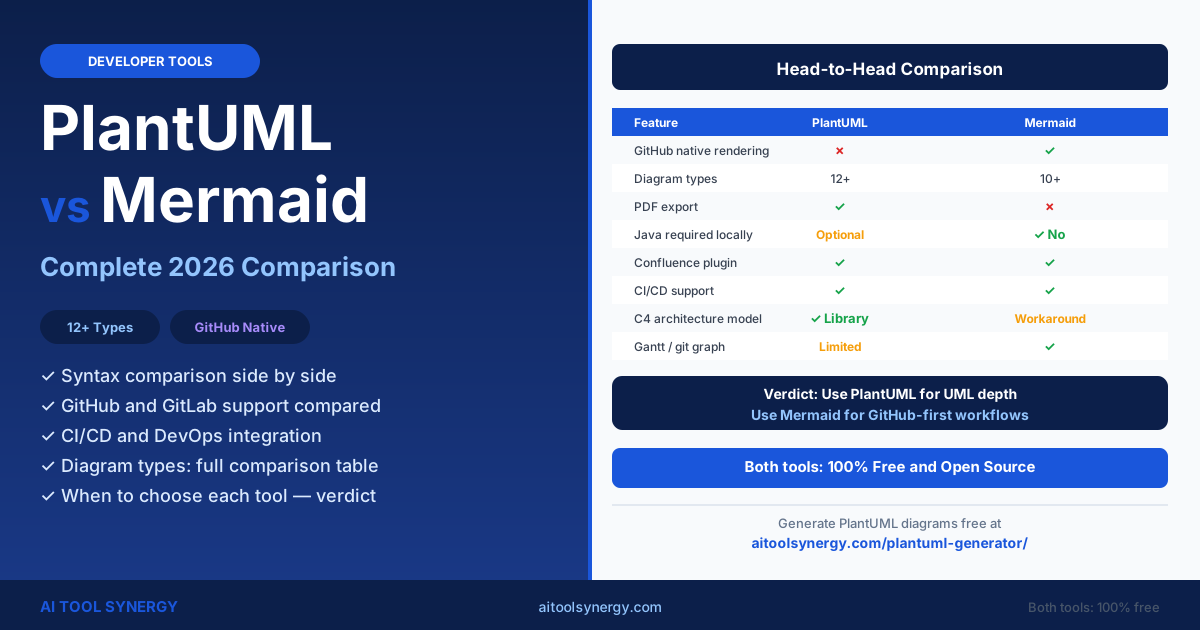
PlantUML vs Mermaid: Which Is Best for Your Team? (Complete 2026 Guide)
The plantuml vs mermaid question is the most common debate developers face when choosing a diagram-as-code tool. Both let you write plain text descriptions and auto-generate UML and architecture diagrams, but they take fundamentally different approaches in syntax, ecosystem, and platform support.
PlantUML uses a Java-based rendering engine and supports over 12 diagram types with rich output formats. Mermaid runs on JavaScript and renders natively inside GitHub and GitLab markdown files — a difference that has made the plantuml vs mermaid choice very team-dependent in recent years.
This guide covers syntax, setup, diagram types, GitHub and GitLab support, CI/CD integration, rendering quality, performance, and how both tools compare to visual options like Draw.io and Lucidchart — so you can make the right call for your workflow.
What Is PlantUML vs Mermaid? A Complete Introduction
The plantuml vs mermaid comparison starts with their underlying technology. PlantUML launched in 2009 and uses a Java-based rendering engine. Mermaid launched in 2014 and runs entirely on JavaScript. Both convert text syntax into visual diagrams — but the technology choice has downstream consequences for setup, platform support, and output formats.
PlantUML is the more mature tool. It supports over 12 diagram types, exports to PNG, SVG, PDF, and ASCII art, and works in IDE extensions, CI/CD pipelines, and standalone desktop editors. It requires Java for local rendering, though online tools like our free PlantUML generator remove that requirement entirely.
Mermaid’s key advantage is platform integration. Since 2022, Mermaid renders natively inside GitHub markdown files — you write a fenced code block with the mermaid tag, and GitHub displays the diagram automatically without any plugin, action, or external service.
PlantUML vs Mermaid Syntax: Code Comparison Side by Side
The most immediate plantuml vs mermaid difference is how you write diagrams. PlantUML uses @startuml / @enduml delimiters with its own keyword set. Mermaid uses a diagram-type keyword on the first line followed by indented content. Neither is objectively better — they reflect different design philosophies.
@startuml
Alice -> Bob : Login request
Bob --> Alice : Token returned
Bob -> Server : Validate token
Server --> Bob : Confirmed
@enduml
sequenceDiagram
  Alice ->> Bob : Login request
  Bob -->> Alice : Token returned
  Bob ->> Server : Validate token
  Server -->> Bob : Confirmed
PlantUML syntax is more explicit — you declare participants and relationships in full, which makes large diagrams easier to read at a glance. Mermaid syntax is slightly more concise, with ->> replacing -> for solid arrows. Both support the same sequence diagram features including activation boxes, notes, and alt/loop blocks.
@startuml
class User {
  +String name
  +String email
  +login()
}
class Order {
  +int id
  +submit()
}
User "1" -- "many" Order
@endumlclassDiagram
class User {
+String name
+String email
+login()
}
class Order {
+int id
+submit()
}
User "1" --> "many" OrderPlantUML vs Mermaid Setup: Which Is Easier to Install?
Setup complexity is one of the sharpest differences in the plantuml vs mermaid comparison. Mermaid has a clear advantage for quick starts — it requires no installation at all when used inside GitHub or GitLab markdown. PlantUML needs Java locally, though server mode and online generators eliminate that requirement.
- Online (zero install): Use our free PlantUML generator — paste code, get diagram instantly
- VS Code extension: Install jebbs.plantuml, set server mode — no Java needed
- Local (full): Install Java JDK + Graphviz + VS Code extension
- Docker: Run
docker run plantuml/plantuml-server:jetty - CI/CD: Use the official Docker image in your pipeline
- GitHub/GitLab (zero install): Write a fenced
```mermaidblock — renders automatically - VS Code: Install the Mermaid Preview extension (no Java needed)
- CLI: Run
npm install -g @mermaid-js/mermaid-cli - Browser CDN: Include
mermaid.min.jsin any HTML file - CI/CD: Use mmdc (Mermaid CLI) in pipeline scripts
For VS Code users switching from PlantUML, our plantuml editor vscode setup guide covers the full extension configuration including server mode, Graphviz, and Mac-specific steps — so you can avoid the Java install entirely.
PlantUML vs Mermaid Diagram Types: What Each Tool Supports
Both tools cover the core UML diagram types, but PlantUML has a larger catalogue overall. Mermaid compensates with diagram types that PlantUML does not support natively, including Gantt charts, user journey maps, git graphs, and pie charts — which are common in project and product management workflows.
| Diagram Type | PlantUML | Mermaid |
|---|---|---|
| Sequence | ✓ Full support | ✓ Full support |
| Class | ✓ Full support | ✓ Full support |
| Activity / Flowchart | ✓ Full support | ✓ Full support |
| State | ✓ Full support | ✓ Full support |
| ER / Entity Relationship | ✓ Full support | ✓ Full support |
| Use Case | ✓ Full support | ✗ Not supported |
| Component | ✓ Full support | ✗ Not supported |
| Deployment | ✓ Full support | ✗ Not supported |
| Timing | ✓ Full support | ✗ Not supported |
| Wireframe (Salt) | ✓ Full support | ✗ Not supported |
| Archimate | ✓ Full support | ✗ Not supported |
| Mind Map | ✓ Full support | ✗ Not supported |
| WBS / Work Breakdown | ✓ Full support | ✗ Not supported |
| Gantt Chart | Limited | ✓ Full support |
| Git Graph | ✗ Not supported | ✓ Full support |
| Pie Chart | ✗ Not supported | ✓ Full support |
| User Journey Map | ✗ Not supported | ✓ Full support |
| XY / Sankey Chart | ✗ Not supported | ✓ Full support |
PlantUML leads for full UML coverage, including Use Case, Component, Deployment, and Timing diagrams essential for enterprise software documentation. Mermaid leads for business-friendly diagram types that project managers and product teams use day to day.
PlantUML vs Mermaid on GitHub, GitLab and Confluence
Platform integration is where Mermaid has a clear structural advantage over PlantUML. Since May 2022, GitHub natively renders Mermaid diagrams inside markdown files and pull request descriptions — no plugin, no GitHub Action, no setup of any kind required by the viewer.
| Platform | PlantUML | Mermaid |
|---|---|---|
| GitHub markdown | Needs GitHub Action or browser extension | ✓ Native since May 2022 |
| GitLab markdown | ✓ Native (enable in Admin settings) | ✓ Native since 2019 |
| Confluence | ✓ Official PlantUML plugin | ✓ Official Mermaid plugin |
| Notion | Via embed or image export | Via third-party embed |
| Slack | ✓ Official PlantUML Slack app | Via image export only |
| VS Code | ✓ jebbs.plantuml extension | ✓ Mermaid preview extension |
PlantUML vs Mermaid for CI/CD Pipelines and DevOps
In the plantuml vs mermaid space, both tools have strong CI/CD support. The typical use case is auto-generating and publishing architecture diagrams whenever documentation files change — keeping your diagrams always in sync with your codebase without manual export steps.
For PlantUML in CI/CD, the recommended approach is the official Docker image. Add a step to your GitHub Actions workflow that runs the PlantUML container against all .puml files in your repository and commits the exported PNG or SVG files back to a /docs folder.
For Mermaid in CI/CD, the @mermaid-js/mermaid-cli package (installable via npm) provides a command-line tool mmdc that converts .mmd files to SVG or PNG. This works in any Node.js CI environment without Docker, which gives Mermaid a slight edge in lightweight pipeline setups.
Rendering Engine, Output Quality and Export Formats
Output format support is one of the clearest wins for PlantUML. Its Java-based engine produces PNG, SVG, PDF, ASCII art, EPS, and LaTeX from a single source file — without any additional tooling or post-processing steps.
Mermaid is more limited on output formats — its primary format is SVG, with PNG available via the CLI using a headless Puppeteer browser. Teams needing PDF or ASCII output have only one code-based option: PlantUML.
| Output Format | PlantUML | Mermaid |
|---|---|---|
| PNG | ✓ Native | ✓ Via CLI (Puppeteer) |
| SVG | ✓ Native | ✓ Native output |
| ✓ Native (local mode) | ✗ Not supported | |
| ASCII art | ✓ Native | ✗ Not supported |
| EPS / LaTeX | ✓ Native | ✗ Not supported |
Mermaid’s SVG output quality is excellent for web rendering and GitHub display. PlantUML’s rendering has improved significantly since 2020 and now produces crisp, professional-quality diagrams especially when using the ELK layout engine for complex graphs.
Performance with Large and Complex Diagrams
For typical team diagrams — under 30 elements and a few dozen relationships — both tools perform equally well and render in under one second. The difference appears at scale. PlantUML can handle very large architecture diagrams by adjusting the PLANTUML_LIMIT_SIZE setting, which controls the maximum pixel output size.
Mermaid can become slow or produce layout errors on very large flowcharts and sequence diagrams. This is because it relies on browser-based or Node.js rendering, which has memory constraints that PlantUML’s Java engine does not share. For enterprise-scale C4 or architecture diagrams with 50+ nodes, PlantUML is generally the safer choice.
PlantUML vs Mermaid vs Draw.io vs Lucidchart: Full Landscape
The plantuml vs mermaid debate sits within a broader choice between code-based and GUI-based diagramming tools. Draw.io (also known as diagrams.net) and Lucidchart serve a different audience — teams that prefer clicking and dragging over writing syntax. Here is how all four compare across the key dimensions.
| Feature | PlantUML | Mermaid | Draw.io | Lucidchart |
|---|---|---|---|---|
| Cost | Free | Free | Free | Paid (free tier limited) |
| Version control | ✓ Text file | ✓ Text file | XML file (workable) | Cloud only |
| Setup required | Low (server mode) | Zero (GitHub) | None (browser app) | None (browser app) |
| Non-developer friendly | Moderate | Moderate | ✓ Very easy | ✓ Very easy |
| GitHub integration | Needs Action | ✓ Native | Via plugin | Via plugin |
| Diagram types | 12+ | 10+ | Unlimited (manual) | Unlimited (manual) |
| PDF export | ✓ Free | Limited | ✓ Free | Paid tier required |
| CI/CD automation | ✓ Docker/CLI | ✓ mmdc CLI | Limited | ✗ Not supported |
The real distinction is philosophy: code-based tools treat diagrams as source files that live in your repository. GUI tools treat diagrams as assets managed separately. This analysis on gleek.io covers additional tool comparisons if you want a third-party perspective before deciding.
When to Choose PlantUML and When to Choose Mermaid
After comparing plantuml vs mermaid across every dimension, the right choice comes down to three questions: where will diagrams live, who will write them, and what types do you need? Use this decision guide to find your answer.
- Your team works primarily on GitHub and wants diagrams rendered natively in README and pull requests
- You need Gantt charts, git graphs, pie charts, or user journey maps
- Setup speed matters — zero install for GitHub users
- Your team is JavaScript-focused and already uses npm
- You want diagrams directly inside markdown documentation files
- You need Use Case, Component, Deployment, Timing, Wireframe, or Archimate diagrams
- PDF export or ASCII art output is required for your deliverables
- You use Confluence, Slack, or enterprise tools with existing PlantUML plugins
- You need a free online tool with no setup at all — use our PlantUML generator
- Your team needs to handle very large architecture diagrams at scale
Many mature engineering teams use both — Mermaid for quick in-repository documentation and GitHub pull request diagrams, and PlantUML for formal architecture diagrams, enterprise documentation, and Confluence wikis. The two tools are complementary rather than mutually exclusive.
If you are starting fresh and the choice is genuinely open, Mermaid is the easier entry point for GitHub-native teams. If you need diagram breadth, Confluence integration, or offline PDF export, PlantUML is the more powerful long-term choice. Both are free — there is no wrong answer.
PlantUML vs Mermaid — Frequently Asked Questions
Neither tool is universally better — the plantuml vs mermaid answer depends on your workflow. PlantUML supports more diagram types (12+ vs 10+), more export formats, and enterprise tool integrations. Mermaid renders natively on GitHub with zero setup and is better for Gantt charts and git graphs.
Mermaid is easier to start with if you use GitHub — you write a fenced code block and the diagram renders with no setup at all. PlantUML setup is straightforward too: use our free online PlantUML tool for instant rendering with no installation, or set VS Code to server mode to avoid installing Java locally.
Yes — Mermaid fully supports class diagrams with the classDiagram keyword. You can define classes, attributes, methods, visibility modifiers, and relationships including inheritance, composition, and association. However, PlantUML’s class diagram support is more mature and handles edge cases and advanced stereotypes better for complex object-oriented models.
Not natively — GitHub does not render PlantUML inside markdown files the same way it renders Mermaid. The options for PlantUML on GitHub are: use a GitHub Action to generate and commit PNG exports, use the PlantUML GitHub browser extension, or link to rendered images via the plantuml.com server URL in your markdown.
Mermaid is generally faster to write for simple diagrams — it has less boilerplate, with no @startuml/@enduml wrapper required. For complex diagrams with many participants, notes, or nested elements, the speed difference is negligible. Both tools support autocomplete in major IDE extensions, which reduces typing time for both syntaxes significantly.
Yes — many teams do. A common pattern is to use Mermaid for simple sequence and flowchart diagrams that live in GitHub markdown files and pull requests, and PlantUML for detailed architecture, component, and deployment diagrams stored in a /docs folder and rendered via CI/CD. The tools do not conflict and serve complementary purposes.
Both work well in CI/CD. PlantUML uses a Docker image (plantuml/plantuml-server) and can export to PNG, SVG, and PDF. Mermaid uses the @mermaid-js/mermaid-cli npm package and exports to SVG and PNG. For teams already using Docker in CI/CD, PlantUML’s official image is slightly easier to integrate. For Node.js-based pipelines, Mermaid’s CLI is the leaner option.
No — both tools are actively maintained and growing. Mermaid has grown faster due to GitHub native support, but PlantUML remains the leader for enterprise UML, Confluence documentation, and complex multi-type diagram suites. They coexist and serve overlapping but distinct audiences — not a zero-sum competition.
PlantUML has strong C4 model support via the C4-PlantUML library on GitHub, which provides C4-specific macros for Context, Container, Component, and Code diagrams. Mermaid has no dedicated C4 library but can approximate C4 diagrams using flowcharts or class diagrams. For formal C4 model use, PlantUML with C4-PlantUML is the recommended choice.
Related Articles