

This guide explains Ahrefs URL Rating — what it measures, how it differs from Domain Rating, why it matters for link building decisions, and how internal linking is the most controllable way to improve it. If you have been evaluating links purely by DR and ignoring UR, you have been missing a critical part of the picture.
What this covers: what Ahrefs URL Rating is · UR vs DR at a glance · how UR is calculated · why high DR does not mean high UR · the internal linking connection · why UR of the linking page matters more than site DR · what a good UR score looks like · how to check and improve it.
What Is Ahrefs URL Rating (UR)? How It Differs From Domain Rating
Most site owners who use Ahrefs know their site’s Domain Rating. Far fewer pay attention to the other authority metric sitting right next to it: Ahrefs URL Rating. While DR tells you how strong your entire website’s backlink profile is, Ahrefs URL Rating tells you how strong a specific page’s backlink profile is. These are completely different measurements — and for many SEO decisions, especially link building evaluation, UR is actually the more important number.
Understanding this page-level metric also explains several counterintuitive SEO situations: why a link from a medium-DR site can outperform a link from a high-DR site, why a page on a DR 80 domain might have nearly zero authority, and why internal linking is one of the most powerful and underused tools for improving page-level rankings. According to Ahrefs’ official URL Rating documentation, UR is one of the core metrics in their toolset — yet it receives a fraction of the attention that DR does.
What Is Ahrefs URL Rating and Why Does It Matter for SEO
Ahrefs URL Rating (UR) is a metric that measures the backlink strength of a single URL on a logarithmic scale from 0 to 100. Unlike Domain Rating, which evaluates the entire website’s backlink profile, UR evaluates only the links pointing to one specific page — plus the internal links pointing to that page from other pages on the same site.
UR matters for SEO because Google ranks pages, not domains. A high Domain Rating means your website has strong overall link authority — but each individual page still needs its own authority to rank competitively for specific keywords. A page with UR 50 on a DR 35 site can outrank a page with UR 8 on a DR 75 site for the same keyword, because the UR 50 page has more direct link authority pointed at the exact URL Google is evaluating.
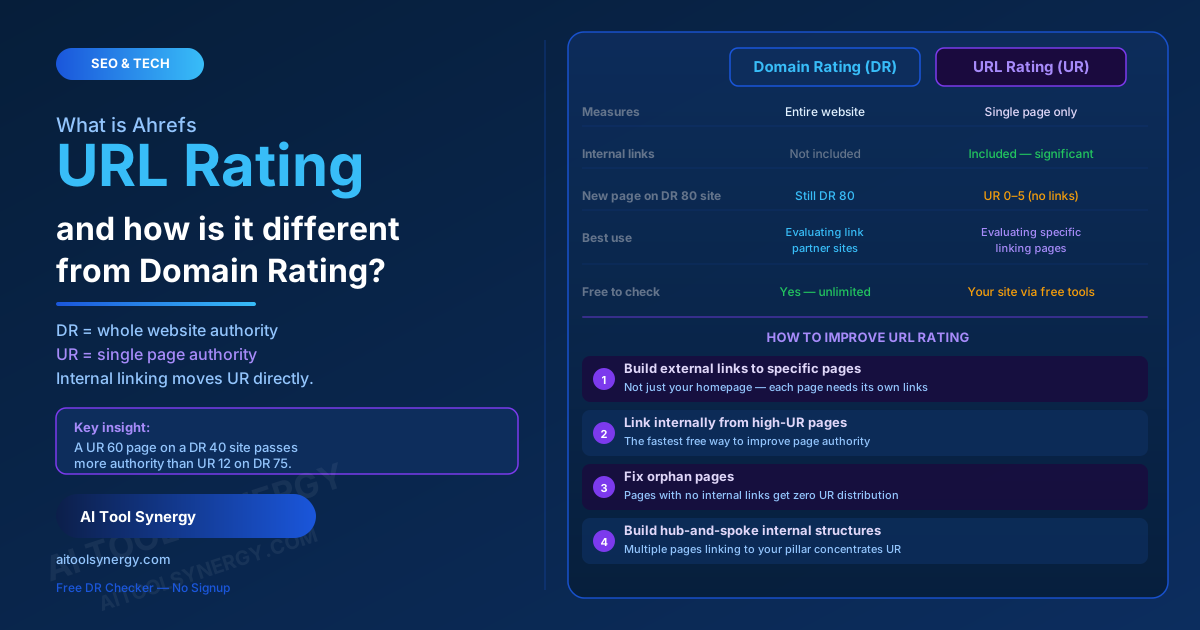
The single most important insight about Ahrefs URL Rating: A link from a UR 60 page on a DR 40 domain passes more authority to your page than a link from a UR 12 page on a DR 75 domain. The UR of the specific linking page matters more than the DR of the site it lives on. This is the core insight that separates effective link building from ineffective link building.
Ahrefs URL Rating vs Domain Rating — The Core Difference
The distinction between Ahrefs URL Rating and Domain Rating is the most important concept to understand before using either metric to make decisions.
Website-level authority
- Measures the entire domain’s backlink profile
- Based on unique referring domains linking to anywhere on the site
- A single score for the whole website
- Use for: evaluating a site as a link partner, competitive benchmarking
- Check free: our Domain Rating Checker
Page-level authority
- Measures a single page’s backlink strength
- Based on external links + internal links to that specific URL
- Each page has its own individual UR score
- Use for: evaluating which specific page to get a link from, page SEO
- Check via: paid Ahrefs account or Ahrefs Webmaster Tools
| Factor | Ahrefs URL Rating (UR) | Ahrefs Domain Rating (DR) |
|---|---|---|
| What it measures | Single page backlink strength | Entire website backlink strength |
| Scale | 0–100 logarithmic | 0–100 logarithmic |
| Affected by internal links | Yes — significantly | No |
| A new page on a DR 80 site | UR 0–5 (no links to that page) | Still shows DR 80 |
| Used for | Evaluating specific link pages | Evaluating sites as link sources |
| Free to check | Limited (your own site via Webmaster Tools) | Yes — unlimited via free tools |
How the UR Score Is Calculated
Ahrefs calculates URL Rating using three main inputs, according to Bluehost’s comprehensive analysis of URL Rating vs Domain Rating:
- External backlinks pointing directly to that URL — only links pointing to the exact page being measured, not to other pages on the same domain. The quality and authority of these linking pages matters, not just their count.
- The URL Rating of the linking pages — UR uses a recursive calculation where the UR of the page giving you the link determines how much authority it can pass. A UR 50 page passes more authority than a UR 15 page regardless of their parent domains’ DR scores.
- Internal links from other pages on the same site — this is the most underappreciated input. Internal links from high-UR pages on your own site pass UR to the target page, which is why strategic internal linking directly improves how individual pages can rank.
Only followed links (dofollow) pass UR value. Nofollow, UGC-tagged, and sponsored links are excluded from the UR calculation, matching how DR handles link type differentiation.
Why High Domain Rating Does Not Guarantee High Ahrefs URL Rating
One of the most important misconceptions about Ahrefs URL Rating is that it automatically follows DR. It does not. A website with DR 80 can have individual pages with UR scores of 0–5 if those pages have no external links pointing directly at them and no internal links from the site’s other high-authority pages.
Consider a practical example: a DR 80 media publication writes a brand new article about your industry today. That article starts with UR 0 — regardless of the publication’s site-wide DR. As the article gets linked to from other pages on the site, shared on social media, and cited externally, its UR climbs. But on publication day, a link from that new article passes very little UR to your site — even though the domain’s DR is impressive.
Common link building mistake: Evaluating a link opportunity purely by the site’s DR without checking the UR of the specific page that will link to you. A DR 70 site’s homepage might have UR 65 — but the blog post that will include your link might have UR 8 if it was published last week with no links pointing at it yet. Always check UR of the linking page, not just DR of the domain.
The Internal Linking Secret Behind Ahrefs URL Rating
The most powerful and controllable way to improve Ahrefs URL Rating for your most important pages is internal linking — and most site owners barely use it strategically. Internal links from pages on your own site with high UR pass link equity to the pages you link to, raising the receiving page’s UR score without requiring any external backlink acquisition.
This creates a compounding opportunity: every time you earn a strong external backlink to one page on your site, that page’s UR rises — and by linking internally from that high-UR page to other pages you want to rank, you distribute authority throughout your site without needing to earn external links for every page individually.
Identify your highest-UR pages. In Ahrefs Site Explorer, look at your top pages sorted by UR. These are the pages that have received the most direct external backlinks and carry the most transferable authority.
Link from high-UR pages to pages you want to rank. Add natural, contextually relevant internal links from your highest-UR pages to pages with lower UR that you want to rank for competitive keywords. Each internal link from a high-UR page passes a proportional share of its authority.
Fix orphan pages. Any page with zero internal links pointing to it receives no UR from the rest of your site, regardless of your overall DR. Audit your site for pages with no internal links and add at least 2–3 relevant internal links to each one from related content.
Build hub-and-spoke structures. Create pillar pages that link to subtopic posts, and have all subtopic posts link back to the pillar. This concentrates UR on your most important pages by creating multiple internal link paths pointing at them from across the site.
Why this matters for Domain Rating too: As individual page UR rises through internal linking, pages become more competitive for their target keywords, which can attract more natural external backlinks — which in turn raises overall site DR. Internal linking improvements create a compounding cycle that benefits both UR and DR over time. For strategies to grow your overall site DR, see our guide on how to increase domain rating.
Check Your Domain Rating Free — No Ahrefs Account Needed
While UR requires Ahrefs Webmaster Tools to check for your own site, you can check any domain’s overall DR instantly with our free checker — no signup, no limits, real Ahrefs data.
Check DR Free →Why the Ahrefs URL Rating of a Linking Page Matters More Than Site DR
This is the practical insight from Ahrefs URL Rating that changes how smart SEOs evaluate link opportunities. When assessing a potential backlink, the UR of the specific page that will link to you determines how much authority that link passes — not the DR of the domain it lives on.
| Link scenario | DR of site | UR of linking page | Authority passed |
|---|---|---|---|
| Link from homepage of major publication | DR 80 | UR 72 | Very high |
| Link from new article on same publication | DR 80 | UR 6 | Very low |
| Link from well-linked resource page on mid-site | DR 40 | UR 55 | High |
| Link from deep blog post on a strong site | DR 60 | UR 14 | Low |
| Link from site with many outbound links | DR 70 | UR 45 but links to 500 pages | Diluted — moderate |
When evaluating any link building opportunity, ask for the UR of the specific page — not just the DR of the site. A placement on a well-linked, high-UR internal page of a DR 40 site often outperforms a placement on a new, unlinked page of a DR 80 site for actual authority transfer.
What Is a Good UR Score for Ranking?
Like Domain Rating, UR is a relative metric — what counts as good depends on the specific keyword competition you are trying to enter. A page with UR 20 might rank easily for a low-competition long-tail keyword where competing pages have UR 5–15, while that same UR 20 page would struggle for a competitive keyword where page-one results average UR 55.
| UR Range | What it signals | Typical ranking ability |
|---|---|---|
| UR 0–10 | New or unlinked page | Very long-tail, near-zero competition only |
| UR 10–25 | Some links or strong internal linking | Low to medium competition keywords |
| UR 25–45 | Solid page authority | Medium competition in most niches |
| UR 45–65 | High page authority | Competitive industry keywords |
| UR 65+ | Exceptional page authority | Most keywords in most niches |
The most useful benchmark: check the UR of the pages currently ranking positions 1–5 for your target keyword. That average UR is your real competitive target — not a generic scale number.
How to Check Ahrefs URL Rating for Any Page
Checking Ahrefs URL Rating is more limited than checking DR because UR data requires Ahrefs access. Here is what is available at each access level:
For your own site (free via Ahrefs Webmaster Tools)
Ahrefs Webmaster Tools is a free account that shows UR data for your own verified site. After verifying ownership, navigate to Site Explorer and you can see the UR for every page on your own domain sorted from highest to lowest. This is the most practical free way to audit your internal UR distribution and identify which pages need more internal links pointed at them.
For competitor sites and link prospects (paid Ahrefs)
Checking the UR of specific pages on sites you don’t own requires a paid Ahrefs subscription. In Site Explorer, entering any URL rather than a domain shows the UR of that specific page alongside its backlink count. This is the key workflow for evaluating a link opportunity — enter the specific article URL that will link to you, not just the site’s homepage.
For domain-level authority (free via our checker)
While UR requires Ahrefs access, you can check any site’s overall Domain Rating instantly using our free DR checker. DR gives you the site-wide picture — combine it with UR checking of the specific linking page when making link building decisions. For a complete guide on getting maximum value from DR data, see our guide on how to check Ahrefs Domain Rating for free.
How to Improve Your URL Rating — Practical Steps
Improving UR on your most important pages requires a combination of external backlink acquisition and internal linking strategy. The external side requires earning dofollow backlinks to that specific URL from pages with high UR themselves. The internal side is entirely within your control immediately.
- Build external links to specific pages, not just the homepage. Every external link should point to the exact page you want to rank — not generically to your domain. Guest posts should link to your most valuable resource pages, not your homepage.
- Add internal links from your highest-UR pages to pages you want to rank. Identify your top 5–10 highest-UR pages in Ahrefs Webmaster Tools and add contextually relevant links from those pages to your key ranking targets.
- Remove internal links to low-value pages from high-UR pages. Every internal link from a high-UR page dilutes the authority it passes per link. Remove links to low-value pages (tag archives, search results, thin content) from your most authoritative pages to concentrate the authority on links that matter.
- Create content clusters that funnel UR to your pillar pages. Build multiple related posts that all link to one central pillar — the compounding internal links raise the pillar page’s UR faster than external links alone could.
For the complete strategy to grow your overall domain authority alongside individual page UR, see our guide on how to increase domain rating — the same quality link-building principles that move DR also build UR on individual pages. And for understanding the relationship between DR and other authority metrics, our guide on Ahrefs Domain Rating vs Domain Authority covers the full comparison. According to Google’s official documentation on links and SEO, the underlying signals that both DR and UR approximate — quality external links and strong internal site structure — remain among the most important ranking factors.
URL Rating vs Moz Page Authority — How They Compare
Moz’s Page Authority (PA) is the closest equivalent to UR — both measure individual page-level link authority on a 0–100 scale. The key differences mirror those between DR and Moz DA: PA includes a broader set of signals beyond pure backlinks, while UR focuses narrowly on link-graph strength.
| Metric | Tool | Measures | Internal links included |
|---|---|---|---|
| URL Rating (UR) | Ahrefs | Page backlink strength only | Yes — explicitly included |
| Page Authority (PA) | Moz | Page backlink strength + broader signals | Partially |
As with DR vs DA, the same page will often show different scores in each tool. Do not compare UR directly to PA — they use different algorithms and different backlink databases. Pick one metric and track it consistently for any link analysis task. For most link building decisions, checking the UR of the specific linking page in Ahrefs gives the most granular and actionable picture of how much authority a link will actually pass.
Check Your Domain’s Overall Authority — Free
Monitor your site’s DR as you implement internal linking and link building improvements. Real Ahrefs data, no signup, no daily limit. See your score move as authority builds.
Check DR Free →Frequently Asked Questions About Ahrefs URL Rating
URL Rating (UR) is an Ahrefs metric that measures the backlink strength of a single web page on a logarithmic scale from 0 to 100. Unlike Domain Rating — which measures the entire website — UR measures the authority of one specific URL based on the external backlinks pointing directly to that page and the internal links pointing to it from other pages on the same site. Higher UR indicates more link authority concentrated on that specific page.
Domain Rating (DR) measures the overall backlink authority of an entire website. URL Rating (UR) measures the backlink authority of a single page. A DR 80 site can have pages with UR 0–5 if those pages have no external links and no internal links pointing at them. DR and UR both use a 0–100 logarithmic scale but answer completely different questions — DR tells you about the site as a whole, UR tells you about one specific URL.
Not directly — Google does not use Ahrefs’ URL Rating as a ranking factor. However, UR strongly correlates with rankings because it approximates the same signals Google uses: quality external backlinks pointing to the specific page and strong internal link structure. Pages with high UR tend to rank well because they have accumulated the same real link authority that Google’s algorithm values. The UR score is a proxy — the underlying links are what matter.
Internal links from other pages on your site directly contribute to a page’s URL Rating. When a high-UR page links internally to another page, it passes a proportional share of its UR to that page. This makes internal linking one of the most controllable and immediate ways to improve URL Rating — you do not need to wait for external backlinks. Adding internal links from your highest-UR pages to pages you want to rank for competitive keywords is one of the fastest SEO improvements available to any site owner.
For your own site, you can check URL Rating for free using Ahrefs Webmaster Tools — a free account that requires verifying your domain ownership. This shows UR for every page on your own site. For checking competitor pages or link prospects, a paid Ahrefs subscription is needed. To check domain-level DR for any site for free, use our free Domain Rating Checker — no account or subscription required.
Because authority is transferred at the page level, not the domain level. The UR of the specific page giving you a link determines how much link equity it can pass — not the DR of the site that page lives on. A UR 60 page has 60 units of page-level authority to distribute through its outbound links. A UR 12 page has only 12 units, regardless of whether its parent domain has DR 75. Google ranks pages based on the authority of pages linking to them, not just the domains they come from.
A good URL Rating is relative to your keyword competition. A UR of 15–25 can easily rank for low-competition long-tail keywords. UR 25–45 is competitive for medium-difficulty keywords in most niches. UR 45–65+ is needed for highly competitive industry keywords. The practical approach: check the UR of the pages currently ranking positions 1–5 for your specific target keyword. Their average UR is your real competitive benchmark, not any generic scale target.
These two metrics both measure individual page-level link authority on a 0–100 scale and serve similar purposes. However, they use different algorithms, different backlink databases, and different signal sets. The same page will often show different scores in each tool. Do not compare UR directly to PA — always compare UR to UR and PA to PA for any meaningful analysis. If you primarily use Ahrefs for SEO, track UR. If Moz is your main tool, track PA.
Understanding URL Rating changes how you approach both link building and on-page optimization. It explains why internal linking is not a minor SEO task but a direct lever for page authority — and why the quality of a link depends far more on the UR of the specific linking page than on the DR of the site it lives on. Check your own site’s UR distribution using Ahrefs Webmaster Tools, identify which pages need more internal links, and combine that with targeted external link building to individual URLs rather than just your homepage. That combination of UR-aware internal linking and external link acquisition is what builds page-level authority that actually translates to rankings. Use our free DR checker to monitor your domain’s overall authority as you build, and see our full guide on what is a good domain rating to understand the site-level benchmarks your DR should be hitting alongside your per-page UR improvements.