

Use PlantUML Generator Tools Free to turn plain text into sequence, class, and UML diagrams 10x faster with zero signup, instant PNG/SVG export, and clean syntax.
Table of Contents
PlantUML Generator Tools Free
PlantUML Generator Tools Free give software engineers, computer science students, and technical writers a fast, reliable way to transform plain-text descriptions into clean Unified Modeling Language (UML) diagrams without dragging boxes across a canvas. Traditional visual drawing applications force you to spend half your time nudging arrows, aligning swimlanes, and fixing overlapping labels every time a single system requirement changes. When you switch to a diagrams-as-code workflow powered by PlantUML Generator Tools Free, you simply write readable text lines defining participants, classes, or states, and the rendering engine handles all layout geometry, spacing, and connector routing automatically.
Whether you are documenting a complex microservices API flow, submitting a software engineering assignment, or preparing system architecture blueprints, AI Tool Synergy provides one of the fastest PlantUML Generator Tools Free on the web. Built directly into your browser with zero account registration, zero Java runtime installation, and zero hidden paywalls, this utility lets you write or paste PlantUML code, preview the rendered visual immediately, and download crisp PNG or scalable SVG files in seconds.
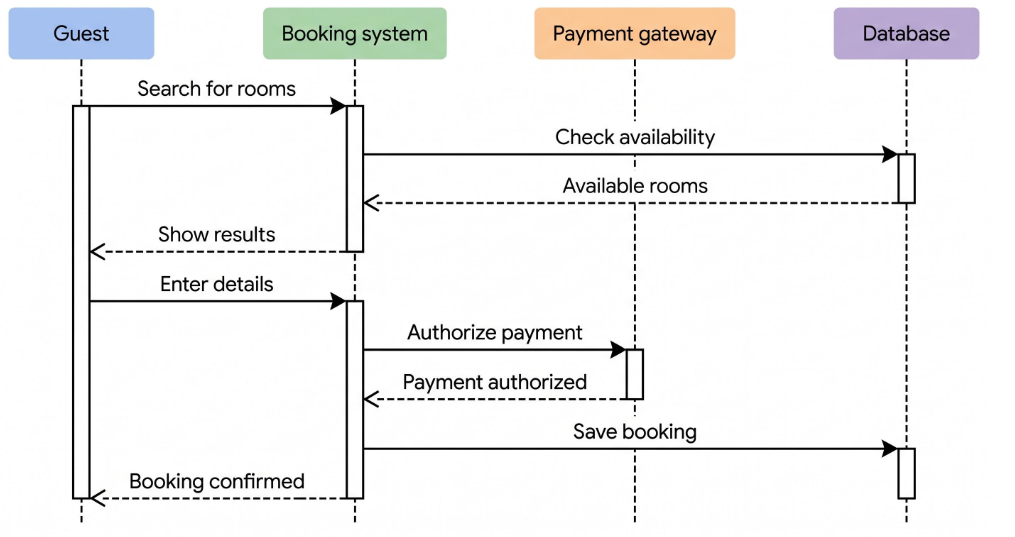
UML sequence diagram generated from text definitions. Source: Made with Google AI
What Are PlantUML Generator Tools Free and How Do They Work?
PlantUML Generator Tools Free are browser-based utilities that compile a lightweight, human-readable domain-specific language into structured visual diagrams. The name PlantUML comes from its core philosophy: you “plant” your system structure as concise lines of plain text, and the layout engine grows those instructions into a complete visual diagram. Every standard UML definition begins with the @startuml marker and closes with @enduml (while specialized mind maps use @startmindmap and @endmindmap).
Historically, running PlantUML locally on a laptop required installing a Java Development Kit (JDK), configuring system environment variables, and setting up Graphviz layout binaries before rendering a single arrow. That local setup created unnecessary friction for students on locked lab computers and developers working across cloud environments. Modern PlantUML Generator Tools Free eliminate all local dependencies by encoding your text snippet and communicating directly with the official PlantUML rendering server over HTTPS, returning a finished diagram image inside your browser window within milliseconds.
Because your diagram lives as plain text rather than a proprietary binary file, you can store it inside Git repositories, review line-by-line diffs during pull requests, and copy-paste templates across different projects effortlessly. Relying on PlantUML Generator Tools Free ensures that your technical documentation stays synchronized with your actual codebase rather than becoming an outdated screenshot buried in a shared drive.
Why Diagrams-as-Code Beats Manual Drag-and-Drop Software in 2026
Software engineering teams and academic institutions have shifted decisively toward diagrams-as-code workflows because manual drag-and-drop editors slow down iterative design. In conventional flowcharting tools, inserting a new database call in the middle of a ten-step authentication sequence forces you to manually select every downstream arrow, drag lifelines downward, and realign text labels. With PlantUML Generator Tools Free, adding that interaction takes a single line of text, and the entire diagram recalculates its spacing automatically.
Version control compatibility represents another major advantage. Binary diagram files produce unreadable merge conflicts in Git, making collaborative editing nearly impossible. When teams write diagrams using PlantUML Generator Tools Free, every participant, relationship, and note appears as clean ASCII text. Engineering leads can review architectural updates right alongside application code changes, ensuring documentation accuracy during sprint reviews.
Speed and cognitive focus also improve dramatically. Instead of breaking your concentration to pick border thicknesses, font sizes, or connector anchor points, you stay focused on system logic, class hierarchies, and edge cases. For computer science students racing against project deadlines and backend engineers mapping distributed APIs, PlantUML Generator Tools Free turn hours of tedious visual formatting into a five-minute coding task.
UML class diagram showing object-oriented relationships. Source: Made with Google AI
Key Capabilities of the AI Tool Synergy PlantUML Generator Tools Free
When evaluating PlantUML Generator Tools Free, ease of use, zero-friction access, and clean output formatting make all the difference. The online PlantUML generator hosted on AI Tool Synergy is designed specifically around rapid, distraction-free productivity for both students and working developers.
First, the platform requires zero signup, zero email verification, and zero subscription tiers. You open the page, enter your syntax into the live editor panel, click Generate, and inspect your rendered diagram immediately. Your code is encoded directly into the rendering request without being permanently stored or indexed on external databases, keeping proprietary system architectures private.
Second, the interface includes built-in quick-reference syntax snippets and starter templates right beside the editor. If you forget the exact arrow notation for asynchronous messages (->>), interface implementation (..|>), or composition relationships (*--), you can check the inline syntax guide without opening separate documentation tabs.
Third, the tool connects seamlessly with the broader collection of over 25 free utilities across AI Tool Synergy. Whether you are formatting study materials with the Text to Handwriting converter, counting prompt tokens with the ChatGPT Token Counter, or drafting project documentation alongside free SEO and productivity calculators, every utility follows the exact same clean, no-account workflow.
Supported UML and Non-UML Diagram Types You Can Build Instantly
One reason PlantUML Generator Tools Free remain the gold standard in software engineering is their comprehensive diagram coverage. Rather than forcing you to learn separate tools for behavioral flows, static class structures, and project timelines, a single text syntax powers more than a dozen standardized diagram formats.
| Diagram Category | Primary Use Case | Key PlantUML Syntax Elements | Best Audience |
|---|---|---|---|
| Sequence Diagram | Modeling step-by-step API calls, user logins, and payment flows over time | participant, actor, ->, -->, activate, deactivate | Backend engineers and CS students |
| Class Diagram | Documenting object-oriented hierarchies, attributes, methods, and visibility | class, interface, `– | >, .. |
| Use Case Diagram | Mapping functional system requirements and external user interactions | actor, usecase, rectangle, -->, ..> | Systems analysts and product owners |
| Activity Diagram | Visualizing conditional workflows, loops, and algorithmic decision branches | start, stop, if/then/else, while, fork | Algorithm designers and QA teams |
| State Diagram | Modeling finite state machines, order lifecycles, and embedded systems | [*], state, -->, : transition event | Embedded and systems developers |
| Component & Deployment | Illustrating microservices, containers, databases, and network nodes | component, database, node, cloud, [Component] | DevOps and cloud architects |
Beyond classic UML specifications, PlantUML Generator Tools Free also render non-UML visualizations that help technical teams communicate complex structures quickly. You can generate Entity Relationship Diagrams (ERD) for relational database schemas, Gantt charts for sprint planning, Work Breakdown Structures (WBS) for project scoping, mind maps (@startmindmap) for brainstorming, and visual tree representations of raw JSON or YAML payloads.
Step-by-Step Guide to Creating Your First Diagram with PlantUML Generator Tools Free
Building a clean, publication-ready diagram takes less than two minutes once you understand the core workflow inside PlantUML Generator Tools Free.
Step 1: Open the Editor and Choose a Starter Structure
Navigate to the PlantUML generator on AI Tool Synergy. You will see a clean split-screen workspace featuring a plain-text code editor on one side and a high-contrast visual preview panel on the other. Every diagram starts with @startuml on the first line and closes with @enduml on the final line.
Step 2: Declare Your Participants, Classes, or System Nodes
Inside the opening and closing tags, define the core building blocks of your system. For a sequence diagram modeling a user checkout flow, declare your entities clearly using descriptive keywords such as actor Customer, participant "Web App" as App, participant "Payment API" as Pay, and database "Orders DB" as DB. Declaring participants explicitly at the top controls their exact left-to-right display order and assigns specialized visual icons automatically.
Step 3: Define Interactions, Arrows, and Conditional Logic
Write each interaction on its own line using intuitive arrow operators. A solid arrow (->) represents a synchronous request, while a dashed arrow (-->) indicates a return response. You can wrap conditional branches inside alt and else blocks, highlight active processing intervals with activate and deactivate, and attach clarifying callouts using note right of or note over.
Step 4: Render, Refine, and Export Your Finished Diagram
Click the Generate button to compile your text through the rendering engine. Inspect the preview panel to verify that every arrow label, lifeline, and grouping box reads clearly. If a diagram looks too wide or dense, add left to right direction or scale 1.2 near the top of your script, re-render, and download your finished graphic as a PNG or SVG file.
Essential PlantUML Syntax Rules Every Developer and Student Should Know
Mastering a handful of core syntax conventions allows you to write error-free scripts inside PlantUML Generator Tools Free without constantly checking reference manuals.
Comments, Titles, and Scaling Controls
Adding inline comments keeps complex architecture scripts easy for teammates to maintain. Start any comment line with a single apostrophe (' This is a comment), or wrap multi-line comment blocks between /' and '/. To place a bold header above your diagram, add title User Authentication Sequence right below @startuml. If your diagram needs to fit neatly onto a presentation slide or academic report page, control its output resolution using scale 1.5 or scale 800 width.
Arrow Styles and Relationship Indicators
PlantUML uses intuitive ASCII symbols to distinguish different types of technical relationships. In sequence diagrams, -> draws a solid synchronous call, --> draws a dashed return message, ->> renders an asynchronous thin arrowhead, and -x denotes a lost or failed message. In class diagrams, --|> represents class inheritance (extends), ..|> represents interface realization (implements), o-- shows aggregation, and *-- denotes strong composition.
Visibility Modifiers and Styling Themes
When documenting object-oriented classes, prefix attributes and methods with standard UML visibility characters: + for public members, - for private fields, # for protected properties, and ~ for package-private elements. You can also modernize the visual appearance of any diagram generated with PlantUML Generator Tools Free by adding !theme cerulean or !theme plain at the top of your script, giving your charts crisp typography and contemporary color palettes without manual CSS styling.
Exporting High-Resolution PNG and SVG Files for Documents and Presentations
Choosing the right export format ensures your diagrams look razor-sharp across every medium, from printed university theses to responsive developer portals. Quality PlantUML Generator Tools Free support both raster PNG and vector SVG downloads directly from the preview panel.
PNG (Portable Network Graphics) is ideal for embedding diagrams into Microsoft Word documents, Google Docs, PowerPoint slide decks, and email updates. Because PNG uses lossless compression, text labels and crisp 1-pixel connector lines remain sharp without the blurry compression artifacts common in JPEG images. When exporting PNG files for print reports or high-DPI retina displays, adding skinparam dpi 300 inside your script ensures crystal-clear print fidelity.
SVG (Scalable Vector Graphics) is the superior choice for web documentation, technical blogs, wikis, and large-format architectural posters. Unlike raster pixels, SVG stores every box, curve, and text label as mathematical vector paths. Readers can zoom in 400% on a massive microservice topology diagram without seeing a single jagged edge, and file sizes remain remarkably lightweight for fast page loading.
Integrating PlantUML Diagrams into GitHub, VS Code, Notion, and Confluence
One of the strongest reasons to adopt PlantUML Generator Tools Free is universal ecosystem portability. Once you learn PlantUML syntax in your browser, that exact same text works seamlessly across the entire modern software development stack.
Inside Visual Studio Code and JetBrains IDEs (such as IntelliJ IDEA and PyCharm), installing the official PlantUML extension lets you store .puml files directly alongside your source code. Whenever a developer updates an API endpoint, they update the .puml file in the same commit.
In GitHub, GitLab, and Confluence, teams embed PlantUML blocks inside Markdown documentation or wiki macros so architectural diagrams render automatically during documentation builds. Even when collaborating in tools like Notion or Google Slides that lack native PlantUML compilers, you simply paste your snippet into PlantUML Generator Tools Free, export an SVG or PNG image in two seconds, and drop it straight onto your page.
Comparing Free Diagramming Utilities and AI Productivity Platforms
Modern technical creators frequently combine specialized tools to handle both visual system modeling and written technical documentation. While broad AI writing suites such as Copy.ai Tools help marketers and product teams draft release notes, blog outlines, and product descriptions, visual software architecture requires deterministic syntax rendering rather than generative prose.
| Comparison Criteria | AI Tool Synergy PlantUML Generator Tools Free | Traditional Desktop UML Suites | General AI Copywriting Suites |
|---|---|---|---|
| Core Purpose | Converts plain-text PlantUML code into exact UML diagrams | Manual drag-and-drop visual modeling software | Generates marketing copy, summaries, and text drafts |
| Installation & Setup | Zero install; runs 100% in browser with no Java/Graphviz needed | Heavy desktop installers, license keys, and updates | Web-based login required |
| Version Control Friendliness | Plain-text syntax tracks cleanly in Git diffs | Proprietary binary files create merge conflicts | Outputs unstructured prose or markdown |
| Cost & Access Friction | Completely free, unlimited diagrams, zero signup required | Expensive enterprise seats or restricted free tiers | Tiered subscriptions and usage credits |
| Export Precision | Deterministic PNG and infinite-zoom SVG vector output | Manual export menus with layout alignment quirks | Text copy-paste only |
By pairing deterministic PlantUML Generator Tools Free for exact technical blueprints with streamlined writing workflows, engineers and students produce clearer documentation in a fraction of the time.
Frequently Asked Questions About PlantUML Generator Tools Free
Are PlantUML Generator Tools Free completely free with no signup?
Yes. The PlantUML Generator Tools Free utility on AI Tool Synergy is 100% free to use with no account registration, no credit card requirements, and no daily diagram caps. You can write, preview, and download unlimited diagrams directly in your web browser.
Do I need to install Java or Graphviz on my computer to use this tool?
No. Unlike running PlantUML from a local command line, browser-based PlantUML Generator Tools Free handle all compilation remotely through the official PlantUML rendering engine. You do not need to install Java, Graphviz, or any browser plugins on Windows, macOS, Linux, or Chromebook devices.
Is my PlantUML code stored on external servers?
No. Your diagram text is encoded directly into the rendering URL request to generate the visual preview and is never saved into a user database or shared publicly. Once you close your browser tab, your session remains completely private.
What is the difference between PNG and SVG downloads?
PNG downloads produce a standard raster image file that works universally inside Word documents, PowerPoint presentations, and messaging apps. SVG downloads generate a resolution-independent vector file that scales infinitely without pixelation, making it ideal for technical websites, README files, and large architectural prints.
Which UML diagram types are supported by PlantUML Generator Tools Free?
You can generate sequence diagrams, class diagrams, use case diagrams, activity diagrams, state machine diagrams, component diagrams, deployment diagrams, object diagrams, timing diagrams, Entity Relationship Diagrams (ERD), Gantt charts, and mind maps using standard PlantUML syntax.
Can I preview existing PlantUML code shared by a teammate or AI assistant?
Yes. Simply paste any valid @startuml ... @enduml snippet into the editor panel and click Generate to verify syntax accuracy, inspect the layout immediately, and export a clean visual image for your project documentation.
Meta Description (158 Characters): Use PlantUML Generator Tools Free to turn plain text into sequence, class, and UML diagrams 10x faster with zero signup, instant PNG/SVG export, and clean syntax.