


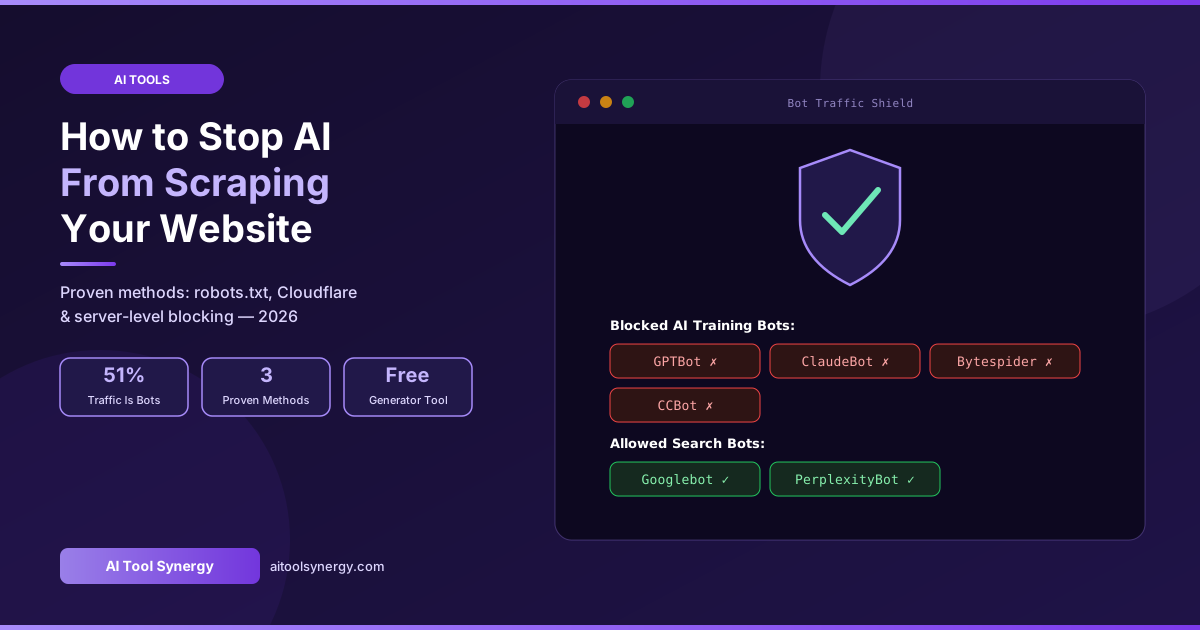
Learning how to stop AI from scraping your website has become essential — bot traffic now exceeds human traffic on the open web, and a large share of it is AI crawlers harvesting content for model training with zero benefit flowing back to site owners. This guide covers every proven method for how to stop AI from scraping your website: robots.txt rules, server-level blocking, Cloudflare’s AI Crawl Control, and a free generator tool to implement it all in minutes.
How to Stop AI From Scraping Your Website — Why It Matters in 2026
Bot traffic now makes up more than half of all web traffic, and a significant share is driven by AI crawlers. According to Cloudflare’s own reporting on bot traffic trends, the dominant crawlers hitting sites in 2026 are Googlebot at roughly 38.7%, followed by GPTBot at 12.8%, Meta-ExternalAgent at 11.6%, and ClaudeBot at 11.4%. Understanding how to stop AI from scraping your website selectively — rather than blocking everything indiscriminately — protects your content while preserving the search visibility your site depends on.
Unlike traditional search engine bots that index your content and send visitors back through search results, many AI scrapers download your content purely to train models that may never reference you again. OpenAI’s own GPTBot documentation confirms the crawler’s purpose is collecting training data, and industry analysis from the IAB Tech Lab found that AI-powered search summaries reduce publisher traffic by 20% to 60% on average, with some niche publications losing up to 90% — a direct revenue impact that makes how to stop AI from scraping your website a question every publisher now needs to answer.
How to Stop AI From Scraping Your Website: Know Your Bot Types First
Before learning how to stop AI from scraping your website, it helps to understand that not every AI-related crawler deserves the same treatment. Blocking everything indiscriminately can silently remove your brand from ChatGPT’s live search results — the opposite of what most site owners actually want.
GPTBot, ClaudeBot, Google-Extended, CCBot, Bytespider
These crawlers absorb your content into AI training datasets with no attribution and no link back. Most site owners choose to block these specifically when figuring out how to stop AI from scraping your website for training purposes, while leaving search-facing bots untouched.
OAI-SearchBot, Claude-SearchBot, PerplexityBot
These fetch your content specifically to answer live user queries and typically cite your page with a clickable link back. Blocking these removes you from AI-powered answers entirely — an increasingly important referral channel.
Googlebot, Bingbot
These power your actual search visibility. Never block these when implementing how to stop AI from scraping your website — doing so would remove you from Google and Bing search results entirely.
Method 1: How to Stop AI From Scraping Your Website Using Robots.txt
The first and easiest step in how to stop AI from scraping your website is configuring your robots.txt file — a plain text file at yourdomain.com/robots.txt that tells well-behaved crawlers which parts of your site they may or may not access.
# ==========================================
# HOW TO STOP AI FROM SCRAPING YOUR WEBSITE
# Block AI training crawlers — 2026
# ==========================================

User-agent: GPTBot
Disallow: /

User-agent: ClaudeBot
Disallow: /
User-agent: anthropic-ai
Disallow: /

User-agent: Google-Extended
Disallow: /

User-agent: CCBot
Disallow: /

User-agent: Bytespider
Disallow: /

User-agent: FacebookBot
Disallow: /
User-agent: Meta-ExternalAgent
Disallow: /

User-agent: cohere-ai
Disallow: /
User-agent: Diffbot
Disallow: /
User-agent: Amazonbot
Disallow: /Googlebot, Bingbot, OAI-SearchBot, or PerplexityBot unless you specifically want to disappear from those search surfaces entirely. Blocking the wrong bot is the most common mistake when implementing how to stop AI from scraping your website.According to recent research on AI bots and robots.txt adoption, as of mid-2025 almost 21% of the top 1000 websites had already added explicit rules for GPTBot in their robots.txt files — a number that has only grown through 2026 as awareness of AI scraping spreads.
Method 2: How to Stop AI From Scraping Your Website With Cloudflare
If your site uses Cloudflare, the fastest implementation of how to stop AI from scraping your website is the built-in AI Crawl Control feature, available even on the free tier.
Enable Cloudflare’s AI Crawl Control
- Log into your Cloudflare dashboard and select your domain
- Navigate to Security → Bots
- Find AI Crawl Control (or “AI Crawls and Scrapers”) and toggle it on
- Cloudflare automatically blocks known AI training bots based on continuously updated fingerprints
This approach to how to stop AI from scraping your website works at the network edge, blocking requests before they ever reach your server — meaning zero performance impact and no code changes required. It is the most practical option for WordPress sites and anyone without direct server access.
Method 3: How to Stop AI From Scraping Your Website at the Server Level
Robots.txt is a voluntary directive — well-behaved crawlers respect it, but some scrapers ignore it entirely, using techniques like user-agent spoofing (pretending to be a regular browser) and IP rotation to evade detection. For these cases, how to stop AI from scraping your website requires server-level enforcement.
- User-agent header blocking — configure NGINX or Apache to reject requests matching known AI bot signatures with a 403 response
- Rate-limiting by content type — AI scrapers often hit content-heavy pages like articles while ignoring utility pages like login screens; monitoring this ratio helps detect scraping behavior other methods miss
- Honeypot trap links — invisible links only bots can see (using
display:none) instantly reveal and let you blacklist the IPs accessing them
X-Robots-Tag: noindex response header or HTML meta tags telling crawlers not to index or store your content. Regulatory frameworks emerging around AI training data have started pushing AI companies to honor these signals as scrutiny over unlicensed data use grows — combining robots.txt with response headers strengthens both your technical and legal position.Complete AI Bot List to Reference When Blocking
| User Agent | Company | Type | Block? |
|---|---|---|---|
GPTBot | OpenAI | Training | Yes |
OAI-SearchBot | OpenAI | Search/Citation | No |
ClaudeBot | Anthropic | Training | Yes |
Claude-SearchBot | Anthropic | Search/Citation | No |
Google-Extended | AI Training Token | Yes (Search unaffected) | |
PerplexityBot | Perplexity | Search/Citation | No |
CCBot | Common Crawl | Training | Yes |
Bytespider | ByteDance/TikTok | Training | Yes |
Meta-ExternalAgent | Meta | Training | Yes |
Amazonbot | Amazon | Training | Yes |
Does Blocking AI Bots Affect Google Rankings?
No — implementing how to stop AI from scraping your website for training bots like GPTBot, ClaudeBot, or CCBot has zero effect on Google Search rankings. These crawlers are entirely separate from Googlebot, which handles search indexing independently. Even Google-Extended, Google’s own AI training control token, only affects whether your content trains Gemini and AI Overview features — it does not control standard Google Search visibility.
How to Stop AI From Scraping Your Website — Free Generator Tool
Manually writing and maintaining robots.txt rules means tracking dozens of evolving AI bot signatures. Our free Robots.txt Generator handles this automatically — select which AI bots to block, configure your search engine rules, and download a complete, correctly formatted file in seconds.
Generate your robots.txt in 3 steps
- Go to our free Robots.txt Generator
- Select the AI bots you want to block from the list
- Download your complete robots.txt file instantly
🤖 Free Robots.txt Generator — Stop AI Scraping in Seconds
Select which AI crawlers to block, customize search engine rules, and download your complete robots.txt instantly. No signup required.
Generate Robots.txt Free →How to Verify Your AI Bot Blocks Are Working
After implementing how to stop AI from scraping your website, confirm your blocks are actually effective rather than assuming they work:
- Check your access logs — search server logs for known bot signatures:
grep -Ei "gptbot|claudebot|bytespider" access.log - Test with curl — simulate a request using a specific bot’s user-agent string to confirm your server returns a block response
- Use an online robots.txt checker — validates your syntax is correctly formatted and recognized by major crawlers
- Monitor Cloudflare analytics — if using AI Crawl Control, the dashboard shows exactly which bots were blocked over time
Frequently Asked Questions
Final Thoughts on How to Stop AI From Scraping Your Website
Knowing how to stop AI from scraping your website in 2026 means layering multiple defenses — robots.txt for compliant crawlers, Cloudflare or server-level blocking for non-compliant ones, and selective rules that protect your content without sacrificing your visibility in Google Search or AI-powered answers. Start with robots.txt today using our free generator, then add Cloudflare’s AI Crawl Control if you need stronger enforcement.
✅ Free Robots.txt Generator — No Signup
Block the AI bots you don’t want, keep the ones that drive traffic. Generate your robots.txt instantly.
Open Robots.txt Generator →




One Response
[…] Google Search rankings while preventing your content from being used to train Gemini. Our guide on how to stop AI from scraping your website covers the full list of training bots, the exact robots.txt code to block them, and additional […]