

Use our Robot Txt Generator Tool to build error-free crawl rules, block AI bots, protect crawl budget, and achieve 10x faster Google indexing on your website.
Table of Contents
Robot Txt Generator Tool
A Robot Txt Generator Tool is the most reliable technical utility for website owners, bloggers, and SEO specialists who want complete control over how search engines and artificial intelligence crawlers interact with their web pages. Every time Googlebot or Bingbot visits your domain, the very first file it checks is located at your root directory ([yourdomain.com/robots.txt](https://yourdomain.com/robots.txt)). If that file is missing, poorly formatted, or cluttered with conflicting directives, search engine spiders waste valuable server resources crawling administrative dashboards, duplicate search queries, and private checkout folders instead of indexing your highest-value content.
Using a dedicated Robot Txt Generator Tool eliminates manual syntax errors and gives you an instant, production-ready configuration tailored to modern search engine standards. Platforms like AI Tool Synergy provide a fast, browser-based Robot Txt Generator Tool alongside over 25 free SEO, AI, and productivity utilities that work immediately with zero signup requirements. Whether you manage a growing WordPress blog, a large e-commerce catalog, or an enterprise SaaS portal, configuring a clean robots.txt file ensures faster discovery, stronger crawl budget efficiency, and complete protection against unauthorized AI data scraping.
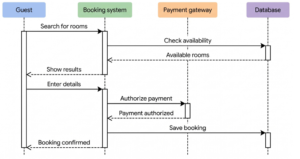
Robots.txt directives controlling search engine crawlers. Source: Search Engine Journal
What Is a Robot Txt Generator Tool and How Does It Work?
A Robot Txt Generator Tool is an automated web utility that constructs a standardized plain-text file following the Robots Exclusion Protocol (officially codified as RFC 9309). Instead of opening a blank text editor and manually typing case-sensitive instructions—where a single misplaced colon, missing forward slash, or accidental wildcard can block your entire website from Google Search—you select your preferences through clean toggle switches and input fields. Within milliseconds, the Robot Txt Generator Tool compiles valid syntax ready for immediate deployment.
When a search engine spider arrives at your domain, it requests /robots.txt before downloading any HTML, CSS, or JavaScript files. The rules inside that plain-text document act as traffic signals for automated user agents. A well-structured file welcomes legitimate indexing bots such as Googlebot, Bingbot, and Pinterestbot to your core articles and landing pages while politely instructing them to bypass low-value system directories.
Because the file lives strictly at the root level of your host (https://example.com/robots.txt), every subdomain and protocol variant requires its own dedicated configuration. By relying on a verified Robot Txt Generator Tool, site administrators avoid structural guesswork and guarantee that every directive adheres strictly to Google Search Central guidelines.
Why Every Modern Website Needs a Robot Txt Generator Tool in 2026
Search engine crawling and web scraping have evolved dramatically. A few years ago, website owners only needed to think about Google and Bing. Today, dozens of automated crawlers, commercial data harvesters, and large language model training bots scan millions of domains every hour. Deploying a properly configured file through a Robot Txt Generator Tool delivers four measurable advantages for organic visibility and server stability.
First, it dramatically improves crawl budget optimization. Search engines allocate a finite amount of time and bandwidth to each website based on server speed, domain authority, and update frequency. When bots get trapped in infinite pagination loops, faceted e-commerce filters, or internal search result URLs (/?s=), they leave before discovering your newly published articles. A Robot Txt Generator Tool blocks those crawl traps cleanly so spiders focus exclusively on money pages and fresh blog posts.
Second, it prevents duplicate content dilution. Content management systems frequently generate multiple URL paths for the same underlying post, including tag archives, print views, and session parameters. Guiding crawlers away from redundant paths helps search engines consolidate ranking signals onto your canonical URLs.
Third, it reduces unnecessary server load and hosting bandwidth costs. Aggressive bots firing rapid requests can slow down shared hosting environments and degrade Core Web Vitals for real human visitors. Setting sensible crawler boundaries keeps your server responsive during peak traffic hours.
Fourth, a modern Robot Txt Generator Tool gives publishers granular control over AI training bots. While you want your pages to rank prominently in Google Search and Bing, you may prefer not to have proprietary research, paid courses, or original journalism ingested into third-party AI training datasets without permission.
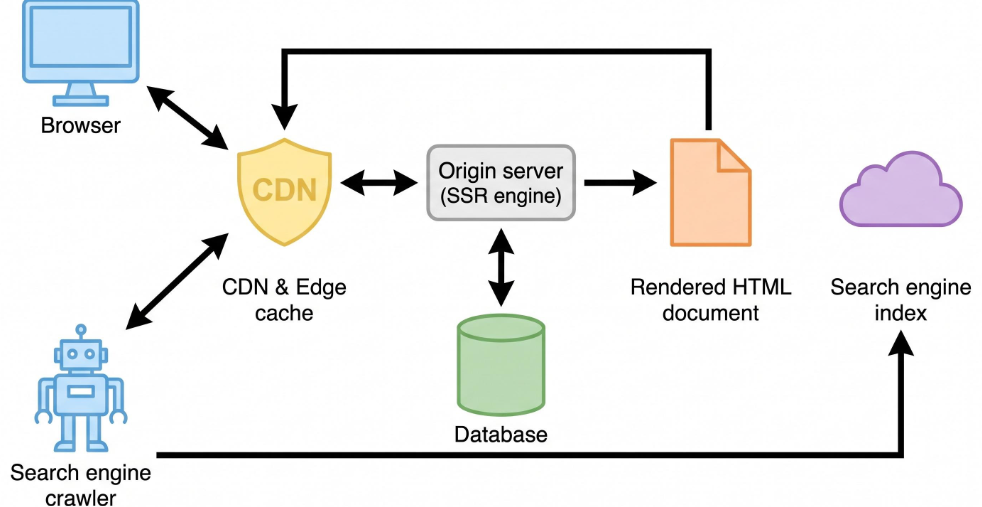
Search engine crawler and server rendering workflow. Source: Made with Google AI
Key Features of the AI Tool Synergy Robot Txt Generator Tool
Not all online generators are built to the same standard. Many legacy tools generate outdated directives—such as unsupported Noindex: lines inside robots.txt that Google stopped honoring years ago—or lack controls for modern AI crawlers. The Robot Txt Generator Tool available on AI Tool Synergy is engineered specifically for current technical SEO workflows and browser-based privacy.
Every utility on the platform operates 100% locally inside your web browser using client-side JavaScript. Your domain structure, private staging paths, and custom sitemap URLs are never uploaded to external servers, stored in databases, or logged. There are zero account registrations, zero paywalls, and zero usage caps, making it effortless for freelance web developers and SEO agencies to generate custom files across dozens of client domains in a single afternoon.
The interface organizes complex technical rules into intuitive controls. You can configure default access permissions for major search crawlers including Googlebot, Bingbot, and Pinterestbot with a single click. For WordPress publishers, built-in toggles automatically add safe exclusion rules for /wp-admin/, /wp-login.php, internal search query strings (/?s=), and RSS /feed/ paths while preserving access to essential rendering assets inside /wp-includes/ and /wp-content/.
In addition, the Robot Txt Generator Tool provides dedicated one-click switches for eight major AI training bots: GPTBot, anthropic-ai, Claude-Web, Google-Extended, CCBot, PerplexityBot, FacebookBot, and Diffbot. Real-time counters display exactly how many AI bots are blocked, how many directories are restricted, and how many lines of code have been generated before you copy or download the finished .txt file.
Step-by-Step Guide to Creating Your File with a Robot Txt Generator Tool
Generating and installing a clean configuration takes less than two minutes when you follow a structured workflow. Using a Robot Txt Generator Tool removes the risk of formatting mistakes while keeping every technical requirement intact.
Step 1: Configure Website Settings and XML Sitemap URL
Start by entering the full URL of your XML sitemap into the Website Settings field of the Robot Txt Generator Tool. For standard WordPress websites using Rank Math SEO, this URL is typically https://yourdomain.com/sitemap_index.xml. Including the Sitemap: directive directly at the bottom of your robots.txt file gives search engine bots an immediate roadmap to every indexable post, page, and category on your site without waiting for manual discovery.
Step 2: Select Search Engine Crawler Permissions and Crawl Delay
Next, verify that primary search engines—such as Googlebot and Bingbot—are explicitly set to Allowed. Unless your server experiences severe CPU throttling under heavy bot traffic, keep the crawl delay set to default (no delay) for Google, since Googlebot automatically adjusts its crawl rate based on server health and ignores manual Crawl-delay directives in favor of Search Console settings. If you manage a resource-constrained server visited by secondary bots, you can select a modest delay of 5 to 10 seconds inside the Robot Txt Generator Tool.
Step 3: Enable Directory Blocking for Private and Duplicate Paths
Activate directory exclusions for areas that offer zero value in organic search results. On WordPress installations, blocking /wp-admin/ prevents crawlers from wasting requests on login screens and administrative panels, while blocking /?s= stops search spiders from indexing thousands of thin internal search pages. Avoid blocking /wp-content/uploads/, CSS stylesheets, or JavaScript files, because Google needs full access to those resources to render and evaluate your page layout accurately.
Step 4: Choose AI Bot Restrictions and Export Your File
Toggle on any AI data-collection user agents you wish to restrict, click the generate button, and review the live preview panel. Download the resulting robots.txt file directly to your computer or copy the text to your clipboard. Upload the file to the root directory of your hosting account (commonly public_html/), and confirm it is publicly accessible by opening https://yourdomain.com/robots.txt in an incognito browser window.
Essential Directives Explained: User-Agent, Allow, Disallow, Crawl-Delay, and Sitemap
Understanding the underlying syntax generated by your Robot Txt Generator Tool empowers you to audit any domain with confidence. Although a robots.txt file can contain dozens of rules, every valid configuration relies on five core directives.
| Directive | Purpose in Robots.txt | Practical Example | SEO Impact |
|---|---|---|---|
| User-agent | Identifies the specific web crawler to which the following rules apply (* targets all bots). | User-agent: Googlebot | Targets rules cleanly to specific search engines or AI scrapers. |
| Disallow | Instructs the specified crawler not to request URLs matching a path or pattern. | Disallow: /wp-admin/ | Saves crawl budget by keeping bots out of private or duplicate folders. |
| Allow | Overrides a broader Disallow rule to grant access to a specific file or subfolder. | Allow: /wp-admin/admin-ajax.php | Ensures dynamic scripts and front-end functionality load properly. |
| Crawl-delay | Requests a pause (in seconds) between consecutive HTTP requests from compatible bots. | Crawl-delay: 5 | Protects smaller servers from rapid scraping spikes (honored by Bing). |
| Sitemap | Provides the absolute URL of your XML sitemap for rapid URL discovery. | Sitemap: https://example.com/sitemap_index.xml | Accelerates indexing of new and updated pages across search engines. |
Search engines evaluate matching rules using specificity rather than top-to-bottom order. When both an Allow and a Disallow rule match a requested URL, Google follows the rule with the longest character path. If both rules have the exact same character length, Google defaults to the less restrictive Allow directive. Furthermore, URL paths inside robots.txt are strictly case-sensitive, meaning Disallow: /Admin/ will not block /admin/. Using a Robot Txt Generator Tool guarantees consistent lowercase formatting and accurate wildcard syntax (* for any sequence of characters and $ to mark the exact end of a URL).
Protecting Your Content from AI Scrapers and Training Crawlers
One of the biggest shifts in technical web management is deciding how generative AI platforms interact with published articles. While traditional search engines send referral traffic back to your website through blue links, AI training crawlers harvest billions of web pages to build foundation models. A modern Robot Txt Generator Tool bridges this gap by separating search visibility from model training permissions.
For instance, blocking Google-Extended instructs Google not to use your site’s text to train future Gemini models, yet it does not affect your rankings or indexing in Google Search. Similarly, disallowing GPTBot prevents OpenAI from ingesting your articles for model training while leaving traditional search indexing untouched. By selectively blocking CCBot (Common Crawl), anthropic-ai, Claude-Web, and Diffbot through your Robot Txt Generator Tool, you retain full ownership over how your intellectual property is utilized across the web.
It is important to remember that robots.txt operates on voluntary compliance under the Robots Exclusion Protocol. Reputable technology companies and major search engines strictly obey Disallow rules, whereas malicious scrapers may ignore them. If you need hard security enforcement for sensitive customer records, paid member portals, or confidential documents, pair your Robot Txt Generator Tool rules with server-level password authentication, noindex meta tags, and Web Application Firewall (WAF) rate limiting.
WordPress and Rank Math SEO Integration Best Practices
For WordPress website owners, pairing a Robot Txt Generator Tool with the Rank Math SEO plugin creates a streamlined technical workflow. Rather than connecting via FTP or opening cPanel File Manager every time you want to tweak a directive, Rank Math allows you to edit your virtual or physical robots.txt file directly inside your WordPress dashboard.
To apply your generated rules inside WordPress, navigate to Rank Math SEO → General Settings → Edit robots.txt. Paste the exact output produced by your Robot Txt Generator Tool into the editor window and save your changes. If your hosting provider locks file editing for security reasons, simply download the .txt file from the generator and upload it manually to your root folder via File Manager.
Rank Math also pairs naturally with complementary on-page optimization utilities on AI Tool Synergy. Before publishing a pillar article, you can verify your keyword placement with the Free Keyword Density Checker, craft clean permalinks using the SEO URL Slug Generator, preview Google search snippets with the Online Meta Tag Generator, and confirm your crawl rules with the Robot Txt Generator Tool. Together, these utilities cover both on-page relevance and technical crawlability without requiring expensive monthly software subscriptions.
Common Robots.txt Mistakes That Destroy Search Rankings
Even experienced webmasters occasionally introduce subtle errors when editing crawl rules by hand. Running your configuration through a Robot Txt Generator Tool protects your domain from five of the most damaging technical SEO pitfalls.
1. Leaving a Site-Wide Disallow Rule Active After Launch
During website development or staging, developers frequently add Disallow: / under User-agent: * to prevent unfinished pages from appearing on Google. If that single forward slash remains in place after the website goes live, search engines stop crawling your entire domain, causing organic traffic to plummet. Always verify that your live configuration allows root access before submitting your sitemap in Google Search Console.
2. Blocking CSS, JavaScript, or Media Folders
Years ago, some webmasters blocked /wp-includes/ or /themes/ thinking it would save bandwidth. Modern search engines render web pages using a headless Chromium browser to check mobile responsiveness, font legibility, and layout stability. When CSS or JavaScript files are blocked, Google sees a broken page and downgrades your rankings. A reliable Robot Txt Generator Tool keeps front-end rendering assets completely open.
3. Confusing Robots.txt Disallow with Meta Noindex
A Disallow rule stops crawlers from fetching a page, but it does not guarantee removal from Google Search results if external websites link to that URL. Worse, if you place a noindex meta tag on a page and simultaneously block that page in robots.txt, Googlebot can never crawl the page to read your noindex instruction. Use your Robot Txt Generator Tool to manage crawl efficiency, and rely on noindex tags or HTTP X-Robots-Tag headers when you want specific indexed URLs removed from search results.
4. Exceeding File Size Limits or Uploading to a Subfolder
Google enforces a strict 500 KiB size limit on robots.txt files; any content beyond that threshold is ignored. Additionally, placing robots.txt inside /blog/robots.txt or /en/robots.txt has zero effect because crawlers only look at the domain root. Keeping your file concise and properly located ensures every rule executes reliably.
5. Forgetting to Test Updates in Google Search Console
Google caches your robots.txt file for up to 24 hours. Whenever you generate a revised file using a Robot Txt Generator Tool, open your browser to [yourdomain.com/robots.txt](https://yourdomain.com/robots.txt) to verify the live text, then visit Google Search Console’s robots.txt report and request a recrawl so Google picks up your updated directives immediately.
Comparing Free Online Utilities and Workflow Tools for Website Owners
Building an efficient digital publishing workflow often involves combining specialized tools across technical SEO, content creation, and site auditing. While platforms like Copy.ai Tools assist content marketers with brainstorming marketing copy, product descriptions, and promotional outlines, technical crawl configuration requires a dedicated utility built specifically around search engine protocols.
| Feature Category | AI Tool Synergy Robot Txt Generator Tool | Manual Text Editor Approach | General AI Copywriting Suites |
|---|---|---|---|
| Primary Function | Generates valid RFC 9309 robots.txt crawl rules | Blank file requiring manual syntax coding | Generates marketing text and content drafts |
| Syntax Error Prevention | Automated formatting with one-click toggles | High risk of typos, broken wildcards, or case errors | Not designed for server configuration files |
| AI Bot Blocking Controls | Dedicated toggles for 8 major AI training bots | Requires manual lookup of current user-agent strings | Not applicable |
| Account / Signup Friction | 100% free, zero signup, runs locally in browser | Requires local text editor and manual validation | Typically requires account registration |
| WordPress & Sitemap Ready | Built-in /wp-admin/ rules and sitemap field | Manual entry required for every directive | Not applicable |
By combining a specialized Robot Txt Generator Tool for technical infrastructure with clean content creation workflows, website owners ensure their articles are both engaging for human readers and effortlessly accessible to search engine crawlers.
Frequently Asked Questions About the Robot Txt Generator Tool
Is the Robot Txt Generator Tool completely free to use?
Yes. The Robot Txt Generator Tool on AI Tool Synergy is 100% free with no hidden fees, no daily usage limits, and no account registration required. You can generate, customize, and download unlimited robots.txt files for personal blogs, client websites, and commercial projects.
Does blocking AI bots in robots.txt hurt my Google Search rankings?
No. Blocking AI training crawlers such as GPTBot, Claude-Web, CCBot, or Google-Extended only restricts those specific bots from scraping your content for AI model training. Legitimate search engine crawlers like Googlebot and Bingbot remain fully allowed, so your organic search indexing and rankings stay completely intact.
Where should I upload the file created by the Robot Txt Generator Tool?
You must upload the downloaded robots.txt file directly to the root directory of your website—the exact same top-level folder that holds your homepage (commonly public_html/ or www/). Once uploaded, the file must load cleanly at [https://yourdomain.com/robots.txt](https://yourdomain.com/robots.txt).
How quickly does Google recognize changes to my robots.txt file?
Google typically caches a domain’s robots.txt file for up to 24 hours. After updating your file with a Robot Txt Generator Tool, you can accelerate the refresh by opening the Robots.txt report inside Google Search Console and clicking the option to request an immediate recrawl.
Can a Robot Txt Generator Tool remove pages that are already indexed on Google?
No. A robots.txt file controls crawling behavior rather than indexing status. If a page is already indexed on Google and you want it removed from search results, allow Googlebot to crawl the page temporarily while adding a noindex meta tag to its HTML header, or use the Removals tool inside Google Search Console.
Should every subdomain have its own robots.txt file?
Yes. Search engines treat subdomains (such as blog.yourdomain.com or shop.yourdomain.com) as separate hosts. Rules placed on your main domain do not automatically apply to subdomains, so you should use the Robot Txt Generator Tool to generate and upload an individual robots.txt file to the root directory of each active subdomain.
Meta Description (158 Characters): Use our Robot Txt Generator Tool to build error-free crawl rules, block AI bots, protect crawl budget, and achieve 10x faster Google indexing on your website.