


Knowing how to write meta tags for SEO is one of the highest-return skills in on-page optimisation — these few lines of HTML control your Google search headline, your click-through rate, and how your page looks across every social platform. This guide covers exactly how to write meta tags for SEO in 2026: the right formula for each tag, precise character limits, what makes Google rewrite yours, and the mistakes that silently kill organic traffic.
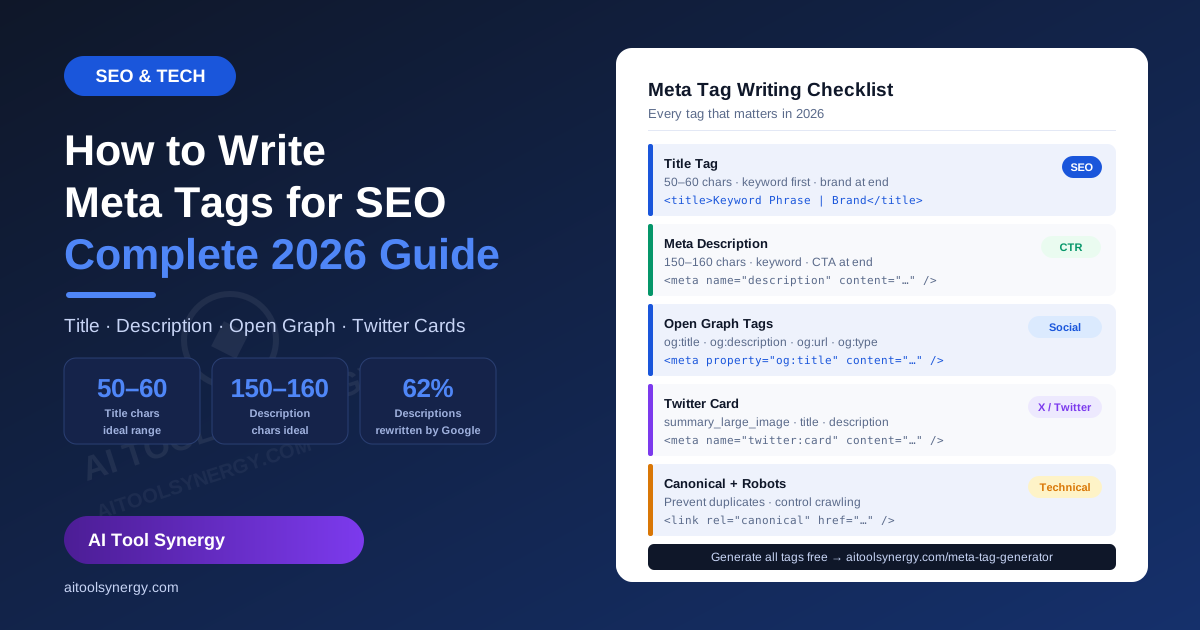
How to Write Meta Tags for SEO — Complete 2026 Guide
Meta tags sit in your page’s <head> section, invisible to visitors but read by every search engine and social platform that processes your URL. Getting them right means more clicks from the same ranking position. Getting them wrong means Google quietly rewrites them — usually into something less compelling than what you wrote.
How to Write Meta Tags for SEO — The 5 Tags That Actually Matter
Before getting into formulas, understanding how to write meta tags for SEO starts with knowing which tags are still worth your time in 2026. Many guides list a dozen meta tags — most are ignored by modern search engines.
| Meta Tag | SEO Impact | Still Matters? |
|---|---|---|
| Title tag | Direct ranking signal + CTR | Yes — most important |
| Meta description | CTR only (not ranking) | Yes — controls clicks |
| Open Graph tags | Social sharing appearance | Yes — indirect traffic |
| Twitter Card tags | X/Twitter preview | Yes — social engagement |
| Canonical tag | Duplicate content prevention | Yes — technical |
| Robots meta tag | Crawl control | Yes — for non-indexable pages |
| Meta keywords | None — ignored since 2009 | No — skip entirely |
How to Write Meta Tags for SEO — The Title Tag Formula
The title tag is the single most important element when learning how to write meta tags for SEO. It appears as the blue clickable headline in Google results, as your browser tab text, and as the default title when someone bookmarks your page. It is a confirmed Google ranking signal and directly affects click-through rate.
Title tag writing rules
- 50–60 characters. Google measures in pixels (~600px) but 50–60 characters is the safe practical range. The live counter in our free meta tag generator turns green in this range and red when you exceed it.
- Keyword in the first 3–4 words. Google assigns slightly more weight to terms that appear early in the title — and users scan left to right, so front-loading the keyword helps CTR too.
- Brand name at the end. Separate with a pipe
|or dash—. This way if Google truncates your title, it cuts the brand name rather than your keyword. - One unique title per page. Duplicate title tags across your site cause keyword cannibalization — Google struggles to decide which page to rank when two share the same title.
- Match search intent. A “how to” query expects a guide title. A “best X” query expects a list. Mismatched titles hurt CTR even at a high ranking position.
✅ How to Write Meta Tags for SEO — Complete Guide | AI Tool Synergy
58 chars · keyword first · clear benefit · brand at end
❌ Meta Tags | SEO Guide | Write Tags | 2026 | AI Tool Synergy Website Blog
Too long · keyword buried · reads like spam · will be truncated
What makes Google rewrite your title?
Google rewrites title tags when it decides yours doesn’t accurately represent the page. The most common triggers: title too short or too long, title doesn’t match the page’s H1, title appears keyword-stuffed, or title doesn’t match the user’s search intent. The best protection is keeping your title tag and H1 closely aligned — not identical, but covering the same core topic in similar language.
How to Write Meta Tags for SEO — The Meta Description Formula
The meta description is your organic search ad copy. It’s not a direct ranking factor — Google has confirmed this in its official search documentation — but it controls click-through rate, which indirectly affects rankings over time. Knowing how to write meta tags for SEO means treating the description as seriously as the title.
Meta description writing rules
- 150–160 characters for desktop, ~120 for mobile-first. Google truncates with an ellipsis beyond this — making your snippet look incomplete at exactly the moment it should be convincing a searcher to click.
- Include your focus keyword naturally. When a searcher’s query matches words in your description, Google bolds them in the results — your listing visually stands out from all competitors above and below.
- State the benefit in the first sentence. Searchers read the first 10 words and decide. “Learn the exact formula for every meta tag” lands better than “In this guide we will be exploring…”
- End with a clear call to action. “See the full guide →”, “Check yours free”, “Learn exactly how” — something that creates a reason to click now rather than scroll past.
- Unique for every page. Around 50% of websites use duplicate or missing descriptions — making this one of the easiest competitive advantages in on-page SEO.
✅ Learn the exact formula for every meta tag that matters in 2026 — title, description, OG and Twitter Cards. Free generator, no signup.
152 chars · keyword in first line · benefit clear · CTA at end
❌ This page is about meta tags for SEO. Meta tags are important for SEO. Learn about meta tags SEO on this page. Meta tags help with SEO rankings.
Keyword-stuffed · no benefit · no CTA · Google will rewrite this
How to Write Meta Tags for SEO — Open Graph Tags for Social Sharing
Open Graph (OG) tags are the part of how to write meta tags for SEO that most guides skip — yet they control every social media preview your page generates. When someone shares your page on Facebook, LinkedIn, WhatsApp, or Slack, those platforms read OG tags — not your title tag or meta description.
<!-- Open Graph tags -->
<meta property="og:title" content="How to Write Meta Tags for SEO | AI Tool Synergy" />
<meta property="og:description" content="Learn the exact formula for every meta tag — title, description, OG tags and Twitter Cards. Free generator included." />
<meta property="og:url" content="https://aitoolsynergy.com/how-to-write-meta-tags-for-seo/" />
<meta property="og:type" content="article" />
<meta property="og:site_name" content="AI Tool Synergy" />
OG tag writing tips
- OG title can be slightly longer than your title tag — up to ~95 characters — since social previews have more space than Google’s 600px limit.
- OG description can be more conversational — you’re writing for someone scrolling a social feed, not someone scanning a search results page.
- Always include og:image — without it, platforms choose a random image from your page, often the wrong one. Ideal size: 1200×630px.
- If you use RankMath or Yoast, these plugins generate OG tags automatically from your post data — you don’t need to add them manually in most cases.
How to Write Meta Tags for SEO — Twitter Card Tags
Twitter (now X) uses its own card system separate from Open Graph. Part of knowing how to write meta tags for SEO completely is including these — without them, links shared on X show a plain text preview with no image, dramatically reducing engagement.
<!-- Twitter Card tags -->
<meta name="twitter:card" content="summary_large_image" />
<meta name="twitter:title" content="How to Write Meta Tags for SEO | AI Tool Synergy" />
<meta name="twitter:description" content="The exact formula for title tags, meta descriptions, OG tags and Twitter Cards in 2026." />
<meta name="twitter:url" content="https://aitoolsynergy.com/how-to-write-meta-tags-for-seo/" />
According to Moz’s on-page SEO research, consistent tag structure across title, OG, and Twitter significantly improves link equity. Use summary_large_image as your card type — it shows a full-width image preview in the tweet and gets significantly higher engagement than the smaller summary card format.
How to Write Meta Tags for SEO — Where to Add Them by Platform
Once you’ve written your tags, the next practical question is where to paste them. The answer differs by platform, and this is where many guides leave you hanging. Understanding how to write meta tags for SEO is only half the job — knowing where they go is the other half.
Paste title and description text into the RankMath panel at the bottom of the post editor. RankMath handles OG tags automatically. No raw HTML needed.
Use the Yoast SEO box below the editor. Enter title and description as plain text. Yoast generates OG and Twitter tags from your post settings automatically.
Paste the full generated HTML block between your <head> and </head> tags. Use our free meta tag generator to produce the complete block in one click.
Go to the product or page editor → Search engine listing preview section → Edit website SEO. Paste title and description as plain text.
Page settings → SEO tab → Title tag and Meta description fields. Paste title and description text only — Webflow handles the HTML tags.
Document settings → SEO tab in Elementor Pro. Without an SEO plugin, use a custom HTML widget to add tags manually to the page head.
How to Write Meta Tags for SEO — Complete HTML Example
Seeing a complete working example is the clearest way to understand how to write meta tags for SEO in practice. Here is a full, correctly structured set of meta tags for a single page:
<!-- SEO Meta Tags -->
<title>How to Write Meta Tags for SEO | AI Tool Synergy</title>
<meta name="description" content="Learn the exact formula for every meta tag — title, description, OG tags and Twitter Cards in 2026. Free generator, no signup." />
<link rel="canonical" href="https://aitoolsynergy.com/how-to-write-meta-tags-for-seo/" />
<meta name="robots" content="index, follow" />
<!-- Open Graph -->
<meta property="og:title" content="How to Write Meta Tags for SEO | AI Tool Synergy" />
<meta property="og:description" content="Learn the exact formula for every meta tag that matters in 2026." />
<meta property="og:url" content="https://aitoolsynergy.com/how-to-write-meta-tags-for-seo/" />
<meta property="og:type" content="article" />
<!-- Twitter Card -->
<meta name="twitter:card" content="summary_large_image" />
<meta name="twitter:title" content="How to Write Meta Tags for SEO | AI Tool Synergy" />
<meta name="twitter:description" content="The exact formula for every meta tag in 2026." />
Generate This Code Free — No Typing Required
Enter your page details and get the complete HTML block above in one click. Live SERP preview included. No signup ever.
Open Free Meta Tag Generator →How to Write Meta Tags for SEO — 8 Mistakes That Kill Rankings and CTR
Most errors in how to write meta tags for SEO come down to a few repeating patterns. Here are the eight that do the most damage.
- Title over 60 characters. The end gets truncated in search results — often cutting off your brand name or call to action at the worst possible moment.
- Description over 160 characters. An ellipsis mid-sentence makes your snippet look broken. Mobile truncates even earlier at ~120 characters.
- Keyword missing from title. Your title tag is your single strongest on-page relevance signal. A title without the focus keyword gives up that signal entirely.
- Duplicate titles across pages. Google cannot determine which page to rank when two share the same title. The result: neither ranks well for the target keyword.
- Blank meta descriptions. Google auto-generates a snippet from your page content — usually a random sentence that’s rarely as compelling as a crafted description.
- Writing the description for Google, not the searcher. Keyword lists read as spam to humans. A description that explains a genuine benefit and ends with a CTA outperforms keyword-heavy copy every time.
- Title tag and H1 completely misaligned. If your title says one thing and your H1 says something different, Google may override your title with the H1 — or worse, combine elements from both in an unpredictable way.
- Including meta keywords. No search engine uses this tag. Including it is a pure time-sink that signals outdated SEO practices to anyone auditing your code.
How to Write Meta Tags for SEO — Quick Checklist Before Publishing
Run through this before hitting publish — it covers every element of how to write meta tags for SEO correctly in under 2 minutes.
- Title tag is 50–60 characters
- Focus keyword appears in the first 3–4 words of the title
- Brand name at end of title, separated by
|or— - Title tag and H1 are closely aligned (not identical)
- Meta description is 150–160 characters
- Focus keyword appears naturally in the description
- Description ends with a clear call to action
- Title and description are unique — not copied from another page
- Open Graph tags present (og:title, og:description, og:url, og:type)
- Twitter Card tags present (twitter:card set to summary_large_image)
- Canonical tag points to the correct URL
- No meta keywords tag
Frequently Asked Questions — How to Write Meta Tags for SEO
How do you write meta tags for SEO?
Write a title tag of 50–60 characters with your focus keyword in the first 3–4 words and your brand name at the end. Write a meta description of 150–160 characters that states a clear benefit and ends with a call to action. Add Open Graph tags for social sharing and a canonical tag to prevent duplicate content issues. Use our free meta tag generator to produce the complete HTML code with live preview in under 2 minutes.
What is the ideal title tag length for SEO in 2026?
50–60 characters. Google measures titles in pixels (roughly 600px on desktop) rather than a strict character count, but 50–60 characters is the safe zone for most fonts and devices. Titles longer than 60 characters are truncated with an ellipsis — hiding your brand name and sometimes your keyword from searchers.
Does the meta description affect Google rankings?
Not directly — Google has confirmed it’s not a ranking factor. However, a well-written meta description increases click-through rate (CTR), and higher CTR sends a positive signal to Google — Search Engine Journal notes CTR is widely considered a ranking influence — and a compelling description also reduces the chance Google rewrites yours with something less effective.
Why does Google rewrite my meta description?
Google rewrites descriptions when they’re too short, duplicated across pages, keyword-stuffed, or don’t match the searcher’s query well. Around 62% of descriptions get rewritten according to 2026 research. The best protection is writing descriptions that directly address the most common search intent for that page — specific, benefit-led, and naturally including the focus keyword.
What are Open Graph tags and do I need them for SEO?
Open Graph tags control how your page appears when shared on Facebook, LinkedIn, WhatsApp, and Slack. They don’t directly affect Google rankings, but they influence click-through from social traffic — and social shares can indirectly generate backlinks that do affect rankings. If you use RankMath or Yoast SEO, these plugins generate OG tags automatically.
Should I still write meta keywords?
No. Google stopped using meta keywords as a ranking signal in 2009. Bing ignores them too. Adding meta keywords wastes time and signals to anyone auditing your site that your SEO practices may be outdated. Leave them out entirely.
What is a canonical tag and when do I need it?
A canonical tag tells Google which URL is the definitive version of a page — preventing duplicate content issues when the same content is accessible via multiple URLs (HTTP vs HTTPS, with/without trailing slash, paginated versions etc.). Every page should have a self-referencing canonical tag. If you use an SEO plugin, it adds this automatically.
How is the title tag different from the H1?
The title tag appears in Google search results and browser tabs — it’s what searchers see before clicking. The H1 is the main visible heading on the page seen by visitors after they arrive. They serve different audiences and can differ slightly in wording. However, they should cover the same core topic — a major mismatch between the two is a common trigger for Google to rewrite your title tag.
Final Thoughts — How to Write Meta Tags for SEO in 2026
Mastering how to write meta tags for SEO comes down to three things: precision (hitting character limits so nothing gets truncated), intent-matching (writing titles and descriptions that align with what the searcher actually wants), and completeness (covering title, description, OG, Twitter Card, and canonical so no platform is left guessing).
The good news is that once you have the formulas right — and a free tool to generate the code — it takes under 2 minutes per page. The compounding effect on CTR across every page on your site is significant over time.
For more on the SEO elements that work alongside your meta tags, see our guides on what every meta tag type actually does, what makes a meta description perform well, how to write SEO-friendly URLs, and ideal keyword density for body content.
Free Meta Tag Generator — Write and Preview in One Place
Live SERP preview · character counters · OG + Twitter Cards · full HTML output. Free forever, no signup.
Generate My Meta Tags Free →Related Articles
🛠️ Looking for free tools?
Check out our collection of 17+ free online tools — no signup, no cost. Finance calculators, SEO tools, AI detectors and more.








One Response
[…] the clearest possible picture of your site’s content hierarchy. Also see our guides on how to write meta tags for SEO and how to create SEO-friendly URLs — these three files and tags work together as the technical […]