


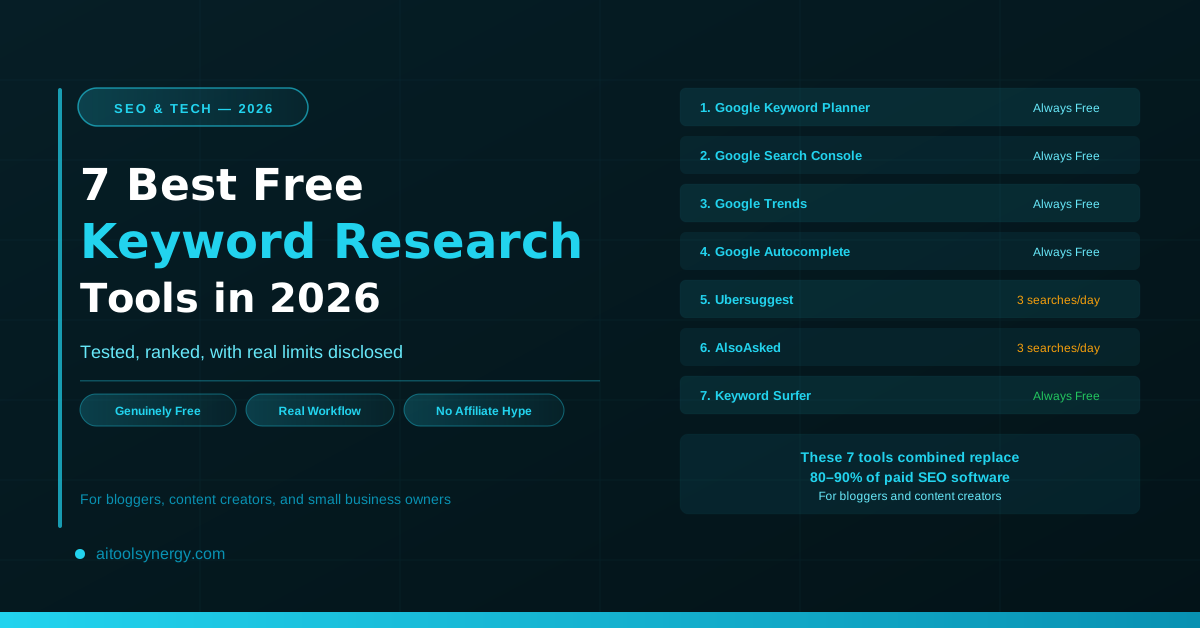
Every list of “best free keyword research tools” in 2026 has the same problem — half the tools they call “free” lock you out after a 7-day trial. You find out after you’ve already built your workflow around them.
This guide only covers tools that are genuinely free — permanently, not as a trial. Each entry includes the real daily limits and hidden catches that other reviews bury or skip. You’ll also get the step-by-step workflow for combining them, which is where most beginners get stuck.
We’ve tested all 7 of these free keyword research tools against real content topics to verify what they actually deliver before a paywall appears. No affiliate bias — some of the most-promoted paid tools aren’t on this list because their free tiers are too restricted to be genuinely useful.
Why Free Keyword Research Tools Are Enough to Get Started
Paid keyword research tools — Ahrefs ($129/month), Semrush ($139/month), Moz Pro ($99/month) — are excellent. For established agencies and SEO teams managing dozens of websites, they’re worth every dollar. But for bloggers, content creators, and small business owners starting out, they’re an expensive dependency before you’ve even published ten posts.
The free keyword research tools covered in this guide collectively give you: search volume data directly from Google, real first-party performance data for your own site, trending topic discovery, question-based keyword mining, and in-SERP keyword data while you browse. That covers the full keyword research workflow — for zero cost.
Once your site hits 10,000+ monthly organic visitors and you’re investing significant time in content, upgrading to a paid tool makes sense. Until then, the seven tools below give you everything you need.
How We Tested and Ranked These 7 Free Keyword Research Tools
We evaluated each tool on four criteria: how much useful data is available before hitting a paywall, how clearly the tool discloses its own limits, how actionable the output is for a content creator (not an enterprise SEO team), and whether the free tier still works meaningfully in June 2026.
Tools that inflate free-tier value through misleading trial framing were excluded. Tools that show “free” in their marketing but require a credit card within minutes are not on this list. Every tool below can be used today, right now, without a payment method.
| Tool | Best For | Free Tier | Real Daily Limit | Hidden Catch |
|---|---|---|---|---|
| Google Keyword Planner | Volume data | Always free | Unlimited | Volume ranges, not exact numbers |
| Google Search Console | Your own rankings | Always free | Unlimited | Only your own site, 16 months data |
| Google Trends | Trending topics | Always free | Unlimited | Relative scores, not absolute volumes |
| Google Autocomplete | Real-time intent | Always free | Unlimited | No volume data |
| Ubersuggest | All-in-one starter | 3 searches/day | 3 searches | Pushes paid upgrade heavily |
| AlsoAsked | PAA questions | 3 searches/day | 3 searches | CAPTCHA at high use |
| Keyword Surfer | In-SERP volumes | Always free | Unlimited | Volume estimates, not exact |
The 7 Best Free Keyword Research Tools in 2026
Google Keyword Planner Always Free
Google Keyword Planner is the starting point for any free keyword research because the data comes directly from Google’s own search infrastructure. There’s no third-party index, no estimation lag — the volume data reflects what Google’s ad auction system actually sees.
You enter a seed keyword (or a website URL) and it returns hundreds of related keyword ideas with estimated monthly search volumes, 12-month historical trend data, and suggested bid estimates. You can filter by location down to city level, language, and date range.
The real catch: Without active Google Ads spend, the tool shows volume ranges (like “1K–10K” or “10K–100K”) instead of exact monthly numbers. This makes it harder to prioritize between two competing keywords when both fall in the same range. For content planning where you’re comparing a handful of specific keywords, this limitation matters. For broad topic discovery where you’re looking for directional signals, it doesn’t.
Best used for: Initial keyword discovery and generating a large list of related terms around any topic. It’s the widest net in free keyword research.
Google Search Console Always Free
Google Search Console is arguably the most underused tool in the entire free keyword research toolkit. Most tutorials treat it as a technical SEO tool — it’s far more valuable than that for content strategy.
Search Console shows you the exact queries that are bringing impressions and clicks to your site right now, with real click-through rate data, average position, and 16 months of historical performance. This is first-party data — Google’s own record of how your content performs in its search results.
The highest-leverage strategy: look for keywords where you currently rank in positions 11 to 20 (page 2 of Google). These are queries where your content is already being found relevant — but not quite making the first page. Updating and strengthening those pages for those specific keywords is the fastest path to ranking jumps. No other free tool gives you this information.
The real catch: You can only see data for sites you own and have verified. It’s not useful for competitor research or finding new keywords you haven’t targeted yet. It works best as a complement to discovery tools, not as a standalone research tool.
Best used for: Optimizing existing content. Find keywords where you’re close to ranking and strengthen those pages specifically.
Google Trends Always Free
Google Trends is the most undervalued free keyword research tool on this list. Most people use it to check if a topic is rising or falling in popularity — and stop there. That’s about 20% of what it actually offers.
What makes Trends uniquely powerful is its ability to surface rising keywords before they appear in other tools’ databases. When a keyword starts trending, it typically takes 4–8 weeks for volume data to show up in tools like Google Keyword Planner or Ubersuggest. Trends shows you the signal in real time, giving you a first-mover advantage if you publish quickly.
Three high-value use cases that most free keyword guides ignore:
- Compare keyword variations: Enter two versions of a keyword (e.g., “morning routine” vs “daily routine”) to see which has more search momentum in your target region — even when both show the same volume range in Keyword Planner.
- Find seasonal peaks: Know exactly when to publish seasonal content. “Tax calculator” content should be live 3–4 weeks before the annual search peak, not during it.
- Explore “rising” related queries: Scroll to the bottom of any Trends result for a “Rising” section showing breakout queries — these are often low-competition topics that larger sites haven’t targeted yet.
The real catch: Trends shows relative interest (0–100 scale) not absolute search volume. A score of 100 means peak popularity, not 100 searches per month. You always need to cross-reference with Keyword Planner to understand the actual volume behind a trend.
If you want to go deeper on Google Trends-style keyword tracking — identifying trending keywords early before they peak — our free Trendly Keyword Trend Checker builds on this concept with a simplified interface for tracking keyword momentum across topics.
Google Autocomplete Always Free
Google Autocomplete is the single most accurate source of real-time keyword intent available — and it costs nothing. When you type a query into Google’s search bar, the autocomplete suggestions are generated directly from what real users are actively searching right now. There’s no database lag, no volume estimation, and no model — it’s live user data.
Most keyword research guides treat Autocomplete as a quick brainstorming trick. It’s significantly more powerful than that when used systematically. The technique: type your seed keyword, note every autocomplete suggestion, then add a letter after the keyword (e.g., “morning routine a…”, “morning routine b…”) and record every suggestion across all 26 letters. This generates dozens of real, long-tail keyword ideas that reflect actual search behavior.
Also use the related searches at the bottom of every Google results page — these are algorithmically selected by Google as the most semantically related queries to your search. They’re a direct window into how Google clusters topics.
The real catch: No volume data whatsoever. Autocomplete tells you what people search, not how many people search it. Always combine with Google Keyword Planner to validate volume before committing to content.
Best used for: Generating long-tail keyword ideas and understanding real user intent before validating volume with other tools.
Ubersuggest 3 Searches/Day Free
Ubersuggest, created by Neil Patel, is the closest a free tool gets to replicating a paid all-in-one SEO platform. Enter any keyword and it returns estimated monthly volume, keyword difficulty (KD) score, CPC data, content ideas, and a list of related keywords — all on one screen.
The keyword difficulty score is the most useful feature for beginner free keyword research. Rather than guessing whether a keyword is competitive, you get a 0–100 score where anything under 30 is generally achievable for a newer site. This is data that normally requires a paid tool subscription.
It also shows you the top-ranking pages for any keyword with their estimated monthly traffic and backlink counts — which gives you a quick competitive landscape assessment without paying for Ahrefs or Semrush.
The real catch: Three searches per day is a meaningful restriction. Plan your three daily searches before opening the tool — don’t waste them on keyword variations you could check with Autocomplete first. The tool also pushes paid upgrade prompts aggressively. The free data is real and useful; just ignore the upgrade noise.
Best used for: Validating keyword difficulty before committing to a content piece. Use your 3 daily searches on your shortlisted keywords after initial discovery with Autocomplete and Trends.
AlsoAsked 3 Searches/Day Free
AlsoAsked pulls the “People Also Ask” (PAA) questions that Google displays for any keyword and maps them as a visual tree. Where AnswerThePublic shows you a broad range of questions, AlsoAsked specifically mines the questions Google itself has determined are related to your target query — which makes them ideal for FAQ sections and H2 headings.
The PAA questions it surfaces are exactly what Google expects a comprehensive article on that topic to answer. If your post answers these questions well, you have a higher chance of appearing in the PAA boxes yourself — which are among the highest-visibility placements in Google’s search results, often appearing above organic position #1.
The real catch: Three daily searches is tight if you’re researching multiple topics. Prioritize using AlsoAsked for your most important planned posts rather than every topic you’re exploring. At volume, CAPTCHA challenges can also slow usage.
Best used for: Building FAQ sections and identifying what sub-questions your content must answer to satisfy Google’s understanding of the topic. Use it after you’ve confirmed a keyword with Ubersuggest.
Keyword Surfer Always Free
Keyword Surfer is a free Chrome extension that overlays keyword data directly onto Google search results. When you search for anything on Google, Keyword Surfer automatically shows estimated monthly search volume for the exact query in the search bar, plus related keyword suggestions with their volumes in a sidebar panel. There’s no tool to open, no searches to count — it works passively every time you use Google.
This passive functionality makes it the highest-efficiency tool on this list. Your normal Google browsing sessions become keyword research sessions. When you’re checking what competitors rank for, scouting topics, or just reading about your niche, you’re simultaneously collecting volume data without any extra effort.
The real catch: The volume figures are estimates based on Surfer’s own data model — not Google’s official data. They’re directionally accurate and useful for comparisons, but treat them as indicators rather than precise figures. For any keyword you’re seriously considering, cross-reference with Google Keyword Planner.
Best used for: Passive keyword data collection during normal browsing. Install it once and it works continuously without counting against any daily limits.
The Free Keyword Research Workflow — How to Use These Tools Together
Knowing the individual tools isn’t the same as knowing how to combine them. Here’s the exact workflow — from topic idea to confirmed keyword — using only free tools in the right sequence.
Generate seed keywords with Google Autocomplete (5 minutes)
Open Google and type your broad topic. Record every autocomplete suggestion. Then add letters after the topic (“budgeting a…”, “budgeting b…”) to generate long-tail variations. This is your raw keyword list — 20 to 50 topic ideas generated from real search behavior at zero cost.
Check trend direction with Google Trends (5 minutes)
Take your top 5 to 10 seed keywords from Step 1 and check each in Google Trends. Filter by country (USA for highest RPM) and 12-month timeframe. Eliminate any keywords showing a clear declining trend. Use the “rising” related queries section to find breakout keywords that haven’t peaked yet. If a keyword fits your content, check it in our Trendly Keyword Trend Checker for an additional trend signal.
Validate volume with Google Keyword Planner (10 minutes)
Take your trending keywords from Step 2 into Google Keyword Planner. Look for keywords with at least “1K–10K” monthly searches. Use the “Discover new keywords” feature to find related terms you might have missed. Export the full list with volume ranges.
Check keyword difficulty with Ubersuggest (use 1–2 of your 3 daily searches)
Take your top 3 keyword candidates into Ubersuggest. Look for a keyword difficulty score under 30 for a new site (under 40 for an established one). If a keyword has decent volume but high difficulty, look at the related keywords panel — long-tail variations are often significantly easier to rank for.
Mine questions with AlsoAsked (use 1 of your 3 daily searches)
Enter your confirmed keyword into AlsoAsked. Screenshot or copy the PAA question tree. These questions become your H2 subheadings and FAQ section. Google has already told you what a comprehensive answer to this topic looks like — follow its structure.
Check existing performance in Google Search Console (ongoing)
If you’ve published content before, check Search Console before starting any new piece. Filter queries by your topic to see if you’re already ranking for related terms. If you rank positions 11–20 for any relevant query, update that existing content rather than creating new content — it’s always faster to push an existing page from position 15 to position 5 than to rank a brand new page from scratch.
Google Trends for Keyword Research — The Most Underused Free Tool
Of all the free keyword research tools available in 2026, Google Trends receives the least attention relative to its actual utility. Most guides mention it in one sentence. It deserves its own section.
The core advantage of Google Trends over every other tool on this list: it shows you what’s happening in search right now, not what happened in the last 30 days. All other keyword research tools work from historical data that is typically 2–8 weeks delayed. Trends is real-time. For fast-moving topics — economic news, health trends, technology changes, seasonal events — that difference is significant.
Three specific Google Trends strategies for content creators
1. Keyword timing: Search any seasonal topic and switch the date range to “Past 5 years.” You’ll see exactly when the topic peaks each year. Publishing content 3–4 weeks before the peak (not during it) gives Google time to index and rank your content before the traffic surge arrives.
2. Regional targeting: If you’re writing for a specific audience — UAE expats, US professionals, UK readers — use the regional filter to confirm that your target keyword is actually searched in your target country. Some keywords that trend strongly in one country are nearly invisible in another.
3. Rising vs breakout queries: The “Related queries” section at the bottom of any Trends result shows two tabs — “Top” (most searched) and “Rising” (fastest growing). The Rising tab is where the real opportunity hides. A breakout query (labeled with a rising arrow or “Breakout”) means the search volume has increased more than 5,000% — these are topics that larger, slower-moving sites haven’t targeted yet. Publish quality content on a breakout keyword early and you may own that topic before the competition finds it.
For tracking which topics are genuinely trending vs which have already peaked, our free Trendly Keyword Trend Checker gives you a simplified interface specifically designed for content planning — without needing to learn all of Google Trends’ more complex features.
How to Find Low Competition Keywords With No Budget
Finding low competition keywords with free tools is primarily about targeting specificity over volume. The keywords with the lowest competition are almost always longer, more specific, and more clearly tied to a user’s exact intent.
The framework: start broad, go narrow.
Step 1 — Start with a broad topic: “budgeting” (high competition, too broad).
Step 2 — Add a modifier: “budgeting for beginners” (still competitive but narrowing).
Step 3 — Add specificity: “budgeting for beginners with irregular income” (lower competition, very specific intent).
Step 4 — Add a context layer: “budgeting for freelancers with irregular income 2026” (highly specific, likely under 1K monthly searches but almost zero competition).
New websites with low domain authority consistently rank faster for specific long-tail keywords than for broad competitive ones. Ten articles each ranking for 500-search/month keywords generates 5,000 monthly visitors — the same as one article ranking #1 for a 5,000/month keyword, but far more achievable for a site that’s six months old.
According to Ahrefs’ keyword research data, approximately 92% of all keywords get fewer than 10 searches per month. But collectively, long-tail keywords with low monthly searches drive the majority of all search traffic. The volume is in the aggregate, not in any single high-competition keyword.
What These Free Tools Cannot Do — When to Upgrade to Paid
Free keyword research tools have genuine and important limitations. Knowing when you’ve hit them prevents you from wasting time working around constraints you should just pay to solve.
| Capability | Free Tools | Paid Tools (Ahrefs/Semrush) |
|---|---|---|
| Keyword volume (rough) | ✅ Google Keyword Planner | ✅ Exact numbers |
| Keyword difficulty | ⚠ Ubersuggest (3/day limit) | ✅ Unlimited, more accurate |
| Competitor keyword research | ❌ Not available free | ✅ Full competitor analysis |
| Backlink analysis | ❌ Not available free | ✅ Full backlink profiles |
| Rank tracking | ⚠ Search Console (own site) | ✅ Automated daily tracking |
| Keyword clustering | ❌ Manual only | ✅ Automated clustering |
| SERP feature tracking | ❌ Not available | ✅ Featured snippets, PAA boxes |
| Traffic forecasting | ❌ Not available | ✅ Projection models |
Upgrade to a paid tool when: You’re consistently publishing 4+ pieces of content per month and need to scale research. You want to analyse what specific competitors rank for. You’re running a content marketing strategy for a client or a business where keyword research time has direct revenue value. Most bloggers don’t hit this point until 6–12 months in.
The Google SEO Starter Guide explicitly recommends starting with Google’s own free tools before investing in third-party platforms — Search Console and Keyword Planner are Google’s official recommendation for understanding search performance.
Track Keyword Trends Before They Peak — Free
Google Trends gives you the raw signal. Trendly simplifies it into a clean, content-focused view of what’s rising and what’s falling — so you can publish at the right moment and capture traffic before the competition does.
Try Trendly Free →





5 Responses
[…] 7 Best Free Keyword Research Tools in 2026 […]
[…] guide on what is a good Ahrefs Domain Rating by niche gives you exact benchmarks to target, and our 7 best free keyword research tools covers the other side of the SEO equation once your authority starts […]
[…] Benchmarks SEO & Tech How to Check Ahrefs Domain Rating for Free — Complete 2026 Guide SEO & Tech 7 Best Free Keyword Research Tools in 2026 — Tested and Ranked SEO & Tech How to Create SEO Friendly URLs for a Blog […]
[…] SEO & Tech How to Increase Domain Rating — 8 Proven Strategies That Work in 2026 SEO & Tech What Is a Good Domain Rating for a New Website? 2026 Benchmarks SEO & Tech How to Check Ahrefs Domain Rating for Free — Complete 2026 Guide SEO & Tech 7 Best Free Keyword Research Tools in 2026 — Tested and Ranked […]
[…] & Tech What Is a Good Keyword Density for SEO? Benchmarks and Data SEO & Tech Free Keyword Research Tools — The Best Options Compared SEO & Tech What Are Meta Tags in SEO? A Complete Overview SEO & Tech How to Create […]