

AI tools are not just for tech companies or content creators anymore. In 2026, professionals across every field — from accountants in Lahore to marketing managers in Dubai — are using AI tools in their everyday workflow to get more done in less time. The question is no longer whether AI can help you — it’s how to integrate it effectively without feeling overwhelmed.
This guide walks you through practical, tested ways to boost productivity with AI tools in your daily work — with specific tool recommendations, real time savings, and step-by-step guidance for getting started.
Why Everyday AI Productivity Matters More Than Ever
The average knowledge worker spends only 39% of their time on their primary job duties, according to research by McKinsey Global Institute. The rest goes to emails, meetings, administrative tasks, and information gathering — all areas where AI tools can deliver immediate, measurable time savings.
A Microsoft Work Trend Index survey found that 70% of people would delegate as much work as possible to AI to lessen their workload. More importantly, those who already use AI tools in their daily workflow report feeling less burned out, more creative, and more satisfied with their work.
💡 The key insight: The biggest productivity gains from AI don’t come from replacing entire jobs — they come from eliminating the small, repetitive tasks that collectively steal 2-3 hours from your day. Fix those and you reclaim your most valuable resource: focused time.
8 Practical Ways to Boost Productivity with AI Tools Daily
1. Start Your Day with an AI Planning Session
Instead of spending 20-30 minutes figuring out priorities each morning, open ChatGPT or Claude and paste in your task list. Ask it to prioritize by urgency and impact, suggest what to delegate, and estimate how long each task will take. This takes 5 minutes and gives you a structured plan you can act on immediately.
Tools like Motion and Reclaim.ai go further — they connect to your calendar and automatically schedule your tasks around your meetings, protecting blocks of deep work time and rescheduling tasks when things change.
2. Use AI to Handle Email Faster
Email is one of the biggest productivity killers in modern work. The average professional spends 28% of their workday on email, according to Harvard Business Review — that’s more than 2 hours every single day.
AI tools dramatically reduce this. Gmail’s Smart Reply suggests one-click responses to common emails. Microsoft Copilot in Outlook drafts full replies, summarizes long email threads, and flags messages that need your attention. Superhuman uses AI to help you reach inbox zero in minutes rather than hours.
Even without paid tools, you can paste any email into ChatGPT and ask it to draft a professional reply — then copy, adjust slightly, and send. This alone saves most professionals 30-45 minutes per day.
3. Automate Repetitive Tasks with No-Code AI Tools
Every professional has tasks they repeat dozens of times per week — copying data between apps, sending follow-up messages, updating spreadsheets, organizing files. These tasks feel necessary but rarely require human judgment.
Zapier connects over 6,000 apps and automates workflows between them without any coding. Common automations include: saving email attachments automatically to Google Drive, creating Trello cards when a form is submitted, sending Slack notifications when a spreadsheet is updated, and adding new contacts to your CRM when someone books a meeting.
Make (formerly Integromat) offers more complex automation logic for advanced users. Both have free tiers sufficient for most individual professionals.
4. Summarize Documents and Research Instantly
Reading and synthesizing information is another major time drain. Whether it’s a 50-page contract, a lengthy research report, or a competitor’s website — AI tools can summarize any document in seconds.
NotebookLM by Google allows you to upload multiple documents and then chat with them — asking specific questions and getting cited answers from your source material. Claude can read and summarize PDFs directly. Perplexity AI searches the web and provides sourced summaries for any research question.
For professionals who need to stay on top of industry news, Feedly AI automatically summarizes articles and surfaces the most relevant content for your specific interests.
5. Generate First Drafts — Never Start from a Blank Page
One of the most universally useful applications of AI tools is generating first drafts. Reports, proposals, presentations, blog posts, social media captions, job descriptions, client emails — AI can produce a solid first draft of any written content in seconds.
The key is to use AI for the draft and apply your expertise for the refinement. A good first draft from ChatGPT or Claude that you edit and improve in 10 minutes is far more productive than spending an hour writing from scratch. Your human insight, specific knowledge, and authentic voice are what makes the final content valuable — AI just removes the blank-page barrier.
6. Use AI for Meeting Preparation and Follow-Up
Meetings consume enormous amounts of time — not just the meeting itself but the preparation before and follow-up after. AI tools can handle both.
Before a meeting, ask ChatGPT to generate an agenda based on your meeting topic, prepare briefing notes on a client or topic, or create a list of key questions to ask. After a meeting, Otter.ai or Fireflies.ai automatically transcribes the conversation and generates a summary with action items that can be shared with attendees in one click.
7. Create Visuals and Presentations Faster
Creating professional presentations used to require either design skills or expensive agencies. AI has changed this completely.
Beautiful.ai and Gamma generate entire presentation decks from a text prompt — you describe the topic and the AI creates slides with relevant content, layouts, and visuals. Canva AI generates custom graphics, removes backgrounds, and suggests designs based on your content. Adobe Firefly creates professional images from text descriptions in seconds.
For data visualization, Julius AI and ChartAI convert spreadsheet data into clear, professional charts automatically.
8. Use AI to Learn New Skills Faster
Professional development is essential but time-consuming. AI tools can dramatically accelerate learning. Ask ChatGPT or Claude to explain any concept in simple terms, create a customized learning plan, generate practice exercises, or quiz you on what you’ve learned.
For technical skills, AI coding assistants like GitHub Copilot explain code as they write it — making learning to code significantly faster. Duolingo’s AI features provide personalized language learning that adapts to your pace and weak points.
AI Productivity Tools — Daily Workflow Comparison
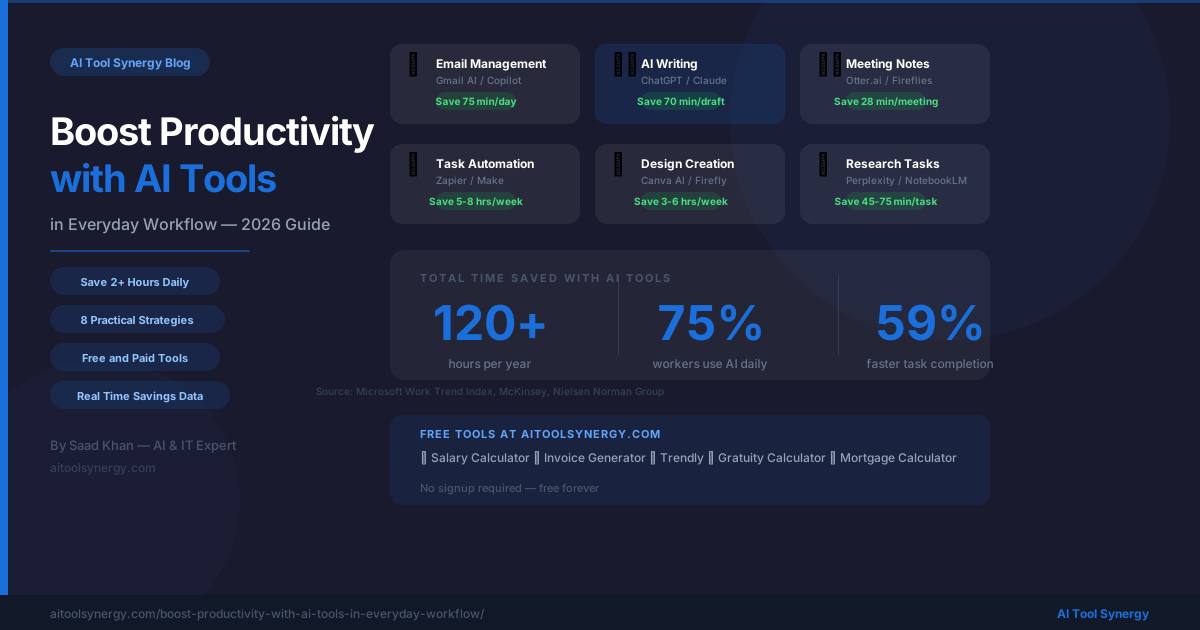
| Daily Task | Without AI | With AI Tool | Time Saved |
|---|---|---|---|
| Morning planning | 20-30 min | 5 min (ChatGPT) | 20 min/day |
| Email management | 2+ hours | 45-60 min (Copilot) | 60-75 min/day |
| Document summarizing | 45-60 min | 5 min (Claude/NotebookLM) | 40-55 min/task |
| Writing first drafts | 60-90 min | 15-20 min (ChatGPT + edit) | 50-70 min/draft |
| Meeting notes | 30 min | 2 min (Otter.ai) | 28 min/meeting |
| Creating presentations | 3-4 hours | 30-45 min (Gamma) | 2-3 hours/deck |
| Research tasks | 60-90 min | 15 min (Perplexity) | 45-75 min/task |
Building Your Personal AI Productivity Stack
Rather than trying every AI tool available, the most effective approach is building a focused stack of 3-5 tools that cover your biggest time drains. Here is a recommended starter stack for different professional types:
For Freelancers and Solo Professionals
- ChatGPT — writing, research, planning (free)
- Zapier — automating client onboarding and invoicing (free tier)
- Canva AI — creating client deliverables and social content (free)
- Otter.ai — recording and summarizing client meetings (free tier)
- Our Free Invoice Generator — creating professional invoices instantly
For Business Owners and Managers
- Microsoft Copilot — integrated across Word, Excel, Teams, Outlook
- Notion AI — project management and knowledge base
- Fireflies.ai — automatic meeting transcription and action items
- Make — advanced workflow automation
- Our Salary to Hourly Calculator — managing team compensation
For Content Creators and Marketers
- Claude — long-form content writing and editing
- Midjourney or Adobe Firefly — image creation
- Canva AI — social media graphics and templates
- Our Trendly Keyword Trend Checker — finding trending topics to write about
🛠️ Free Tools for Your Everyday Workflow
Alongside AI tools, having the right free utilities saves time on everyday professional tasks. All of these are free with no account required:
- 🧾 Free Invoice Generator — Professional invoices with 50+ currencies, save as PDF
- 💵 Salary to Hourly Calculator — Know your real hourly rate and overtime
- 📈 Trendly Keyword Checker — Discover trending keywords for your content
- 🧩 Word Unscrambler — For word games and puzzle creation
- ⚖️ BMI Calculator — Track your health metrics
Common Mistakes When Using AI Productivity Tools
Many professionals adopt AI tools but fail to see significant productivity gains because of a few common mistakes:
- Using AI output without reviewing it — AI tools make mistakes. Always review and edit AI-generated content before sending or publishing. Your expertise and judgment are still essential.
- Trying too many tools at once — Adopting 10 AI tools simultaneously creates confusion and a steep learning curve. Start with one tool for your biggest pain point and master it before adding more.
- Not investing time in learning prompting — The quality of AI output depends heavily on how well you describe what you need. Spend time learning to write clear, specific prompts and your results will improve dramatically.
- Using AI for tasks that don’t need it — AI is most valuable for repetitive, time-consuming tasks. For quick decisions or simple tasks, doing it manually is often faster than prompting an AI tool.
- Ignoring privacy and security — Never paste sensitive client data, passwords, or confidential business information into consumer AI chatbots. Use enterprise-grade tools with proper data handling for sensitive work.
❓ Frequently Asked Questions
Which AI tool is best for boosting everyday productivity?
For most professionals, ChatGPT or Claude is the best starting point because they handle the widest range of everyday tasks — writing, research, planning, summarizing, and problem-solving. Once you’re comfortable with a general AI assistant, add specialized tools for your specific needs such as Zapier for automation or Otter.ai for meetings.
How long does it take to see productivity gains from AI tools?
Most professionals see measurable time savings within the first week of consistent AI tool use. The first few days involve a learning curve as you figure out effective prompting and workflows. By the end of week two, the time savings become habitual and significant — most users report saving 1-3 hours per day once they have established their AI workflow.
Are free AI tools good enough for professional use?
Yes — for many everyday productivity tasks, free tiers of AI tools are entirely sufficient. ChatGPT free, Canva free, Zapier free tier, Otter.ai free, and Notion AI free all deliver real value without any cost. Paid tiers become worthwhile when you need higher usage limits, advanced features, or enterprise-grade data privacy.
Can AI tools help with productivity if I work in a non-tech industry?
Absolutely. AI tools are used daily by teachers, doctors, lawyers, accountants, real estate agents, HR managers, and professionals in virtually every field. The tasks they help with — writing, research, scheduling, data analysis, communication — are universal to all knowledge work regardless of industry.
Will using AI tools make my work less authentic?
Not if used correctly. AI tools should handle the mechanical, repetitive aspects of your work — drafting, formatting, researching — while you provide the strategic thinking, creative direction, and personal judgment that makes your work valuable. Think of AI as a capable assistant, not a replacement for your expertise and authentic voice.
Browse our complete directory of verified AI tools at AI Tool Synergy — every tool is researched and curated by Saad Khan.