
The ChatGPT message limit per day depends entirely on which plan you use — Free, Plus, Pro, Business, or Enterprise all have different caps, and the limits work differently than most people expect. This guide breaks down the exact ChatGPT message limit per day for every plan in 2026, explains what actually happens when you hit it, and shows you how to check your usage before you run out.
ChatGPT Message Limit Per Day — Quick Answer by Plan
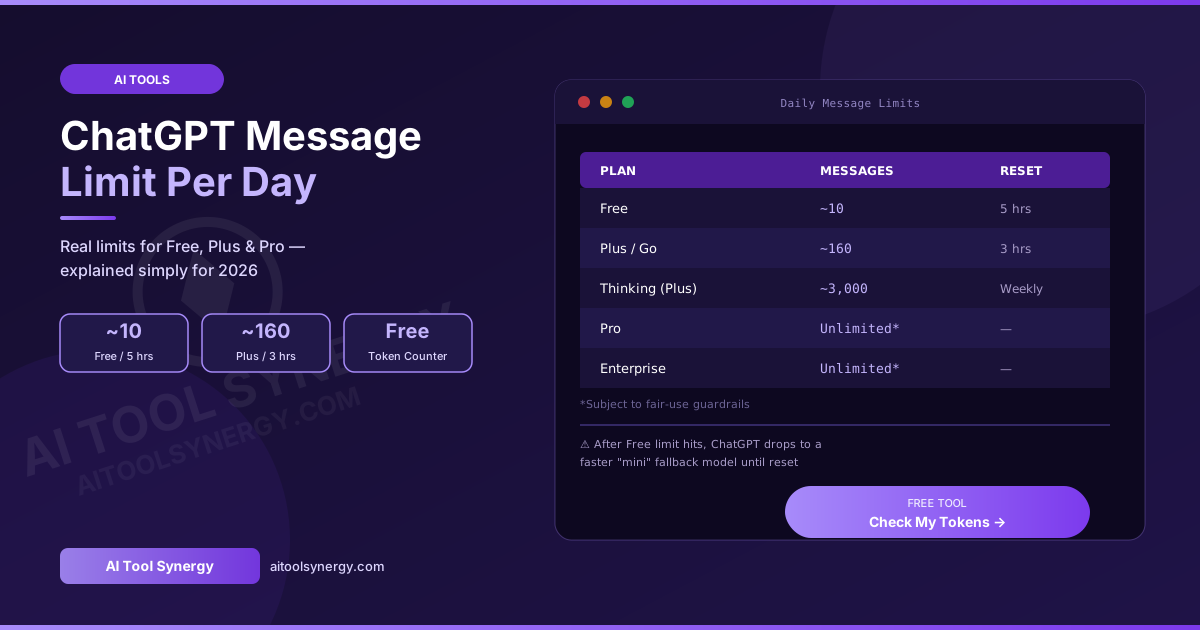
If you just want the numbers: in 2026, the ChatGPT message limit per day works out to roughly 10 messages every 5 hours for Free users on the default model, around 160 messages every 3 hours for Plus and Go users, and effectively unlimited (within fair-use guardrails) for Pro, Business, and Enterprise plans.
ChatGPT Message Limit Per Day: Free Plan
Free Plan — ~10 messages every 5 hours
On the Free plan, the ChatGPT message limit per day is governed by a rolling 5-hour window rather than a true daily reset. Free users get roughly 10 messages on the default GPT-5.5 Instant model within each 5-hour window. Once that limit is hit, ChatGPT automatically switches you to a faster, lighter “mini” fallback model rather than blocking you entirely — meaning you can still chat, just with a less capable model until the window resets.
ChatGPT Message Limit Per Day: Plus and Go Plans
Plus / Go Plan — ~160 messages every 3 hours
Plus and Go subscribers get a significantly higher ChatGPT message limit per day — approximately 160 messages within each 3-hour rolling window on the standard model. This resets more frequently than the Free tier’s 5-hour window, giving paid users effectively much higher total daily throughput.
GPT-5.4 Thinking (Reasoning Model) — Separate Weekly Cap
The paid reasoning model, GPT-5.4 Thinking, operates on its own separate limit from the standard ChatGPT message limit per day — capped at roughly 3,000 manually selected messages per week on the Plus plan, rather than a daily or hourly window. This separation exists because reasoning models consume significantly more compute per response than standard instant models.
ChatGPT Message Limit Per Day: Pro, Business, and Enterprise
Pro, Business & Enterprise — Effectively Unlimited*
For Pro, Business, and Enterprise subscribers, there is no fixed ChatGPT message limit per day advertised — these plans are marketed as having unrestricted access. However, every plan remains subject to OpenAI’s usage policies behind the scenes. There is no truly unlimited tier in practice: extremely high-volume usage patterns can still trigger temporary restrictions even on the highest tiers, though this threshold is far beyond typical individual usage.
| Plan | Standard Model Limit | Reset Window | Reasoning Model Access |
|---|---|---|---|
| Free | ~10 messages | 5 hours | Limited / falls back to mini |
| Plus | ~160 messages | 3 hours | ~3,000/week (Thinking) |
| Go | ~160 messages | 3 hours | Limited |
| Business | Higher than Plus | 3 hours | Higher weekly cap |
| Pro | No fixed cap* | N/A | Full access |
| Enterprise | No fixed cap* | N/A | Full access |
*All plans remain subject to fair-use guardrails — there is no truly unlimited tier for the ChatGPT message limit per day.
Why the ChatGPT Message Limit Per Day Isn’t a True Daily Reset
A common misconception is that the ChatGPT message limit per day resets once every 24 hours at a fixed time, similar to a daily allowance. In reality, OpenAI uses **rolling windows** instead — Free plan limits reset every 5 hours, and Plus plan limits reset every 3 hours, measured from your most recent usage rather than a calendar day boundary.
This means your available messages gradually become available again throughout the day rather than all resetting at once at midnight. According to recent reporting on ChatGPT’s 2026 usage limits, this rolling-window approach helps distribute server load more evenly than a single daily reset would.
ChatGPT Message Limit Per Day vs Token Limit — Not the Same Thing
It’s easy to confuse the ChatGPT message limit per day with the token limit, but they control two completely different things:
- Message limit — caps how many times you can send a message within a rolling time window (e.g., 10 messages per 5 hours)
- Token limit (context window) — caps how much text fits inside a single conversation’s memory, regardless of how many separate messages that took
You can hit a token limit well before ever approaching your daily message limit — for example, pasting one extremely long document in a single message could fill the context window immediately, even though it only counts as one message against your ChatGPT message limit per day. According to detailed reporting on ChatGPT’s context window architecture, ChatGPT typically reserves 750–900 tokens for system instructions before your content even begins, meaning a “128,000 token” model provides closer to 127,000 usable tokens.
What Happens When You Hit the ChatGPT Message Limit Per Day
Automatic fallback to a mini model
When Free users hit their ChatGPT message limit per day, ChatGPT does not block you completely — it automatically switches you to a faster, less capable “mini” model until your 5-hour window resets. You can keep chatting, just with reduced capability.
Temporary model restriction
Plus and Go users who exhaust their reasoning model allocation (like GPT-5.4 Thinking’s weekly cap) are typically prompted to either wait for the reset or continue using a different available model in the meantime.
How to Avoid Hitting Your ChatGPT Message Limit Per Day
- Check your token usage before sending — long documents and conversation history both count toward context limits, separate from your message count
- Use the right model for the task — reserve reasoning models like GPT-5.4 Thinking for complex tasks that actually need them, since they consume your separate weekly allocation faster
- Space out heavy usage sessions — since limits reset on a rolling window, spreading usage across the day maximizes your effective ChatGPT message limit per day
- Start fresh conversations for unrelated topics — avoids unnecessarily large context windows that consume more resources per message
Our free ChatGPT Token Counter helps you check exactly how many tokens your text uses before sending — useful for managing both your context window and your overall usage efficiently.
🔢 Free ChatGPT Token Counter — No Signup
Paste any text and get an instant, accurate token count. Manage your usage smarter and avoid hitting limits unexpectedly.
Count My Tokens Free →Frequently Asked Questions
Final Thoughts on the ChatGPT Message Limit Per Day
Understanding your ChatGPT message limit per day comes down to knowing your plan, your model, and how rolling reset windows actually work — not a simple once-a-day allowance. Free users get the tightest limits with automatic mini-model fallback, Plus users get substantially more room with a separate weekly cap for reasoning models, and Pro/Enterprise users rarely think about limits at all under normal use. Whatever your plan, checking your token usage before sending long content helps you avoid unexpected restrictions.
✅ Free ChatGPT Token Counter — No Signup
Get an instant, accurate token count for any text. Manage your usage smarter. 100% free forever.
Open Token Counter →